This document describes the Caveman Audio BC1 Bass Compressor, a device designed to enhance the sound of bass guitars. It functions as a compressor, allowing users to shape the dynamics of their bass signal, and can be integrated into various audio setups, including direct to an amplifier, into a preamp, or as part of a larger effects loop.
Function Description
The BC1 Bass Compressor is primarily a compression unit that allows for precise control over the dynamic range of a bass signal. It features a comprehensive set of controls to tailor the compression effect, including Threshold, Attack, Release, Level, and Boost. The device is designed to be versatile, accommodating different playing styles and musical contexts.
Compression Functionality:
- Threshold: Determines the point at which compression begins to kick in. Adjustable from -20dB to +20dB.
- Attack: Controls how fast the compression engages once the signal exceeds the threshold. Adjustable from 0.1ms to 25ms.
- Release: Dictates how long the compression holds the signal after it drops below the threshold. Adjustable from 100 ms to 1.2 sec.
- Level: Sets the overall output of the BC1.
- Boost: Sets the overall output of the BC1 when Boost is engaged.
The compressor is designed to provide a natural and musical compression, suitable for a wide range of bass applications. It can be used to even out dynamics, add sustain, or create a more punchy and defined bass tone.
Connectivity and Signal Flow:
The BC1 offers flexible input and output options to integrate into various setups:
- Instrument Input (1/4" jack): For connecting your bass guitar.
- Line Input (3-pin XLR): For balanced input, typically from a Master Compressor.
- Instrument Input / Line Input Switch: Selects between the 1/4" jack and XLR input.
- Series / Parallel Switch: Determines if the compressor is in series with the dry/direct signal or in parallel.
- DI Output (XLR): Transformer balanced output, switchable between FOH (Front of House) or DAW (Digital Audio Workstation) levels.
- Amp Out (1/4" jack): Transformer balanced output, designed to go to your amplifier.
- 12VDC Input: For power supply.
The device also supports different signal routing configurations:
- Instrument Input to Amp Out: Connects your bass directly to your amplifier through the compressor.
- Instrument Input to DI Output: Sends your bass signal through the compressor to a mixer or recording interface.
- Line Input to DI Output: Processes a balanced input signal through the compressor and sends it to a mixer or recording interface.
- Line Input to Amp Out: Processes a balanced input signal through the compressor and sends it to an amplifier.
The BC1 is designed to be used as a compressor, and when the boost is engaged, it will make the BC1 compress more. If you reduce the signal before the BC1, the unit will compress less. The device provides the option of having two different output levels, with the same amount of compression, allowing users to choose if they want to boost or lower the signal.
Important Technical Specifications
Power:
- 12VDC: The device operates on 12VDC power.
- 200 mA negative: The power supply should provide 200 mA with a negative center pin.
Inputs:
- Instrument Input: 1/4" jack.
- Line Input: 3-pin XLR, balanced.
Outputs:
- DI Output: Transformer balanced XLR, switchable between FOH and DAW.
- Amp Out: Transformer balanced 1/4" jack.
Controls:
- Threshold: Adjustable from -20dB to +20dB.
- Attack: Adjustable from 0.1ms to 25ms.
- Release: Adjustable from 100 ms to 1.2 sec.
- Level: Overall output control.
- Boost: Additional output control.
Switches:
- Instrument/Line Switch: Selects input source.
- Series/Parallel Switch: Selects signal path.
- FOH/DAW Switch: Selects DI output level.
- GL (Ground Lift): Lifts the D.I. output ground.
Usage Features
Connecting the Device:
- Bass Guitar to Amplifier: Connect your bass to the "INSTRUMENT INPUT" (1/4" jack). Connect the "AMP OUT" (1/4" jack) to your amplifier.
- Bass Guitar to Mixer/Recording Interface: Connect your bass to the "INSTRUMENT INPUT" (1/4" jack). Connect the "DI OUTPUT" (XLR) to your mixer or recording interface.
- Master Compressor to Mixer/Recording Interface: Connect the output of a Master Compressor to the "LINE IN" (XLR). Connect the "DI OUTPUT" (XLR) to your mixer or recording interface.
- Master Compressor to Amplifier: Connect the output of a Master Compressor to the "LINE IN" (XLR). Connect the "AMP OUT" (1/4" jack) to your amplifier.
Setting Up the Compressor:
- Input Selection: Use the "INSTRUMENT/LINE" switch to select the appropriate input.
- Signal Path: Use the "SERIES/PARALLEL" switch to choose between series or parallel compression.
- DI Output Level: If using the DI output, select "FOH" for Front of House or "DAW" for Digital Audio Workstation, depending on the receiving device.
- Ground Lift: If experiencing hum or noise, engage the "GL" switch to lift the ground of the DI output.
Adjusting Compression Parameters:
- Threshold: Start with a moderate threshold setting and adjust to taste, listening for when the compression begins to engage.
- Attack: A faster attack (lower ms value) will catch transients more quickly, while a slower attack will allow initial transients to pass through before compression engages.
- Release: A faster release (lower sec value) will make the compression recover more quickly, while a slower release will sustain the compression effect for longer.
- Level: Adjust the overall output level to match other effects or to achieve unity gain.
- Boost: Use the boost control to add additional output gain when desired.
Preamp and Amplifier Integration:
The BC1 is designed to work well with various preamps and amplifiers. Experiment with different settings to find the optimal sound for your specific setup. The manual suggests that when the BC1 is used post preamp in serial mode, LEVEL and BOOST are set as required.
BPIC/BPI Integration:
When used with a Caveman Audio BPIC or BPI, it is recommended to place the BC1 after the preamp. Connect the DI output on the BPIC/BPI to the Line Input on the BC1 with a short microphone cable. Gain and Level on BPIC/BPI are both set to 12 o'clock.
Maintenance Features
The manual does not explicitly detail maintenance features. However, based on the general nature of audio equipment, the following can be inferred:
- Power Supply: Always use the correct 12VDC @ 200 mA negative power supply to prevent damage to the unit.
- Cable Connections: Ensure all cables are securely connected to prevent signal loss or intermittent operation.
- Environmental Conditions: Protect the device from extreme temperatures, humidity, and physical shock to ensure longevity.
- Cleaning: Keep the unit clean and free from dust and debris. Use a soft, dry cloth for cleaning. Avoid using harsh chemicals or abrasive materials.
- Troubleshooting: If the device is not functioning as expected, check all connections, power supply, and control settings before seeking professional repair. The "GL" (Ground Lift) switch is a useful troubleshooting feature for eliminating hum from the DI output.
The Caveman Audio BC1 Bass Compressor is a robust and versatile tool for bass players looking to refine their sound. Its comprehensive controls and flexible connectivity make it suitable for a wide range of applications, from live performance to studio recording.

 Need help?
 General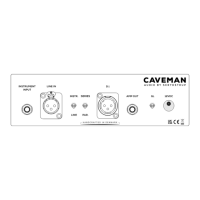

 To Next Page