5
Product
description
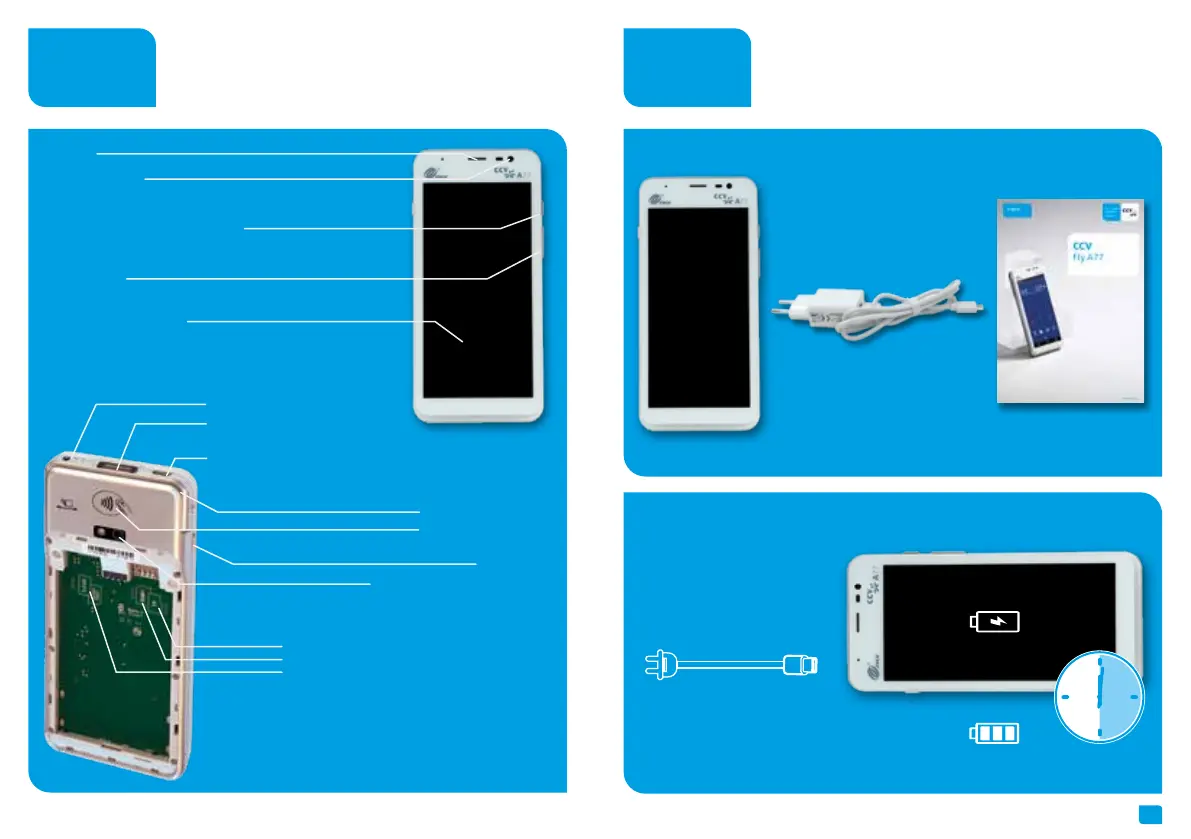
Startup
Content
Connect
Terminal CCV
Fly A77
Connect
power supply
Charge battery
(6 hours)
Power supply with USB
cable type C
Document
“First steps”
Speaker
2MP front camera
Volume (- / +)
5,5“ multi-point capacitive
touch screen (IPS WXGA
1440x720 pixels)
Bottom side:
- Chip card reader
- Charging connectors (2 PIN POGO PIN)
- Microphone
Power ON/OFF (press short = standby
press long = menu aeroplane mode, sound,
restart and power off)
3,5mm headphone jack
USB-C charging connector
(type C OTG)
NFC contactless reader
0,3MP top-side Infrared barcode
scanner (1D & 2D codes)
Card slots:
(removed cover and battery)
- left/ upper slot › SAM1
- right/ upper slot › Micro-SD card (up to 128GB)
- right/ lower slot › Micro SIM card (4G)
Magnetic stripe reader
5MP rear camera (1D & 2D codes)
Scan button



 To Next Page