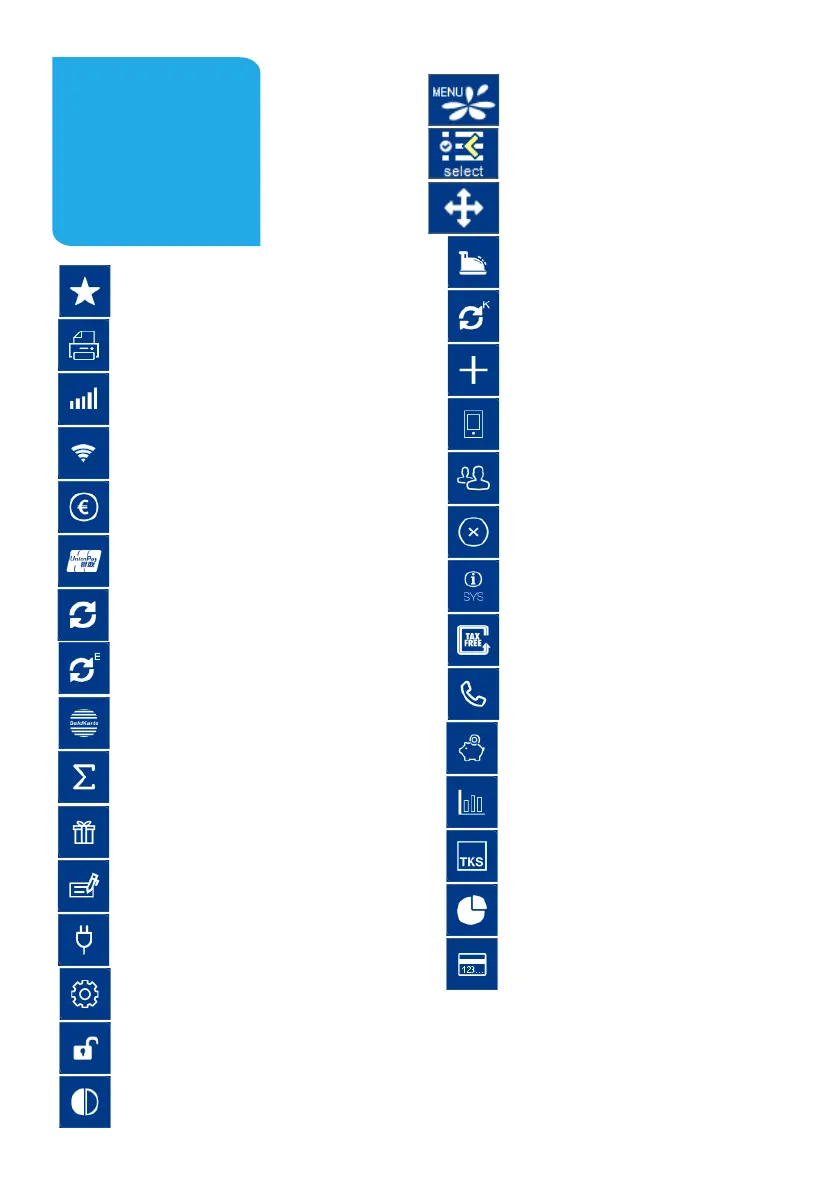
Favourites (show all possible sokeys)
Receipt Copy (reprints merchant and custo-
mer receipt)
Network-switch (WIFI-GPRS/4G)
Network-switch (WIFI-GPRS/4G)
Cashback (payment with a higher amount for
customers cash)
CUP (payment with China Union Pay Card)
Diagnosis (acvate all allowed cards, limits,
receipt header…)
EMV diagnosis (acvate EMV conguraon)
GeldKarte (payment with GeldKarte)
Total revenue (informaon of all transacons
- without booking)
Gicard (payment with gicard)
Credit (start credit transacon)
Startup (startup with input of TID and PU)
Inialisaon (Host registraon + automac
diagnosis)
Unlock (starts the neccessary unlock acon
as diagnosis or inialisaon)
Choose account (choose your payment
account)
Sokeys
Menu (password level merchant, manager or
technician)
Select payment applicaon (select your
payment applicaon
Sokey order (change your sokeys)
Reconsiliaon with closure (start of booking
all open transacons end of the day)
Cong diagnosis (sync host commands)
Addional payment (increase the original
payment amount)
Prepaid (add money to your mobilephone
prepaid account)
Reservaon (reservaon about the choosen
amount)
Reversal (cancel a payment)
System informaon (shows important
system informaon)
Tax Free (start a tax free transacon)
Authorisaon by voice (authorize a declined
payment by phone)
TIP (start a separate TIP transacon)
Transacon list (overview of all transacons
with opportunity for a reprint)
Servicecall (TKS/TMS) (starts a connecon to
the service server)
Intermediate revenue (revenue informaon
since the last Rec. w. closure)
Manual card data (input your card data)
The sokeys are dened by your payment
provider. Some funcons must be acvated
before the rst use.
Page 29


 To Next Page