10
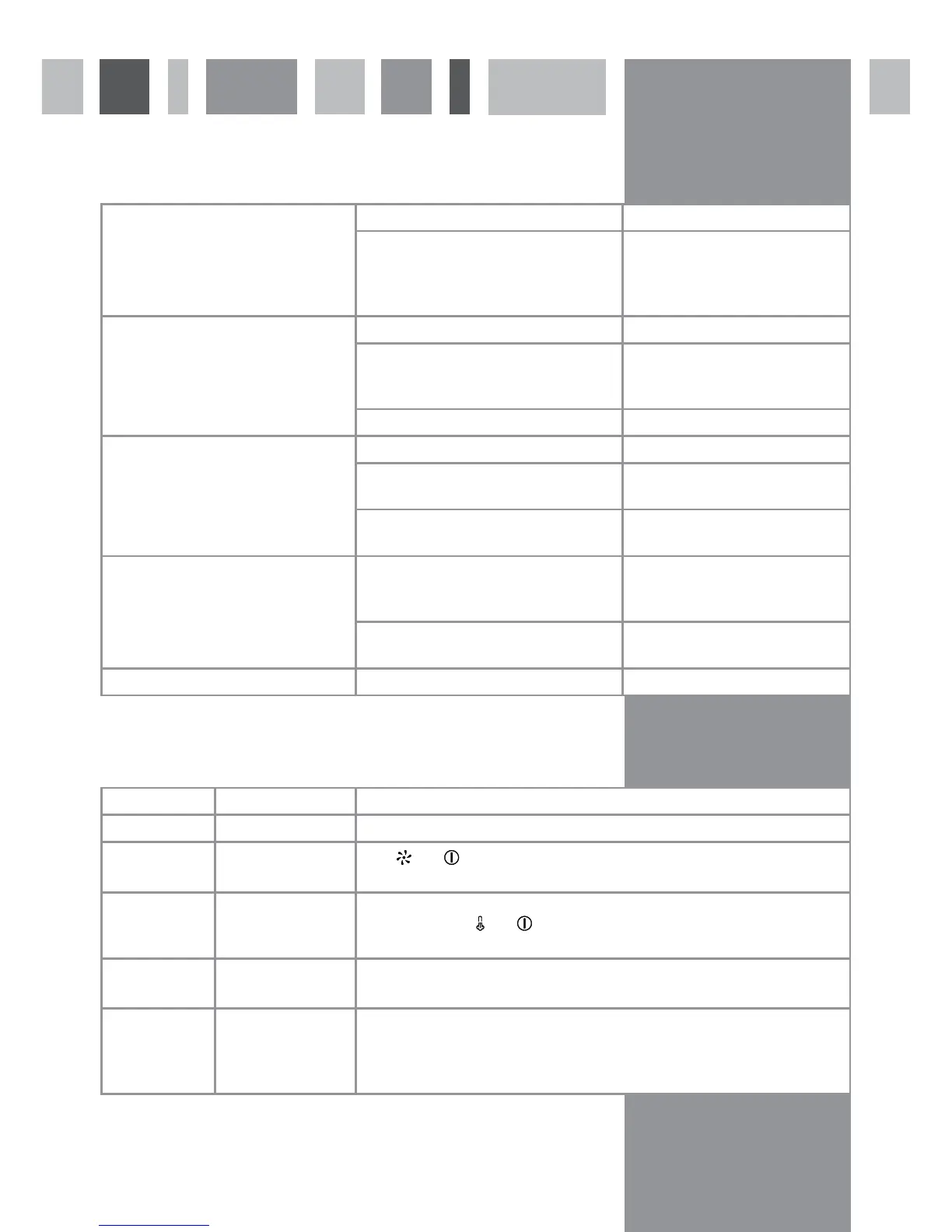
Troubleshooting
The coffee machine is equipped with an auto-diagnostic system to recognise and advise on how to deal with faults.
These alerts will show on the display.
The serial port on the left side of the coffee machine is for diagnostic purposes only.
The coffee machine does not
switch on.
The machine is not fully back in its housing. Push the coffee machine back fully.
There is a problem with the electricity
supply.
Check that the mains supply has not
been switched off.
Check that the fuse in the spur has
not blown.
The coffee will not dispense or dispenses
only in slow drips.
The coffee grind is too fine. Adjust the grind to be coarser.
There is not enough water in the water
tank.
Fill the water tank or check there
is no fault with the mains water
supply.
The internal pipes are obstructed.
The coffee dispenses too fast and is not
creamy.
The coffee grind is too coarse. Adjust the grind to be finer.
The coffee is too old. Replace the coffee beans with fresh
beans.
Coffee blend. Change the coffee beans for those
appropriate for use.
The pump makes a loud noise when
dispensing coffee.
There is not enough water in the water
tank.
Fill the water tank or check there
is no fault with the mains water
supply.
The coffee grind is too coarse so the pres-
sure in the filter holder is too low.
Adjust the grind to be finer.
Milk froth does not form. Check the flow of steam is suitable.
Machine on/off Display shows Solution
OFF DESCALING Descale the coffee machine
ON AFTER SALES SERV
0-3-4
Press
then twice to switch the coffee machine off and on. If the fault per-
sists, call CDA Customer Care
ON WATER PRESSURE
1
Check the water tank is full or that there is no problem with the mains water
supply. Then press
then twice to switch the coffee machine off and on. If the
fault persists, call CDA Customer Care.
ON GRINDER LOCK
2
Check the grinder for any foreign bodies (e.g. impurities or stones) before calling
CDA Customer Care.
ON AFTER SALES SERV
5
If the grind is set too fine and the coffee grind time is not reduced accordingly,
After Sales 5 may show on the display to indicate that the coffee machine cannot
compress the ground coffee sufficiently. To address this, either decrease the grind
time or set the grind to be more coarse.


 To Next Page
 Loading...