SETUP AND PROGRAMMING CHAPTER 3
3-26
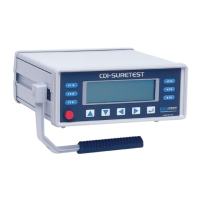
SURETEST Base Unit Controls
Refer to the illustration below when performing the power-up and programming procedures.
Figure 3-2: SURETEST Controls
– SURETEST Graphic LCD Display
– Power Switch
– Front Panel Membrane Function Keys
Powering the Equipment
To power the equipment, press the power button on the front of the SURETEST.
• At POWER ON, the SURETEST performs self-test and momentarily displays the results on the
display.
• With no transducer installed, the display then reads:
• When applying power with the transducer connected, or when connecting a transducer while the
power is on, the display momentarily reads:
ZEROTARE prompt


 To Next Page