TORQUE CALIBRATION SYSTEM SETUP CHAPTER 4
Printing Statistical Analysis
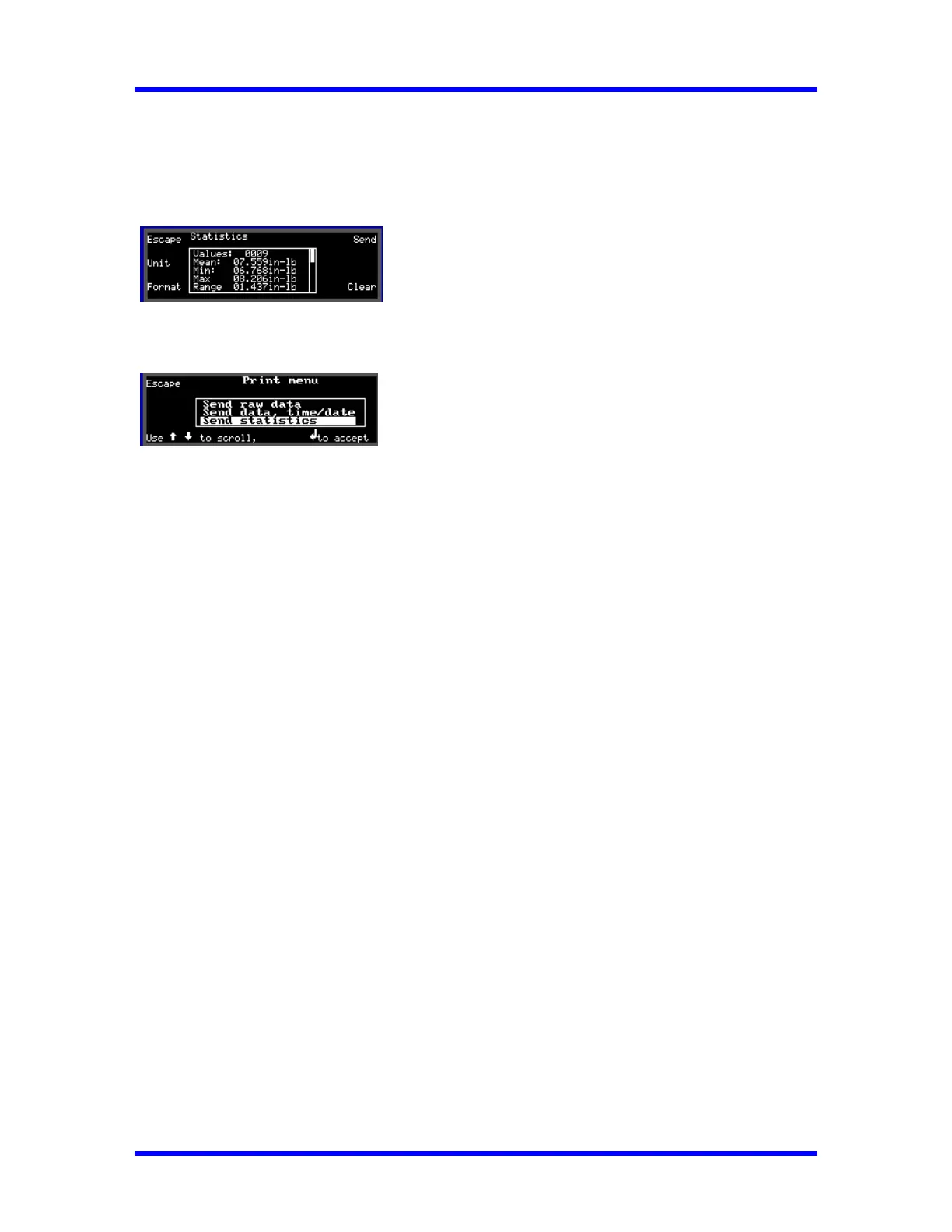
1. Press Data (F1) in select Transducer screen or (F2) in measurements mode.
then Press Format (F3).
2. Press Send (F4) to display the Print out menu.
Use Down (↓) key to select Send Statistics then press Enter (↵) to Print.
See example printout below.
3. Press Escape (F1) to return to measurements mode.
SPC PRINT-OUT
_____________________
SPC listing
_____________________
PART NO.
_____________________
NAME
_____________________
STATISTICAL ANALYSIS
Time : 16/Nov/1998 14:23
** LIMIT DATA **
Set High: 254.85 in-lb
Set Low : 251.55 in-lb
0001 254.45 in-lb
0002 253.91 in-lb
H0003 254.89 in-lb
0004 252.89 in-lb
0005 253.42 in-lb
0006 253.31 in-lb
0007 252.40 in-lb
0008 252.49 in-lb
0009 252.61 in-lb
L0010 251.49 in-lb
4-8



 To Next Page