EasyManua.ls Logo

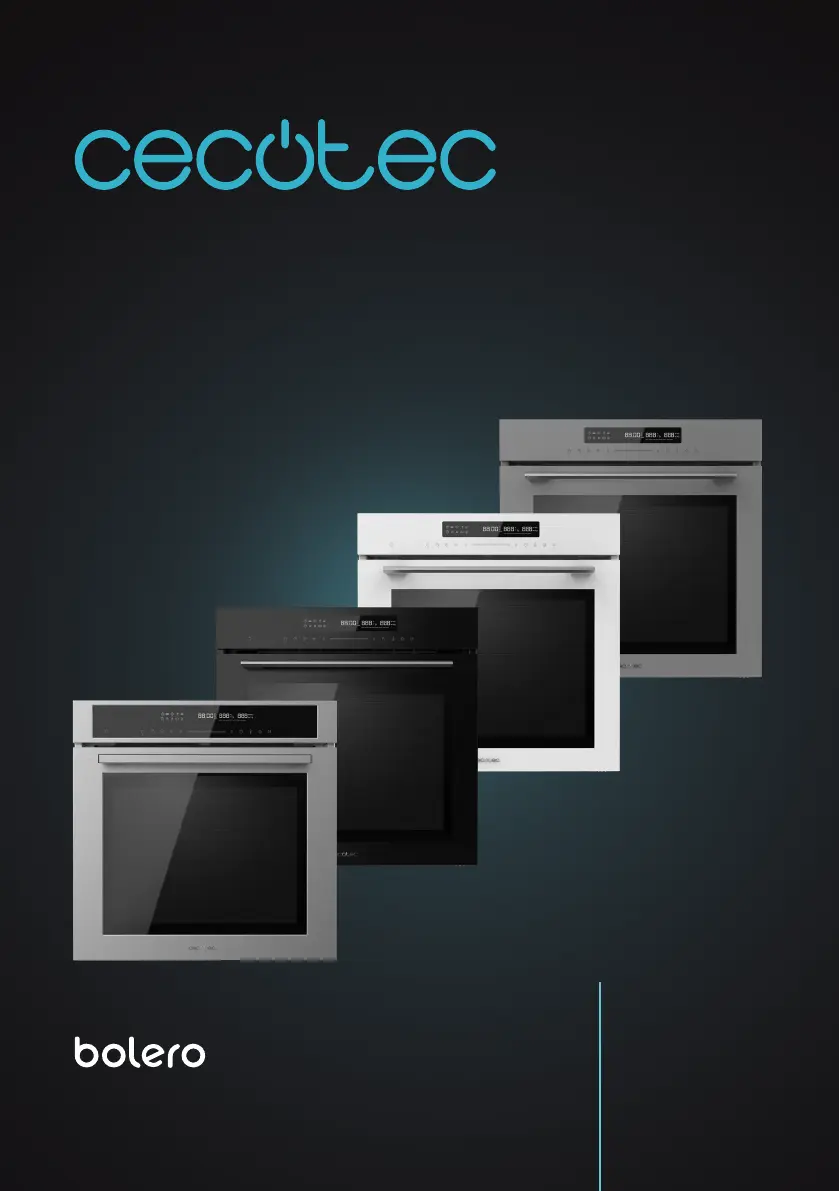
cecotec BOLERO HEXA SM406000 EDGE+ A+ - User Manual

cecotec BOLERO HEXA SM406000 EDGE+ A+
232 pages
Go to English
Print Icon
To Next Page IconTo Next Page
Loading...
1
BOLERO HEXA SM406000 EDGE+ A+ / BOLERO HEXA SM406000 GLASS BLACK A+ / WHITE A+ / GREY A+
Manual de instrucciones
Instruction manual
Manuel d’instructions
Bedienungsanleitung
Manuale di istruzioni
Manual de instruções
Handleiding
Instrukcja obsługi
Návod k použití
BOLERO HEXA SM406000 EDGE+ A+
BOLERO HEXA SM406000 GLASS BLACK A+
BOLERO HEXA SM406000 GLASS WHITE A+
BOLERO HEXA SM406000 GLASS GREY A+
Horno multifunción / Multifunctional oven

Table of Contents

Questions and Answers

  • N
    Nicholas HigginsAug 7, 2025
    Why is toasting uneven in my cecotec BOLERO HEXA SM406000 EDGE+ A+ Oven?
    • T
      thomasvasquezAug 7, 2025
      Uneven toasting in your Cecotec Oven can occur if the temperature setting is too high or the food isn't placed on the correct level; double-check the recipe and oven settings. Also, the cookware's surface finish, color, or material might not be suitable for the selected function. When using radiation heat, opt for oven cookware with a matte finish, dark color, and light weight.
  • S
    Sarah BuchananAug 13, 2025
    What to do if food is not cooked enough in cecotec BOLERO HEXA SM406000 EDGE+ A+ Oven?
    • M
      monica27Aug 13, 2025
      If food isn't cooking properly in your Cecotec Oven within the recipe's time, you might be using the wrong temperature, so check it again. Also, verify that the amount of ingredients matches the recipe.
  • T
    tinasalazarAug 19, 2025
    Why my Cecotec Oven does not work?
    • T
      Tina BarrettSep 12, 2025
      If your Cecotec Oven isn't working, first check the fuse in your home's electrical panel, as a blown fuse could be the cause. Also, verify if there's a power cut by checking if the kitchen light or other appliances are working.
  • U
    uwallAug 26, 2025
    How to clean push buttons on cecotec BOLERO HEXA SM406000 EDGE+ A+ Oven?
    • N
      Nicholas RiceAug 26, 2025
      If the push buttons on your Cecotec Oven are hard to operate, it could be due to dirt or grease. Carefully clean the control panel, referring to the cleaning and maintenance section for instructions.
  • A
    ana59Aug 31, 2025
    Why the light in my cecotec BOLERO HEXA SM406000 EDGE+ A+ Oven does not switch on?
    • J
      Jacqueline WhiteSep 1, 2025
      The light bulb must be replaced. The replacement of the light bulb must be carried out by the official Cecotec Technical Support Service or by a qualified technician.

Summary

SAFETY INSTRUCTIONS

Safety Instructions Overview

General guidelines for safe use, handling, and operation of the oven.

Risk of electric shock

Warning about dangers of incorrect repairs and electrical hazards.

Risk of burns

Caution regarding hot surfaces, heating elements, and steam.

Risk of injuries

Precautions for damaged door glass and moving door hinges.

Risk of fire

Warning about storing flammable items and potential fire hazards.

Risk due to magnetism

Caution for users with electronic implants regarding control panel magnets.

1. PARTS AND COMPONENTS

Control Panel Overview

Description of the oven's control panel buttons and their functions.

Before Use

Instructions for unpacking and initial cleaning of the appliance.

3. INSTALLATION

Installation Guidelines

Guidance on professional installation of the appliance according to regulations.

4. OPERATION

Time Adjustment

Steps to set the current time on the oven's clock display.

Heating Modes

Description of different heating modes available for the oven.

Cooling Fan Operation

Cooling Fan Operation

Explanation of the cooling fan's operation and safety warnings.

Using the Appliance

Using the Appliance

Instructions on how to use oven functions and set cooking parameters.

Fast Preheating

How to use the quick preheat function to shorten cooking time.

Set End Time (Delay End)

Instructions on setting a delayed end time for cooking.

Modifications During Cooking

How to change heating mode and temperature during cooking.

Timer Function

Timer Function

How to activate and use the oven's timer function.

Safety Child Lock

How to activate and deactivate the child safety lock on the oven.

Demo Mode

Explanation of the demo mode for saving data and its features.

Memory Mode

Memory Mode

Function for saving cooking data and its operation.

Oven Accessories

List and description of included oven accessories.

Attaching Accessories

Instructions on how to properly attach accessories inside the oven.

Tilt;Fall Protection

Tilt;Fall Protection

Safety information on safely removing and inserting accessories.

Efficient Energy Consumption

Tips for optimizing energy usage during cooking and baking.

5. CLEANING AND MAINTENANCE

Cleaning Agents and Surfaces

Guidelines for selecting correct cleaning agents for different oven surfaces.

External Cleaning Procedures

Instructions for cleaning the door handle, enamelled surfaces, and glass cover.

Oven Door Maintenance

Safety precautions and steps for removing and assembling the oven door.

Side and Telescopic Guides Maintenance

Instructions for removing, cleaning, and attaching guides.

6. TROUBLESHOOTING

Troubleshooting Common Issues

Table of common problems, their causes, and solutions.

Safety Warning During Troubleshooting

Safety warning regarding dangerous repairs and electric shock risks.

Replacing the Oven Light Bulb

Step-by-step guide for replacing the oven's interior light bulb.

Glass Lid Information

Information regarding the glass cover of the halogen bulb.

7. TECHNICAL SPECIFICATIONS

Appliance Model Details

Technical specifications including model, voltage, power, and energy efficiency.

Energy Consumption Data

Detailed energy consumption figures for different oven modes.

8. DISPOSAL OF OLD ELECTRICAL AND ELECTRONIC APPLIANCES

Appliance Disposal Guidelines

Guidelines for the proper disposal of the appliance and its batteries.

9. TECHNICAL SUPPORT AND WARRANTY

Warranty and Technical Support

Information on warranty, technical support, and contact details.

10. COPYRIGHT

Publication Copyright Information

Information regarding the intellectual property rights of the manual.

cecotec BOLERO HEXA SM406000 EDGE+ A+ Specifications

General IconGeneral
CategoryOven
Energy Efficiency ClassA+
Number of Functions6
Voltage220-240 V
Frequency50/60 Hz
MaterialStainless steel
DoorDouble glass
ThermostatYes
LightYes
Cooling FanYes
ModelBOLERO HEXA SM406000 EDGE+
Capacity60 liters
Safety FeaturesOverheating protection

Related product manuals