46 47
BONGO SERIE A BONGO SERIE A
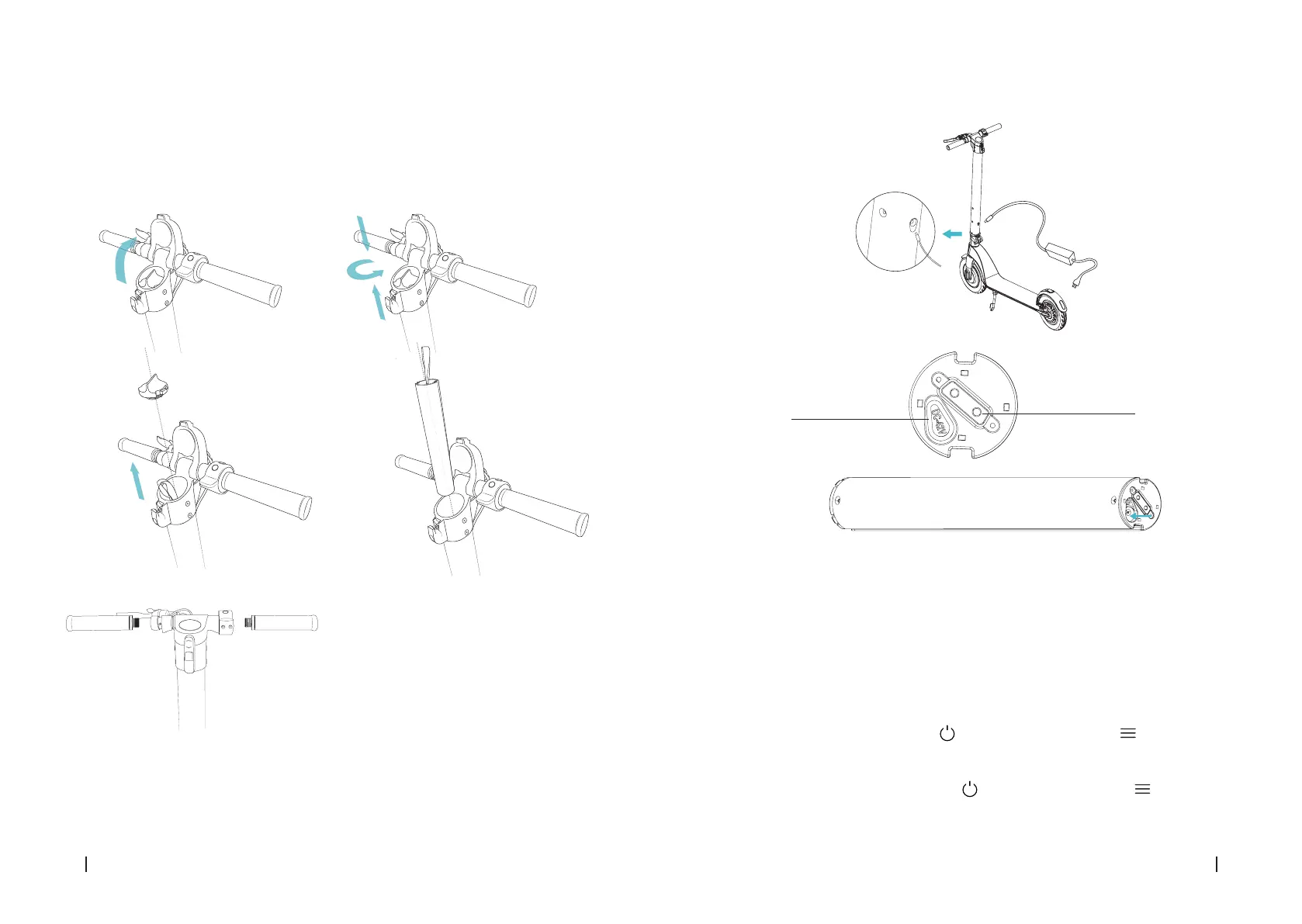
HOW TO CHARGE THE SCOOTER
1. Open the charge port cover. Make sure it is clean and dry.
2. Connect the charger with the battery and the other end to the power supply. Check the
battery indicator is on.
3. The light indicator on the charger will change when it reaches 99 % charge.
NOTE: Once the colour has changed, stop charging it. If the battery is left to overcharge for
long time the battery service life can be aected.
WARNING: Cover the charge port with the anti-dust cap to avoid any metallic element from
touching it to prevent short-circuits.
CHARGING METHOD 1
CHARGING METHOD 2
Charge port
Battery interface
On-board computer operating:
The on-board computer oers the following functions:
P1: Selecting km/h or mph.
P2: Activating and deactivating cruise speed.
P3: Activating and deactivating start up with kick o (foot).
A.- Riding modes:
To select Eco mode, turn on the display and press the menu button until the white D
and red D symbols disappear from the right side of the display.
To select Comfort mode, turn on the display and press the menu button until the white






 To Next Page