13
READY WARM CRYSTAL CONNECTION
3. BEFORE USE
• Take the product out of the box and remove any packaging materials.
• Check for any visible damage, if any is observed, contact as soon as possible the Technical
Support Service of Cecotec for advice or reparation.
• Make sure the power switch is OFF.
• Plug the appliance to an earthed wall power outlet.
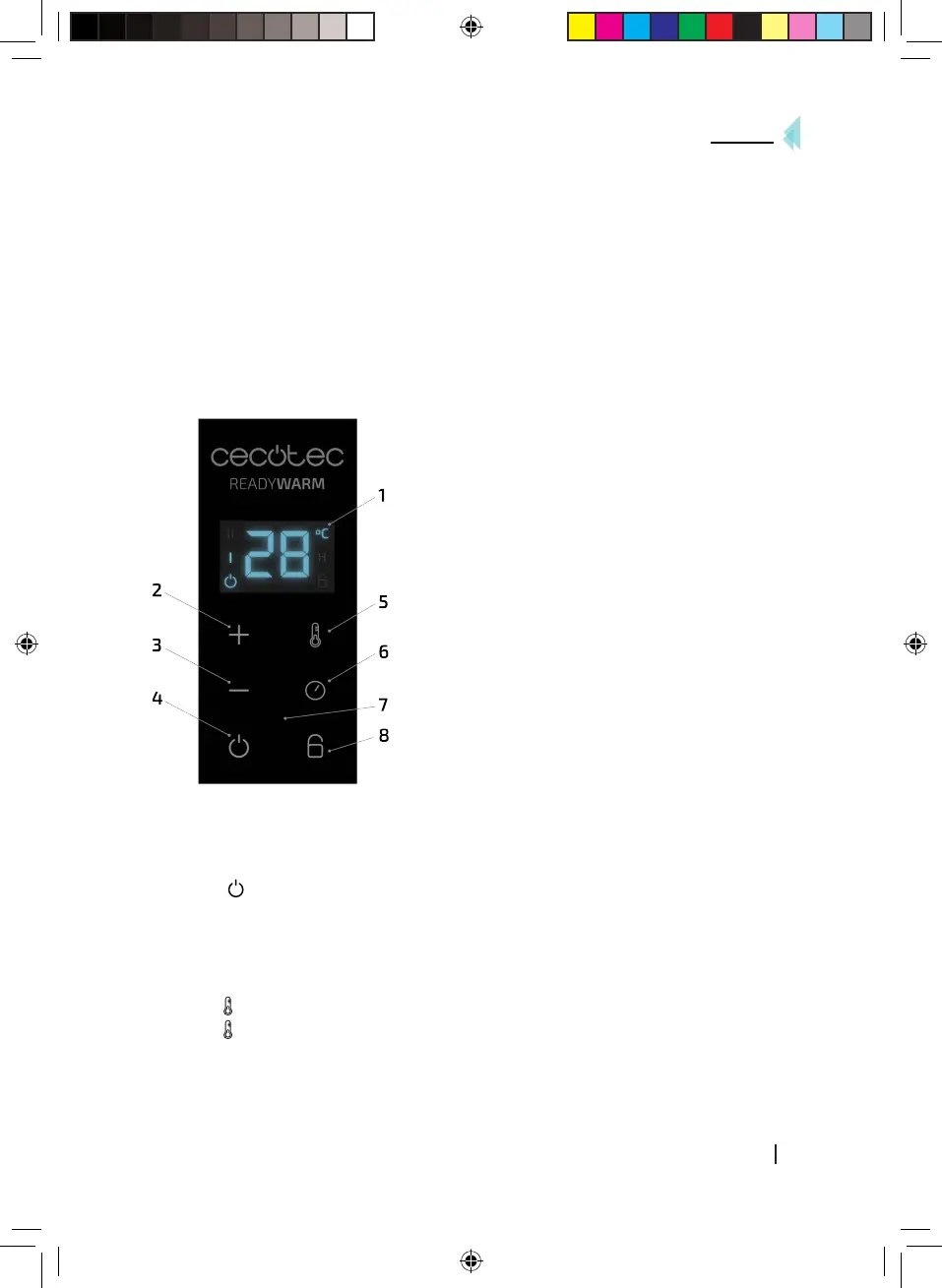
4. CONTROL PANEL
The control panel buttons of this product correspond to those shown on your Smartphone or
Tablet. The controls for the remote control are located in the annex.
1. Display
2. + button
3. – button
4. Power button
5. Mode button
6. Timer button
7. Receiver
8. Child-lock button
5. OPERATION
Power
• Press the power switch.
• Press “ ” to start the device up and enter function settings. The upper part of the display
will show the room temperature.
• The heater will start operating at low power.
Mode
• Press the mode button to select the power level..
- : low-power heating.
- : maximum-power heating
Ready Warm Crystal Connection_Manual_SA.indd 13 14/8/19 18:01





 To Next Page