www.usaprocom.com
200015-01B24
OPERATION
REMOTE CONTROL OPERATION
This appliance must not be used with glass
doors in the closed position. This can lead
to pilot outages and severe sooting outside
the replace.
The transmitter operates on 2 AAA batteries.
Key Settings
ON - Operates unit to on position, manually
operated solenoid ON.
OFF - Operates unit to off position, manually
operated solenoid OFF.
MODE - Changes unit from manual mode to
thermo mode.
SET - Sets temperature in thermo mode.
ROOM SET TEMP
1
4
6
2
3
5
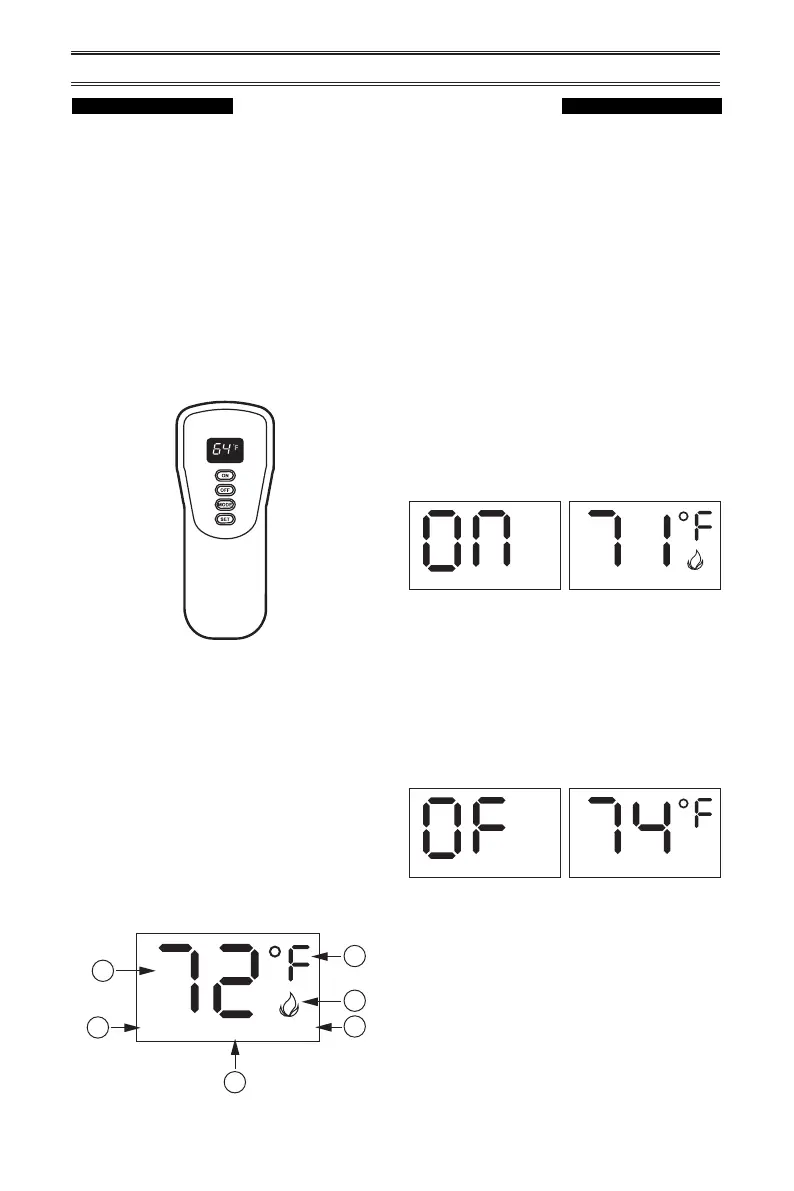
Figure 29 - Remote Control
Figure 30 - Remote Control Display
Figure 31 - Manual Mode in ON Operation
Figure 32 - Manual Mode in OFF Operation
LCD Liquid Crystal Display
1. DISPLAY Indicates CURRENT room
temperature.
2. °F or °C Indicates degrees Fahrenheit or
Celsius.
3. FLAME Indicates burner/valve in operation.
4. ROOM Indicates remote is in THERMO
operation.
5. TEMP Appears during manual operation.
6. SET Appears during time the of setting
the desired temperature in the thermo
operation.
Setting°F/°C Scale
The factory setting for temperature is °F. To
change this setting to°C, press the ON key
and the OFF key on the remote control at the
same time (see Figure 29). This will change
from°F to °C. Follow this same procedure to
change from°C back to°F.
Manual Function
To operate the system in the manual “MODE”
do the following.
ON OPERATION
Press the ON key and the appliance ame will
come on. During this time the LCD screen will
show ON (see Figure 31).
After 3 seconds the LCD screen will default to
display room temperature and the word TEMP
will show (see Figure 31). The ame icon will
appear on LCD screen in manual on mode.
TEMP
TEMP
OFF OPERATION
Press the OFF key and the appliance ame
will shut off. During this time the LCD screen
will show OF (see Figure 32).
After 3 seconds the LCD screen will default to
display room temperature and the word TEMP
will show (see Figure 32).
TEMP



 To Next Page