www.usaprocom.com
200131-01A
18
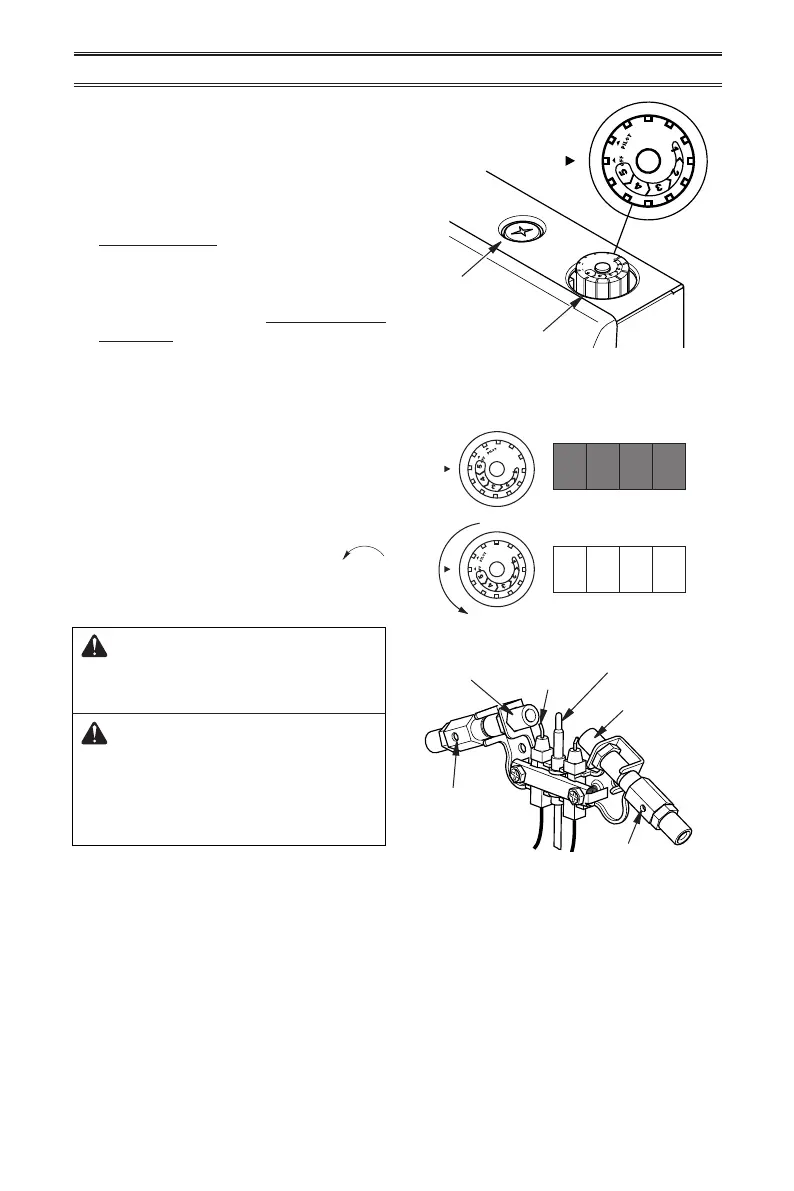
Figure 23 - Pilot Assembly
OPERATION
6. With control knob pressed in, push
down and release ignitor button. This
will light pilot. The pilot is attached to
the front of burner. The pilot can be
seen through the grill. If needed, keep
pressing ignitor button until pilot lights.
Note: If pilot does not stay lit, refer to
Troubleshooting, pages 22 though 25.
Also contact a qualied service technician
or gas supplier for repairs. Until repairs
are made, light pilot with match. To light
pilot with match, see Manual Lighting
Procedure, page 19.
7. Keep control knob pressed in for 30 sec-
onds after lighting pilot. After 30 seconds,
release control knob. If control knob does
not pop up when released, contact a quali-
ed service technician or gas supplier for
repairs.
Note: If pilot goes out, repeat steps 2
through 6. This heater has a safety inter-
lock system. Wait one (1) minute before
lighting pilot again.
8. Turn control knob counterclockwise
to desired heating level. The main burner
should light. Set control knob to any heat
level between 1 and 5.
CAUTION: Do not try to ad-
just heating levels by using the
equipment shutoff valve.
WARNING: If input gas
type is NG, make sure NG pilot
burner ignites. If input gas type
is LP, make sure LP pilot burner
ignites.
Pilot Air
Inlet Hole
Natural Gas
Burner
Propane/LP
Gas Burner
Thermocouple
Pilot Air Inlet Hole
Ignitor
Electrode
O
F
F
P
I
L
O
T
Figure 21 - Control Knob in the OFF
Position
Ignitor
Button
Control Knob
Figure 22 - Burner Patterns
Control Knob Burners


 To Next Page