Getting Started
English - 4 -
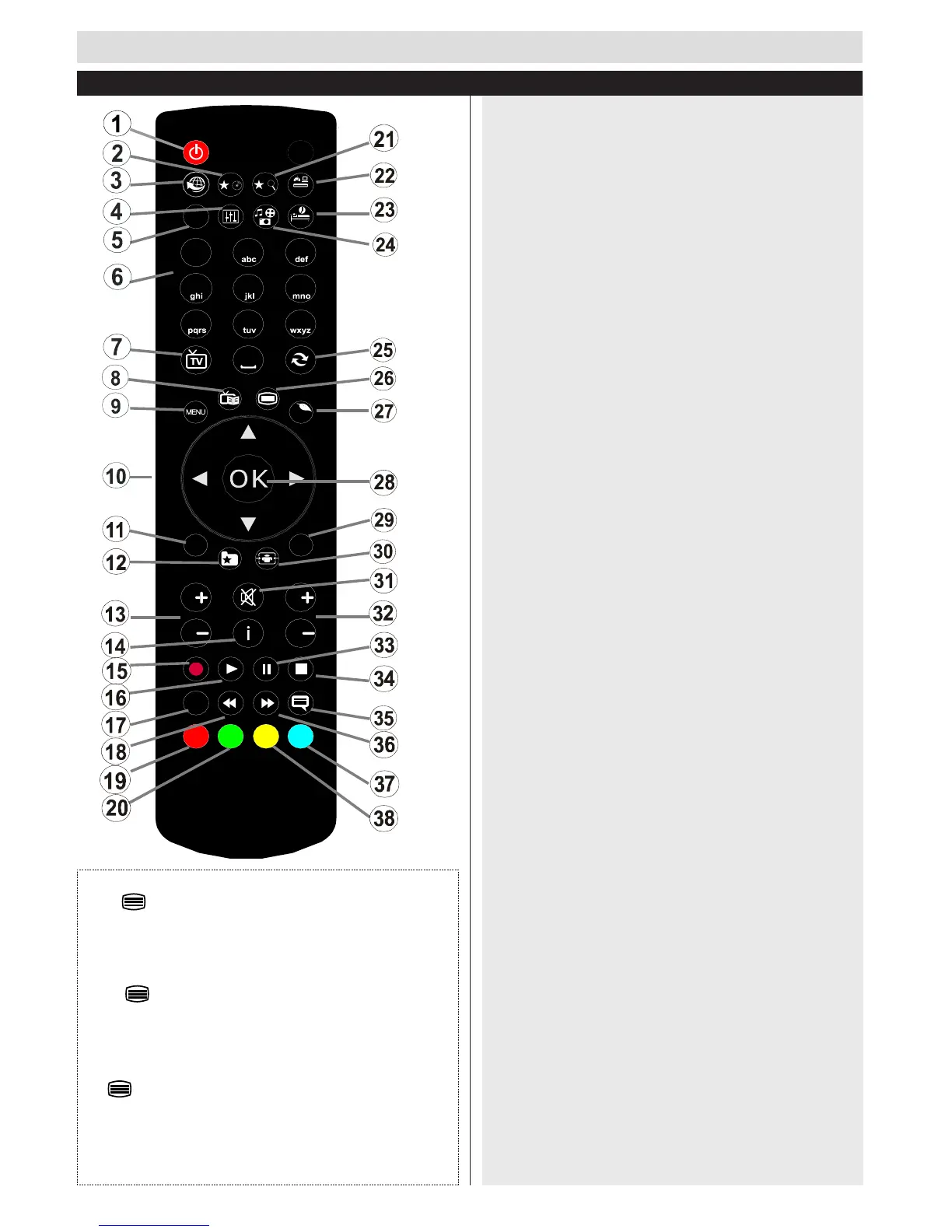
Remote Control
Teletext
Press button to enter. Press again to activate mix
mode. Press once more to exit. Follow the instructions
displayed on digital teletext screen.
Digital Teletext (for UK only)
Press button to view digital teletext information.
Operate it with the coloured buttons, cursor buttons and
the OK button. The operation method may differ
depending on the contents of the digital teletext. Follow
the instructions displayed on digital teletext screen. When
the button is pressed again, the TV returns to
television broadcast.
Note : You cannot use the timeshift fast reverse
feature before advancing the playback with the fast
forward option.
1. Standby
2. My button 1
3. No Function
4. Changes equalizer modes
5. Picture mode selection
6. Numeric buttons
7. TV Button
8. Electronic programme guide
9. Menu
10. 1DYLJDWLRQEXWWRQV8S'RZQ/HIW5LJKW7;76XESDJH
11. Back
12. Favourites
13. Volume Up / Down
14. Info
15. No function
16. Play
17. Current language
18. Rapid reverse
19. Red button / IDTV Page up
20. Green button / IDTV Page down
21. My button 2
22. Source selection
23. Sleep timer
24. Media browser
25. Channel swap
26. Teletext
27. Q. Menu
28. 2.6HOHFW+ROGLQ7;7PRGH&KDQQHO/LVW'79
mode)
29. ([LW5HWXUQ,QGH[SDJHLQ7;7PRGH
30. Image size
31. Mute
32. Program Up / Down
33. Pause
34. Stop
35. Subtitles
36. Rapid advance
37. Blue button
38. Yellow button
Using My button 1
3UHVV0<%87721IRU¿YHVHFRQGVZKHQRQDGHVLUHGVRXUFH
channel or link, until the “MY BUTTON IS SET” message is
GLVSOD\HGRQWKH VFUHHQ7KLVFRQ¿UPVWKDWWKHVHOHFWHG 0<
BUTTON is now associated with the selected function.
Using My button 2
3UHVV0<%87721IRU¿YHVHFRQGVZKHQRQDGHVLUHGVRXUFH
channel or link, until the “MY BUTTON IS SET” message is
GLVSOD\HGRQWKH VFUHHQ7KLVFRQ¿UPVWKDWWKHVHOHFWHG 0<
BUTTON is now associated with the selected function.


 To Next Page