EasyManua.ls Logo

Celestron Nex-GO DX KIT - User Manual

Celestron Nex-GO DX KIT
4 pages
Print Icon
To Next Page IconTo Next Page
Loading...
< 5”
(127mm)
4 6
!
21
5
7
3
#81038
Question and Answer IconNeed help?

Do you have a question about the Celestron Nex-GO DX KIT and is the answer not in the manual?

Summary

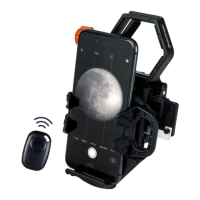
Universal Smartphone Adapter Assembly

Phone Size Compatibility

Specifies maximum phone width supported by the adapter, approximately 5 inches (127mm).

Bluetooth Remote Setup and Usage

Battery Installation

Guide on inserting or replacing the CR2032 battery in the Bluetooth remote.

Pairing the Remote

Instructions to put the remote into pairing mode and connect it via Bluetooth.

Operating the Remote

How to use the remote to trigger shutter for photos or start/stop video recording.

Summary

Universal Smartphone Adapter Assembly

Phone Size Compatibility

Specifies maximum phone width supported by the adapter, approximately 5 inches (127mm).

Bluetooth Remote Setup and Usage

Battery Installation

Guide on inserting or replacing the CR2032 battery in the Bluetooth remote.

Pairing the Remote

Instructions to put the remote into pairing mode and connect it via Bluetooth.

Operating the Remote

How to use the remote to trigger shutter for photos or start/stop video recording.

Celestron Nex-GO DX KIT Specifications

General IconGeneral
BrandCelestron
ModelNex-GO DX KIT
CategoryRemote Control
LanguageEnglish

Related product manuals