EasyManua.ls Logo

Celestron Neximage 93709 - Wavelet Enhancement; Saving the Final Image

Celestron Neximage 93709
9 pages
Print Icon
To Next Page IconTo Next Page
To Previous Page IconTo Previous Page
Loading...
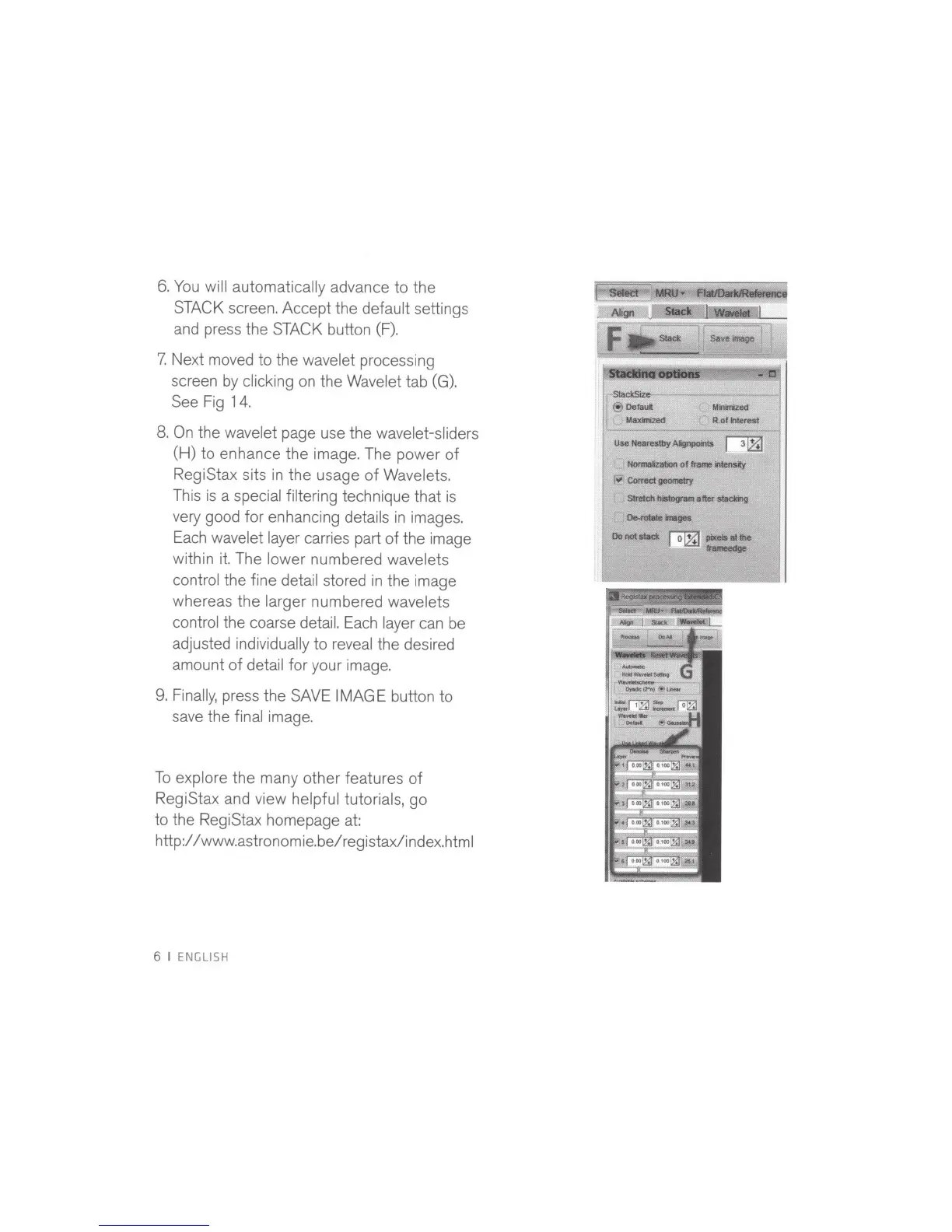
6.
You
will automatically
advance
to
the
STACK
screen. Accept the
default
settings
and press the
STACK
button
(F).
7.
Next moved
to
the
wavelet
processi
ng
screen
by
clicking
on
the Wavelet
tab
(G).
See Fig 14.
8.
On
the
wavelet
page use the
wavelet-sliders
(H)
to
enhance the image. The power
of
RegiStax sits in the usage
of
Wavelets.
This
is
a special filtering
technique that
is
very good
for
enhancing
deta
il
s
in
images.
Each
wavelet layer
carries part
of
the image
within
it.
The
lower
numbered
wavelets
control
the fine
detail
stored
in
the image
whereas the larger
numbered
wavelets
control
the coarse
detail. Each layer
can be
adjusted
individually to
reveal the desired
amount
of
detail
for your image.
9.
Finally,
press the SAVE
IMAGE button to
save the
final
image.
To
explore the many other features
of
RegiStax and view
helpful tutorials,
go
to the RegiStax homepage at:
http:/
/www.astronomie.be/registax/index.html
6
I ENGLISH
Use
Nearestby
AlgnpoiU
I
li&J
Normllzabon
of
fralne
irWensly
~
Comlc:t
geometry
Slretdl
~alter
stadring
~-...
Do
not
IIKk
~
......
Ill
the
L
v
~
hmurlge