12
Control Panel Introduction
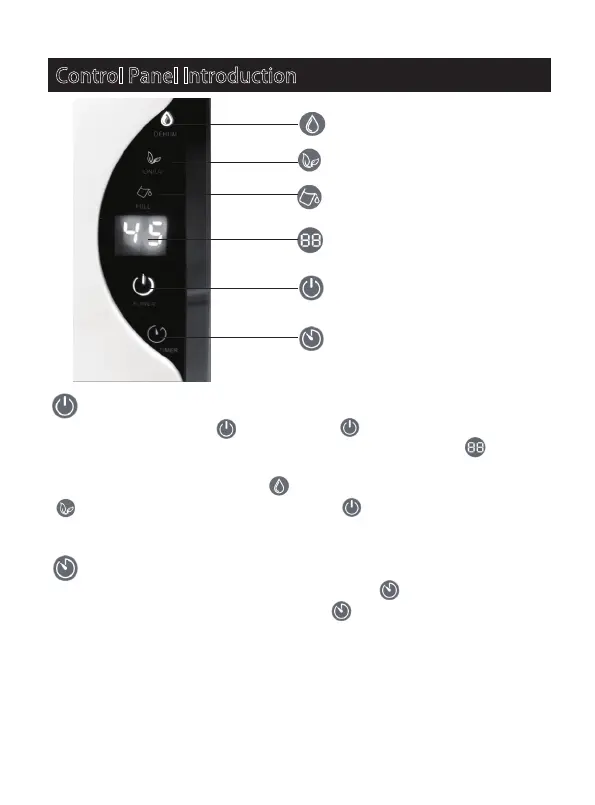
Power key
When press the Power Key , the Power Key will be ON and becomes blue
colour. The UV light inside the air outlet turns on and the LED Dispay shows
the current humidity(%) in your room. The machine will start the dehumidification.
Meanwhile, the dehumidify indicator turns to blue, and the air purifying indicator
turns to green colour. Press the Power Key again, the machine will stop
dehumidifying. All the indicators will be turned off and the inter fan will stop running
after 10 seconds.
Timer key
1. When the machine is operating, press the timer key once to enter the timer
shutdown setting interface. Press the timer key to select the desired shutdown
hour, the range is from 01 to 24 hours as a cycle. After set the desired hours and
wait for 5 seconds, the machine will start the countdown automatically, LED display
shows the current indoor humidity(%). Once the timer reaches the set hour, the
machine will stop operation and enter into the stand by state.
Dehumidify Indicator
Air Purify Indicator
Full water Indicator
LED Display
Power key
Timer key


 To Next Page