BIO X6 User Manual v. 1.0 52
4.4.3 Layer settings
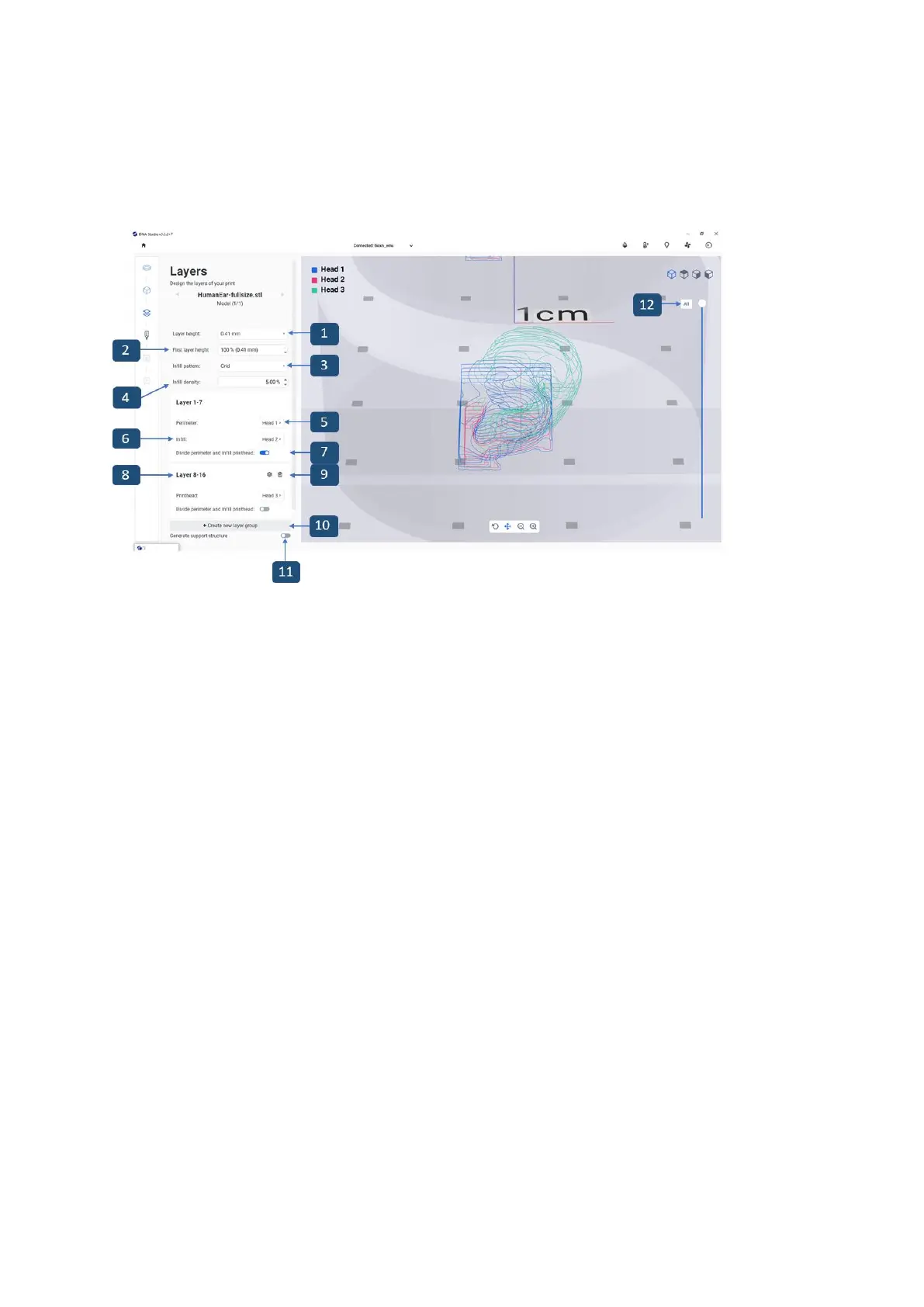
Modify options to define the layers of the 3D model and how the BIO X6 should bioprint the
selected model. Use the predefined settings or create custom settings.
1. Layer height: Specify the thickness of each layer in mm. CELLINK advises to set the
layer height to 80-100% of the nozzle diameter.
2. First layer height: 50-100% depending on the printability and viscosity of the bioprint
material. Modify to ensure sufficient adhesion of the first layer to the print surface.
3. Infill pattern: Tap to select infill pattern (see Infill screenshot below).
4. Infill density: Indicate how dense the model should be from 0% for empty infill to
100% for high density.
5. Layer group head perimeter selection selects which printhead on one specific layer
group is used to print the perimeter.
6. Layer group head infill selection selects which printhead on one specific layer
group is used to print the infill.
7. Toggle button to divide perimeter and infill for different printheads.



 To Next Page