• Avoid using your device’s light close to the eyes of children or animals.
• Do not use the device during a thunderstorm. understorms can cause the device to
malfunction and increase the risk of electric shock.
Turning on e Headset
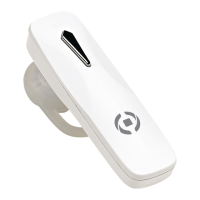
In OFF MODE, press and hold MFB for 3 seconds, the indicator light flashes blue for 3 seconds,
the indicator light flashes blue 3 times and the headset prompts are sounds.
Turning off e Headset
In ON MODE, press and hold MFB for 3 seconds, the indicator light flashes red for 3 times and
the headset prompts are sounds, then the headset will enter into OFF MODE.
Pairing e Headset with the Cellphone
1. Ensure the headset is off, and the distance between your
headset and phone is within 1 meter to activate the Bluetooth function on the phone.
2. Press and hold MFB for 4 seconds until the indicator light flashes red and blue alternately as PAIRING MODE.
3. Search Bluetooth devices (see the user guide of your phone for instructions).
4. Select“BH11”headset from the device list of the phone.
5.If the pairing code is required, please insert the code “0000”.
6. Ensure there is no obstruction between your headset and phone and within effective
distance, you can use the headset freely.
7. If the headset has paired with your phone but disconnected, it will pair automatically again
when turned on within operation range.


 To Next Page