Remote Control
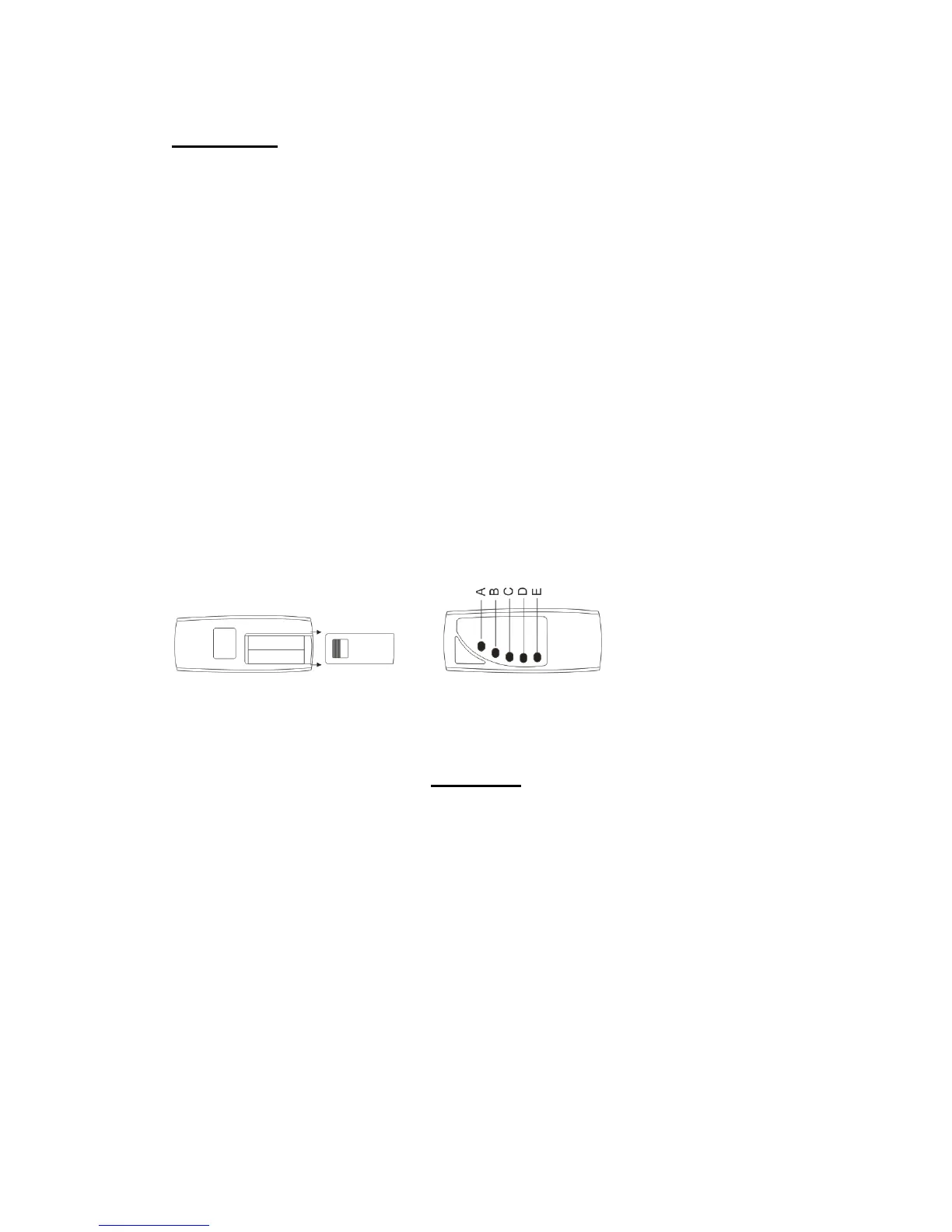
Prior to use the remote control handset requires that the insertion of 2 off AAA batteries, as
supplied. (Figure 8)
Remove the cover on the rear of the remote handset by sliding backwards. Install the batteries as
shown and then slide the cover back into the original position.
To enable the remote control to function the power to the fire must be switched on.
At a distance of 1.5 metres to 2 metres point the remote control handset directly towards the
bottom right hand side of the fire. (Figure 9)
A. On/Off Switch
B. Flame Effect adjuster To operate, press one to five times to commence the cycle of 4 different
brightness levels. Press a fifth time to shut down the flame effect.
C. Low Heat
D. High Heat
E. LED decorative lights ( selected models only)
Figure 8 Figure 9
WARRANTY
In the unlikely event of a problem occurring due to a manufacturing fault within 24 months from
the date of purchase of the appliance it will be repaired or replaced free of charge.
The warranty does not cover consumable items such as fuses which have a limited lifespan.
If a problem should occur, the nature of the problem together with the date of purchase and
installer information should be immediately reported to the retailer that the appliance was
purchased from. Proof of purchase will be required so the original invoice should be retained.



 To Next Page