
 Need help?
Do you have a question about the Centech CAN OBD II and is the answer not in the manual?
Explains the OBD II system, its purpose, and what it monitors in vehicles for emissions control.
Defines Diagnostic Trouble Codes (DTCs), their five-digit alphanumeric structure, and diagnostic purpose.
Details the standardized 16-cavity connector location for interfacing the scan tool with the vehicle's computer.
Explains OBD II Readiness Monitors as indicators of component testing, detailing continuous and non-continuous types.
Explains how readiness status indicates component testing completion for emissions compliance, and conditions for 'ready' state.
Defines key terms used in OBD II systems, including PCM, MIL, Enabling Criteria, and OBDII Drive Cycle.
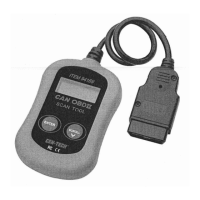
Identifies and describes the main parts of the scan tool, including the LCD display, ENTER button, SCROLL button, and OBD II connector.
Lists technical specifications like display type, operating temperature range, storage temperature range, dimensions, and weight.
Highlights key capabilities and functionalities of the OBD II scan tool, such as reading/clearing DTCs and reviewing readiness status.
Specifies compatible vehicles, including all 1996 and newer OBD II compliant cars and light trucks sold in the U.S.
Detailed instructions on connecting the tool, establishing communication, and retrieving diagnostic trouble codes from a vehicle.
Explains the process for clearing diagnostic trouble codes from the vehicle's computer, including potential effects on readiness status.
Describes how to check the vehicle's emissions monitoring system readiness status for compliance with state inspections.
Instructions for retrieving the Vehicle Identification Number (VIN) from 2002 and newer vehicles that support OBD II Mode 9.
Explains how to use the RESCAN function to retrieve current ECM data or re-establish communication after a disconnection.
 General
| Display | LCD |
|---|---|
| Supported Protocols | CAN |
| Features | I/M readiness |
| Compatibility | OBD2 compliant vehicles (1996 and newer) |
| Connection | OBD II port |
| Supported Systems | Engine |
| LED Indicators | Power |

 To Next Page