28
Do not touch the screen, do not hold your fingers on it for a long period. This may
produce a temporary distortion effect on the screen.
It is not recommended to keep a real (static) image on the screen for a long time,
and also it is not necessary to make the image too bright: reduce the brightness
and contrast when the image is real (static).
2. SCOPE OF SUPPLY
- TV — 1 pc.
- Remote control — 1 pc.
- Battery for remote control — 2 pcs.
- Removable leg — 2 pcs.
- Screw — 4 pcs.
- User Manual — 1 pc.
3. MONTAGE
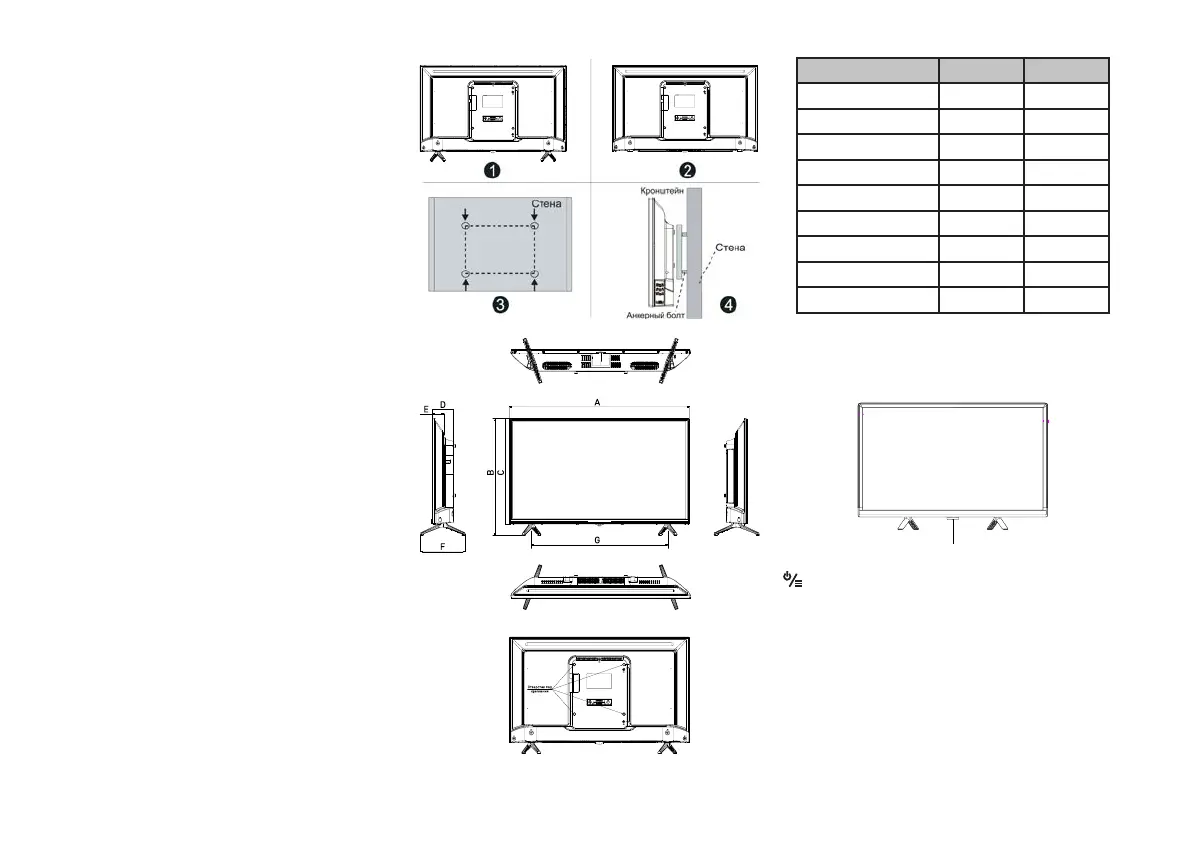
Montage of stand legs
1. Open the box and remove the TV with accessories.
2. To avoid damage to the TV, cover the table with a soft cloth, put the TV on the
table with the screen down.
3. Screw the legs into the corresponding positions on the TV body.
4. The installation of the legs is completed.
Montage the TV on the wall
1. Carefully place the TV on a table, covered with a soft cloth, to avoid scratches.
2. Unscrew the bolts on the bottom rack of the stand with a screwdriver. Remove
the stand. Do these operations carefully.
З. Set the bracket so,that it can be fixed to the wall in accordance with pictures
3 and 4.
4. Drill 4 holes on the wall (the scale is given for reference) and screw 4 bolts
there.
5. Use a screwdriver to fix the bolts on the back wall of the TV, as shown in
the picture
6. Place the TV on the wall.
NOTE:
1. Fixing the montage on the TV complies with the VESA standard.
2. It is not necessary to use a bracket on the wall.
3. When carrying out assembly operations, there should be no other objects near
the wall and under the wall.
4. Installation must be carried out by a qualified specialist.
5. When installing, follow the requirements of the bracket assembly instructions.
6. The pictures are provided for reference.
Model CT-8632 CT-8643
Size without stand (mm) 724х425 963х567
Size with stand (mm) 724х471 963х608
A (mm) 724 963
B (mm) 471 608
C (mm) 425 567
D (mm) 84 82
E (mm) 47 47
F (mm) 180 180
G (mm) 625 963
4. START OF WORK
The front panel of the TV
Before installation and use, please read
the relevant sections carefully «Предостережение» (Warning) and «Инструкция
по технике безопасности» (Safety instruction).
Remote control sensor / Power indicator
Button POWER/STANDBY
Press to turn on the TV. Press again to open the SOURCE MENU. Hold to turn off
the TV.


 To Next Page