Pg. 8 V06232023
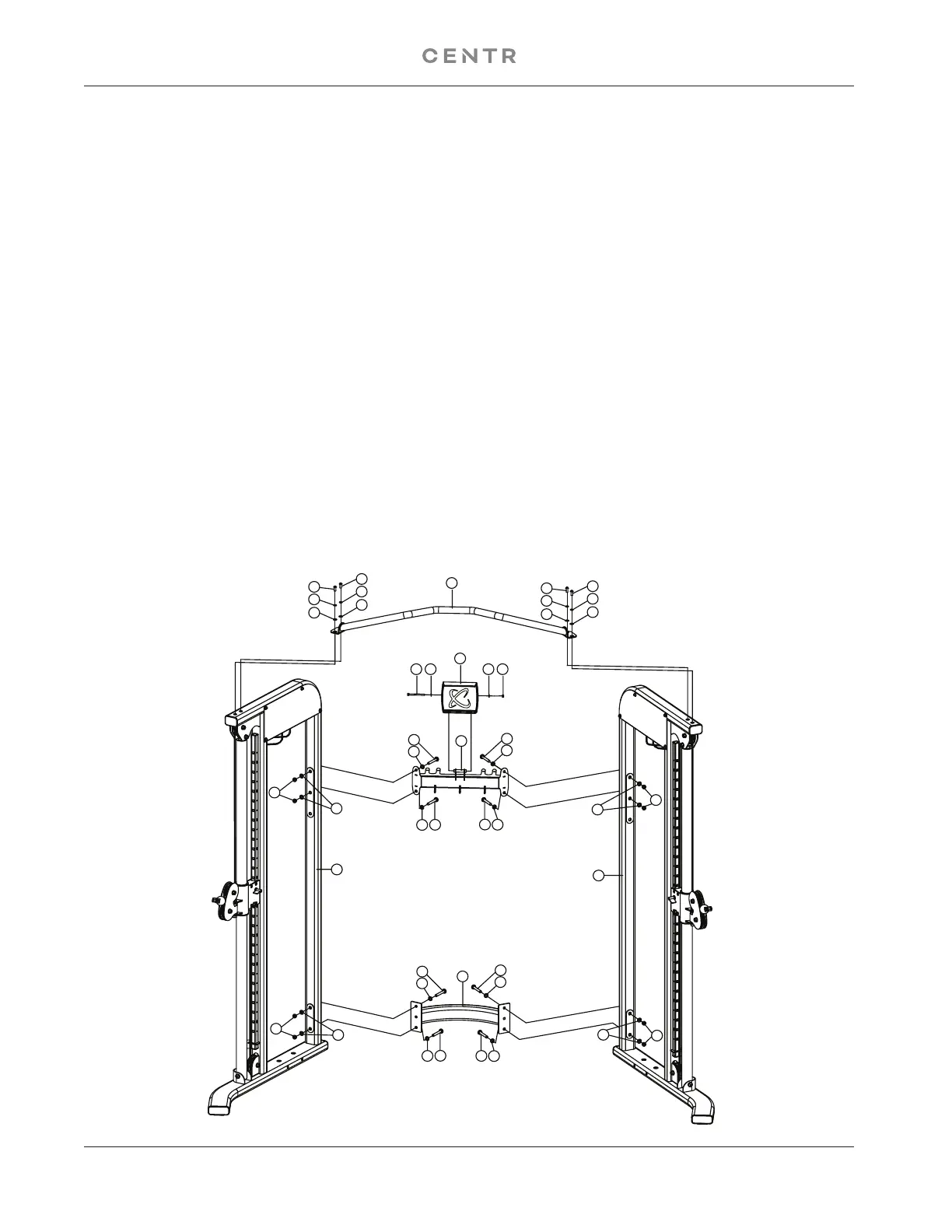
A. Do not tighten the Nuts and Bolts until instructed to do so.
B. Place the Lower Cross Brace (#4) between the Right & Left Stations (#1 & #2) in the mid-span.
C. Attach one end of the Lower Cross Brace to the Right Station. Secure it with two M10 x 70 Allen Bolts
(#19) four Ø 10 Washers (#25), and two M10 Aircraft Nuts (#24). Repeat the same procedure to install
the other side.
D. Repeat Procedure B & C to install the Upper Cross Brace (#5).
E. Place the Pull Up Bar Assembly (#3) on top of the Right and Left Stations.
F. Secure each end with two M10 x 25 Allen Bolts (#20), two Ø 10 ” Lock Washers (#23), and Ø 10
Washers (#25).
G. Place the Tablet Holder on to its mount and secure with a M6x75mm Allen Head Cap Screw (#28) and
M6 Locknut (#30), using M6 Washers (#29) on both sides. Tighten hardware until tablet holder holds
its position but can still be tilted up and down by hand.
H. Securely tighten all Nuts and Bolts installed.
1
2
3
4
5
19
25
19
25
19
25
19
25
19
25
19
25
19
25
19
25
25
24
24
25
20
23
25
20
23
25
20
23
25
20
23
25
25
24
24
25
27
28 29 29 30


 To Next Page