Centroid Acorn Plasma Users Manual Beta CNC12 v4.65 rev6
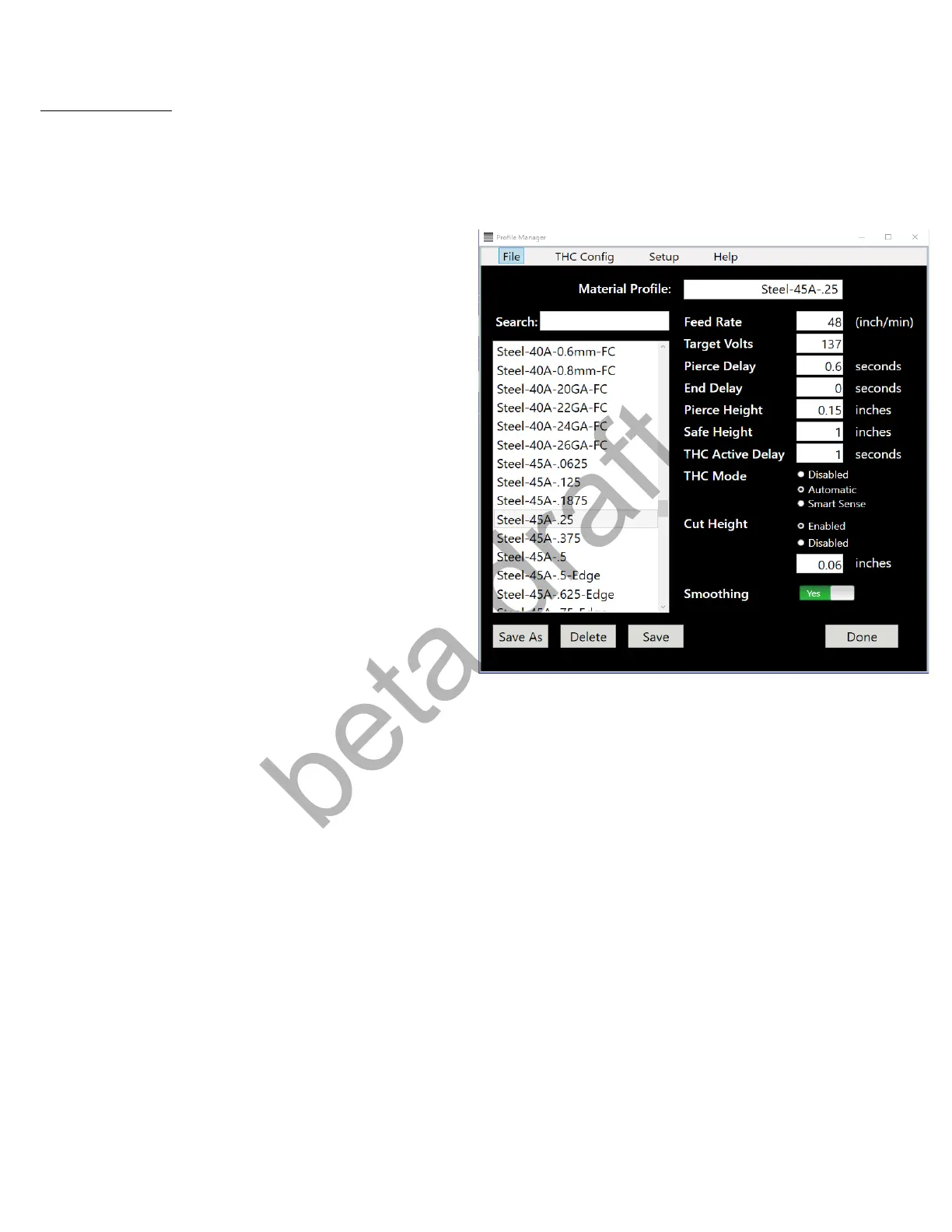
Profile Manager
A set of stock (aka “book”) material profiles are included with the CNC12 Plasma software installation.
These profiles appear in the Profile Manager and can be used as is, copied, duplicated and or modified by
the user by using the Profile manager.
Feedrate: Target XY motion feedrate.
Target Volts: The voltage that the THC will maintain
while cutting.
Pierce Delay: Delay of XY motion after pierce
command is executed.
End Delay: Time in seconds the Torch will wait at
the end of the cut before moving on to the next cut.
Safe Height: Height in which THC retracts to when
done cutting. Safe Height is relative distance to the
material surface.
THC Active Delay: Time of XY motion that will be
held at cut height with THC OFF.
THC Mode:
- Disabled = THC OFF, job will cut at the cut height.
- Automatic = THC ON and will follow the parameters in the profile.
- Smart Sense = THC ON and will use the recorded voltage during the beginning of the cut, this voltage
will override the Target Voltage in the Profile. This Voltage is determined by automatically measuring the
actual voltage while cutting at the cut height at the beginning of the cut and will be displayed on the screen
during the cut.
Cut Height:
- Enabled = Torch will pierce at Pierce Height, move to Cut Height then start XY movement
- Disabled = Torch will pierce at Pierce Height, then start XY movement
Smoothing: G-code smoothing feature Yes = ON, NO = OFF
see smoothing section below for more details on smoothing.
Page 25 D:\Keith Documents\centroid_acorn_plasma_users_manual_draft27.odt rev27 3-15-22


 To Next Page
 Loading...