Opration mode
Technical instructions CONTROLLER - CPREG-Touch
38
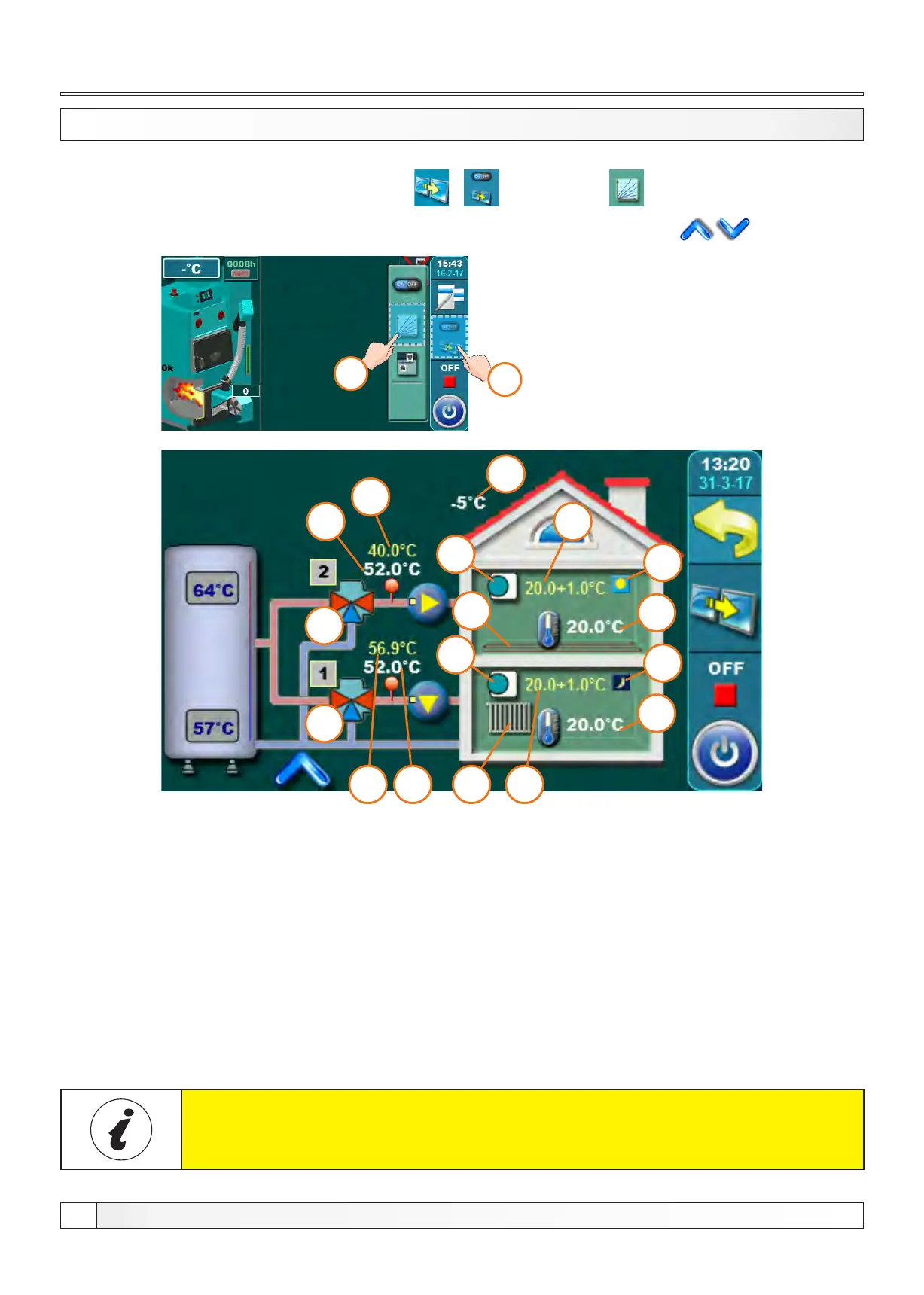
5.6.3.1 - 5.6.4.2 1. CIRCUIT / 2. CIRCUIT
1.
2.
This schematic view is only possible to view, it is not possible to turn on / off / adjust individual elements.
General:
Specific elements can be individually adjusted and displayed for each heating circuit.
For example: Turn on / off the heating circuit, turn on / off the room corrector, select the type of heating circuit for each
circuit (radiator / floor), select the operation mode (daily / night).
Elements 1a - 8a have the same meaning as elements 1 to 8 (described above)
refer only to the 2nd heating circuit or or any heating mixing circuit involved
with respect to the number of circuits included.
8
8a
7
7a
6a
6
4
4a
5
5a
1
1a
9
3a
2a
2
3
It's possible to view all enabled mixing heating circuits (set temperatures, measured temperatures, heating type,
working of the pumps etc...). To enter this view press / button and then .
If there are more than 2 mixing heating circuits enabled you can switch view betwen them with buttons.
1 - Mixing valve (1.circuit)
2 - The calculated flow temperature (1.circuit)
3 - Current measured flow temperature (1.circuit)
4 - Heating type on 1. circuit (radiators or floor heating)
5 - Room corrector „CSK“ on 1. circuit (if turned off,
icon disappears)
6 - The desired temperature + deviation by room corrector
(1.circuit)
7 - Current measured room temperature (shown only
if the room corrector is turned on) in 1.circuit
8 - Mode (1.circuit) (day / night)
9 - Outer temperature (outer sensor)


 To Next Page