Suggested Instructions for Use:
Compass Cast Use without Compass MAP
1. Remove Compass Cast from its sterile package.
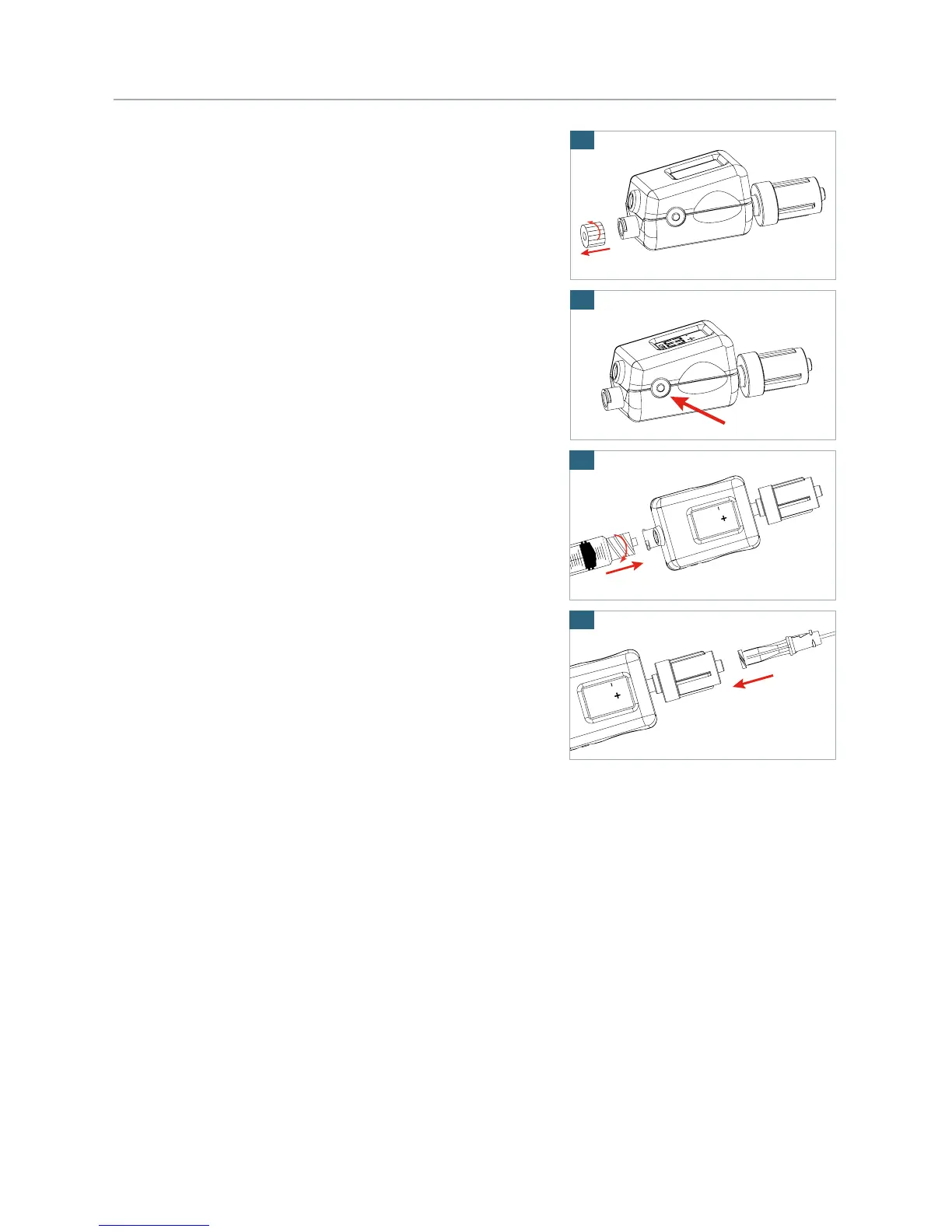
2. Remove the proximal luer cap (Figure 1).
3. Activate and calibrate Compass Cast by depressing the
power button for approximately one second until the LCD
reads “00” (Figure 2).
WARNING: Activate and auto-calibrate Compass Cast
prior to attaching accessories to avoid incorrect
baseline pressure.
4. Depending on the application, attach accessory
(e.g. flushing syringe, stopcock, extension or IV tubing,
etc.) to the proximal, female luer lock port of the
Compass Cast per hospital protocol (Figure 3).
5. Depending on the application, connect the distal, male luer
lock end of the Compass Cast to accessory (e.g. needle,
distal lumen of a central line, extension set or needleless
valve in contact with patient) (Figure 4).
WARNING: Pressure reading is NOT physiological if either
the distal or proximal luer connections of the device is
open to atmospheric pressure.
2
1


 To Next Page