EasyManua.ls Logo

Centurion Compass Cast - User Manual

Centurion Compass Cast
8 pages
Print Icon
To Next Page IconTo Next Page
Loading...
Compass® Cast™ and MAP
CAUTION: Federal (USA) law restricts this device to sale
by or on the order of a physician.
Indications for Use
The Compass Cast and MAP disposable pressure transducer
system with integrated digital display and wireless transmission
capability is intended for direct measurement and monitoring
of physiologic pressure, including during the infusion of fluids
and therapeutic and diagnostic agents.
Device Description
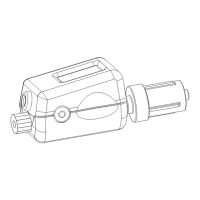
The Compass Cast is a self-calibrating, sterile, single-use,
disposable, wireless-enabled, physiological pressure transducer
with integrated digital display. The Compass Monitor Accessory
Plug (Compass MAP) receives the wireless pressure signal from
the Compass Cast and inputs the pressure signal to a compatible
vital signs monitor.
This device complies with Part 15 of the FCC Rules. Operation is subject to the following two conditions:
(1) This device may not cause harmful interference, and (2) this device must accept any interference received,
including interference that may cause undesired operation.
Changes or modifications not expressly approved by Centurion Medical Products could void the user’s
authority to operate the equipment.
Compass CAST FCCID: 2AF4Z-CWHG001
Compass MAP FCCID: 2AF4Z-CWM001
Question and Answer IconNeed help?

Do you have a question about the Centurion Compass Cast and is the answer not in the manual?

Summary

Indications for Use

Indications for Use

Intended for direct measurement and monitoring of physiologic pressure during fluid infusion and therapeutic/diagnostic agents.

Device Description

Device Description

Describes the Compass Cast transducer and Compass MAP receiver for wireless pressure signal transmission.

Suggested Instructions for Use: Compass Cast Use with Compass MAP

Preparation and Connection

Steps for connecting the Compass MAP to a vital signs monitor and preparing the Compass Cast.

Activation and Calibration

Procedure for activating and auto-calibrating the Compass Cast before attachment.

Wireless Connection Establishment

Details on how the Compass Cast and Compass MAP establish a wireless connection.

Suggested Instructions for Use: Compass Cast Use with Compass MAP (concluded)

Accessory Attachment

Guide on attaching accessories to the Compass Cast's proximal and distal luer ports.

Pressure Reading and Recalibration

Information on reading pressure, notes on recalibration, and guidewire insertion.

Important Warnings

Crucial warnings regarding device reuse, fluid reinfusion, and preventing inadvertent pairing.

Suggested Instructions for Use: Compass Cast Use without Compass MAP

Preparation

Steps for preparing the Compass Cast, including removal of luer cap and activation.

Accessory Connection

Instructions for connecting accessories to the Compass Cast's proximal and distal luer ports.

Suggested Instructions for Use: Compass Cast Use without Compass MAP (concluded)

Pressure Display and Recalibration

How to view pressure on the LCD and notes on recalibrating the device.

Guidewire Insertion

Guidance on inserting a guidewire through the Compass Cast.

Safety Warnings

Warnings against fluid reinfusion and reusing the Compass Cast for different patients.

Connectivity Details

Scanning and Pairing

How Compass MAP selects signals and how devices pair and reinitiate connections.

Connection Loss and Troubleshooting

Behavior when connection is lost or if the Compass Cast cannot establish a wireless connection.

Device Power Off and Recalibration

Power Off and Recalibration Procedure

Steps to power off the device and recalibrate it using the power button.

Cleaning Instructions

Compass MAP Cleaning Guidelines

Instructions for inspecting, disinfecting, and cleaning the Compass MAP, avoiding immersion and liquid contact.

Display

Graphical Waveform Interpretation

Explanation of the graphical waveform display, including bar scaling for pressure.

Numerical Display Modes

Details on numerical display modes and update frequency.

Specifications

Pressure and Output Specifications

Details pressure range, MAP output, and accuracy for LCD and MAP.

Performance Specifications

Covers zero drift, operating life, temperature ranges, light sensitivity, and battery voltage.

Compass Cast: Software Codes

Software Error Codes

List of software codes (UF, SF, HF, bF, EE, CE) and their meanings.

Battery Status Codes

Codes (Lb3, Lb2, Lb1, Lb0) indicating remaining battery life.

Compass MAP: LED Codes

Compass MAP LED Status

Explanation of LED codes: Solid LED for connection, blinking for scanning, and non-functional.

Centurion Compass Cast Specifications

General IconGeneral
BrandCenturion
ModelCompass Cast
CategoryMedical Equipment
LanguageEnglish