GB-5
English
●
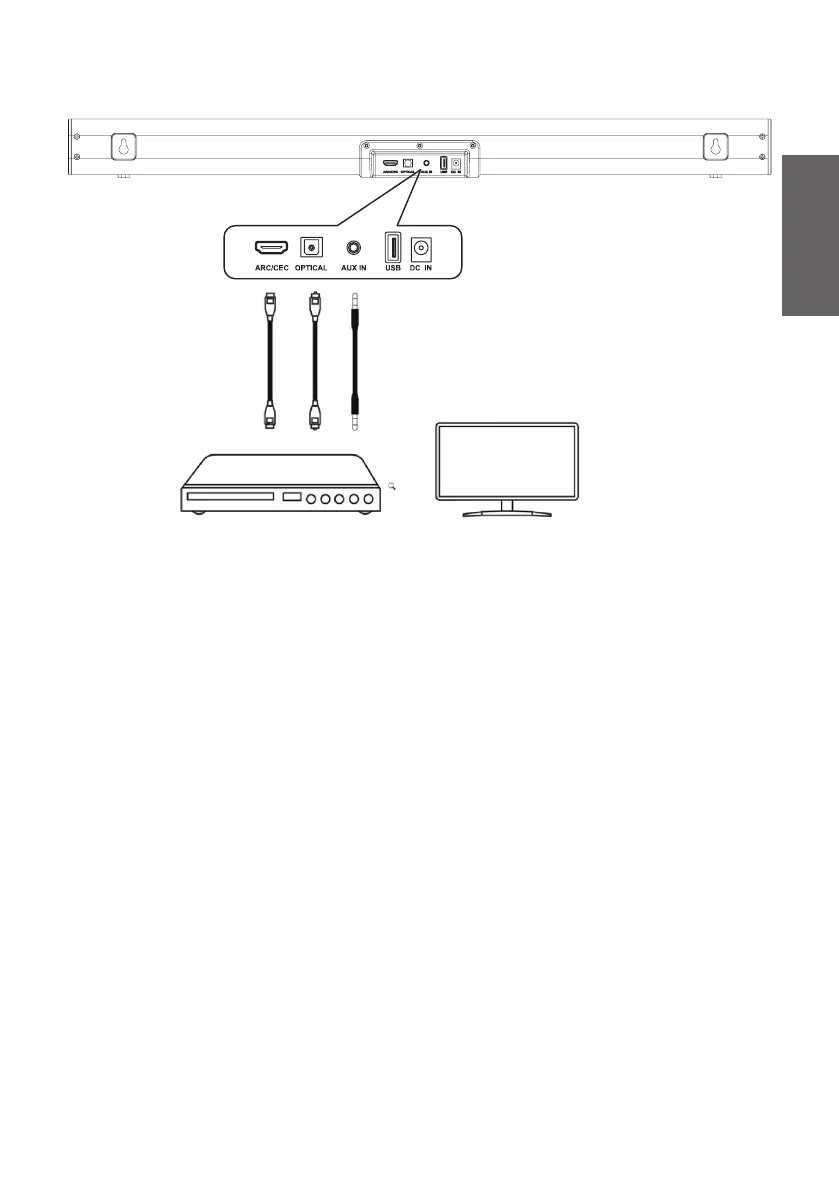
Audio Input connection with HDMI cable / Optical cable/ 3.5mm
Audio cable
4. Operation
●
Subwoofer Connection
–
Auto connect:
Connect the AC power cord of the subwoofer to a power supply securely, Press STANDBY
button to power on the sound bar. The indicator of Subwoofer blinks blue, and the
Subwoofer starts automatically searching the Soundbar's signal for pairing. After the
pairing is successful, the indicator stops blinking and keeps on blue.
–
Manual connect:
When the subwoofer can not be connected with the soundbar and the indicator light
on the subwoofer blinks blue, press and hold Source button on the soundbar or remote
control and the indicator on the soundbar will ash green, then the soundbar start to pair
with the subwoofer, After the pairing succeed, the subwoofer indicator stops blinking and
light blue.
●
AUX / OPTICAL / HDMI Operation
1) Ensure that the soundbar is connected to the TV or audio device.
2) Press the Source button repeatedly on the soundbar/remote control to select the
desired mode. The indicator will show the selected mode light color.
3) Operate your audio device directly for playback features.
4) Press Volume +/- button to adjust the desired volume.
ARC Cable
Optical Cable
3.5mm to 3.5mm Aux Cable


 To Next Page