Need help?
Do you have a question about the CH Products PRO THROTTLE USB and is the answer not in the manual?
Information on obtaining technical assistance, including required system details and contact methods.
Details on the product's limited warranty, coverage, limitations, and service procedures.
Lists the necessary computer and software prerequisites for installation.
Highlights key functionalities like Control Manager, Mode Switch, and Mini joystick.
Provides a step-by-step guide to installing the CH Pro Throttle USB software.
Explains how to access and use the Control Manager software for programming.
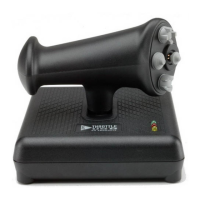
The CH Pro Throttle USB is a sophisticated input device designed to enhance your computing experience, particularly for gaming and other applications requiring precise control. This device offers an unprecedented array of programmable functions, making it a versatile tool for various tasks.
The core function of the CH Pro Throttle USB is to provide advanced control capabilities through its programmable features. It integrates seamlessly with your computer system, offering a robust platform for customized input.
One of its standout features is the Control Manager software. This comprehensive application serves as the central hub for managing all your CH USB devices. With Control Manager, you gain the ability to program not only the CH Pro Throttle itself but also other compatible CH USB devices you may own. This unified control system simplifies the management of multiple input devices, allowing for a cohesive and efficient setup. The Control Manager comes bundled with a detailed Users Guide, which is essential for unlocking the full potential of the software and understanding its intricate functionalities.
Another key feature is the Mode Switch. This allows the CH Pro Throttle USB to operate in three distinct modes. These modes can be independently configured, providing a flexible way to adapt the device's behavior to different applications or game scenarios. For instance, you might set up one mode for flight simulation, another for first-person shooters, and a third for general desktop navigation. This mode-switching capability extends to all other connected CH USB devices, creating a synchronized control environment. The current active mode is clearly indicated by a set of three LED lights on the device, offering a quick and easy visual reference.
The CH Pro Throttle USB also incorporates a mini joystick. This versatile component can be configured to function either as a traditional 2-axis joystick, ideal for fine directional control, or as a mouse control, providing an alternative input method for cursor manipulation. This dual functionality adds another layer of versatility, allowing users to choose the input style that best suits their needs for a particular task.
To ensure optimal performance and to fully leverage the device's capabilities, proper usage and understanding of its features are paramount.
Installation: The installation process for the CH Pro Throttle USB software is straightforward, but it requires careful attention to detail. Before beginning, it is crucial to unplug all CH USB devices, including the CH Pro Throttle itself, from your computer. Other non-CH USB devices, such as scanners or printers, do not need to be disconnected. The software is provided on a CH Products Installation CD. The installation involves inserting the CD into your CD-ROM drive, navigating to "My Computer," opening the CD-ROM drive, and then executing the "Setup.exe" file. It is important to select the correct Setup file, which is identifiable by a computer icon rather than a yellow star. From the main installation screen, you will click on "Drivers and Software" and then specifically on the "Control Manager" link, which is underlined in red. Following the on-screen directions will guide you through the New Hardware Wizard and the setup of the Control Manager software.
Programming: The true power of the CH Pro Throttle USB lies in its programmability. All the necessary information for programming the device is contained within the Users Guide section of the Control Manager. After installing Control Manager, the Users Guide should automatically appear. If it does not, it can be accessed by navigating through "Start," "Programs," "CH Products," "Control Manager," and then "Users Guide." It is explicitly stated that the Pro Throttle will not function correctly until you have thoroughly read the Users Guide. This step is mandatory because it educates you on the inner workings of Control Manager and how to create and apply "maps" to your CH Pro Throttle USB. It is highly recommended to keep the manual readily accessible and refer to the Control Manager Users Guide before proceeding with further use.
Macintosh Compatibility: While the Pro Throttle USB is a USB device and will function with a Macintosh, there are some limitations. Specifically, the mode switch function will not work on a Macintosh. This means that on a Mac, the Pro Throttle USB will be limited to 19 functions and one point of view feature. Users are advised to check the CH Products website periodically for software updates or information regarding MacOS compatibility.
The CH Pro Throttle USB is designed for durability and reliable performance. While specific routine maintenance steps are not detailed, general care practices will help ensure its longevity.
Technical Support: Should you encounter any issues, it is strongly recommended to first consult the comprehensive troubleshooting section within the Users Guide. Many common problems can be resolved by referring to this resource. If the problem persists, CH Products offers technical support. To facilitate efficient support, it is advisable to gather specific information about your computer system before contacting them. This includes:
This information will help the technical support team diagnose and resolve issues more effectively. Technical support can be reached via phone at 760.598.7833, or through mail or e-mail using the provided addresses and forms. An online knowledge base is also available for self-service troubleshooting.
Warranty: The CH Pro Throttle USB comes with a one-year warranty from the date of purchase, covering defects in materials and workmanship. During this period, CH PRODUCTS will, at its option, repair or replace any defective component free of charge. The warranty is limited to repair and/or replacement at the factory and does not cover shipping expenses. It does not apply if the device has been damaged by accident, abuse, improper usage, or unauthorized service or modification. It's important to note that no other warranties, expressed or implied, including those of salability and fitness for a particular purpose, are provided. CH PRODUCTS is not responsible for consequential damages. To obtain warranty service, the device should be sent postage prepaid, along with a dated proof of purchase and a Return Merchandise Authorization (RMA#) obtained from CH PRODUCTS, to the specified address. A $6.00 fee for shipping and handling is also required.
The software provided with the device is offered "as is," without warranties of any kind. CH PRODUCTS disclaims liability for the correctness, precision, or currency of the software, its suitability for a specific purpose, or its market quality. The user assumes all risks related to the usability and performance of the software and accompanying hardware. CH PRODUCTS is not liable for the software's performance or functional capability in multi-user environments. The user is responsible for any costs associated with defect correction, maintenance, repair, or improvement work.
 General
| Product Type | Throttle Controller |
|---|---|
| Manufacturer | CH Products |
| Model | PRO THROTTLE USB |
| Category | Video Gaming Accessories |
| Connection Type | USB |
| Interface | USB |
| Number of Buttons | 6 |
| Throttle Axis | Yes |
| Hat Switch | Yes |
| Compatibility | PC |


 To Next Page