
EasyManua.ls Logo

Challenge Xtreme CXSS 2540 - User Manual

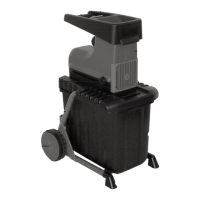
Challenge Xtreme CXSS 2540
16 pages
Print Icon
To Next Page IconTo Next Page
Loading...
CXSS 2540
EH-Art.-No.: 34.305.43
I.-Nr.: 01017
Operating Instructions Silent Shredder
" WARNING! PLEASE READ THESE INSTRUCTIONS
BEFORE OPERATING THIS UNIT"
"KEEP THIS MANUAL FOR FUTURE REFERENCE”

Questions and Answers

  • K
    kyle49Aug 1, 2025
    What to do if my Challenge Xtreme CXSS 2540 Paper Shredder motor does not start?
    • B
      Bradley WalkerAug 1, 2025
      If the Challenge Xtreme Paper Shredder's motor won't start, first check the mains lead, plug, and fuse to ensure there's no power failure. Also, make sure the debris box is correctly positioned and locked, as the safety switch might be preventing the motor from starting.
  • R
    Richard ReevesAug 15, 2025
    Why is my Challenge Xtreme CXSS 2540 not drawing in material?
    • D
      derek56Aug 15, 2025
      If your Challenge Xtreme Paper Shredder isn't drawing in material, it could be due to a few reasons. First, the shredding blade might be running in reverse, so try changing the direction of rotation. Second, there might be a material blockage in the filling funnel; in this case, change the rotation direction and pull the material out. Finally, if the shredding blade is jammed, feed in thick branches again to prevent immediate re-engagement in the previous notches, and then change the rotation direction to release the jammed material.

Summary

Safety Information

General Safety Information

Provides essential safety precautions and warnings for operating the shredder.

Warning Sign Description

Explains the meaning of the warning sign (Figure 15) found on the machine.

Technical Data

Layout and Items Supplied

Proper Use

Installation

Mains Connection

Details how to safely connect the shredder to the electrical power supply.

ON;OFF Switch

Explains the function and usage of the power switch for starting and stopping.

Safety Switch

Describes the safety switch mechanism related to the debris box.

Direction Selection Switch

Explains how to change the rotation direction to clear jams.

Motor Protection

Details the overload protection feature that stops the motor automatically.

Practical Tips

Offers advice and best practices for efficient and safe shredder operation.

Operation

Emptying the Shredded Material Debris Box

Provides instructions on how to safely empty the collected shredded material.

Adjusting the Counter Blade

Explains the procedure for adjusting the counter blade for optimal cutting performance.

Maintenance and Storage

Waste Disposal

Ordering Replacement Parts

Troubleshooting

Challenge Xtreme CXSS 2540 Specifications

General IconGeneral
BrandChallenge Xtreme
ModelCXSS 2540
CategoryPaper Shredder
LanguageEnglish