5
1. Set the fan on a dry, level and sturdy surface.
2. Plug the fan into the mains.
3. Be sure the voltage of fan conformed to local power condition before using it.
Adjust the desired speed by oscillate the power switch:
0--- Stop Ⅰ--- Low Ⅱ--- Medium Ⅲ--- High
1. Push down the oscillation knob to make the fan head oscillate, and pull-up the oscillation knob to stop the fan
head from oscillating.
2. Loosen the adjusting angle knob, adjust the fan to the desired angle, to secure tighten the adjusting angle knob.
OPERATING INSTRUCTIONS
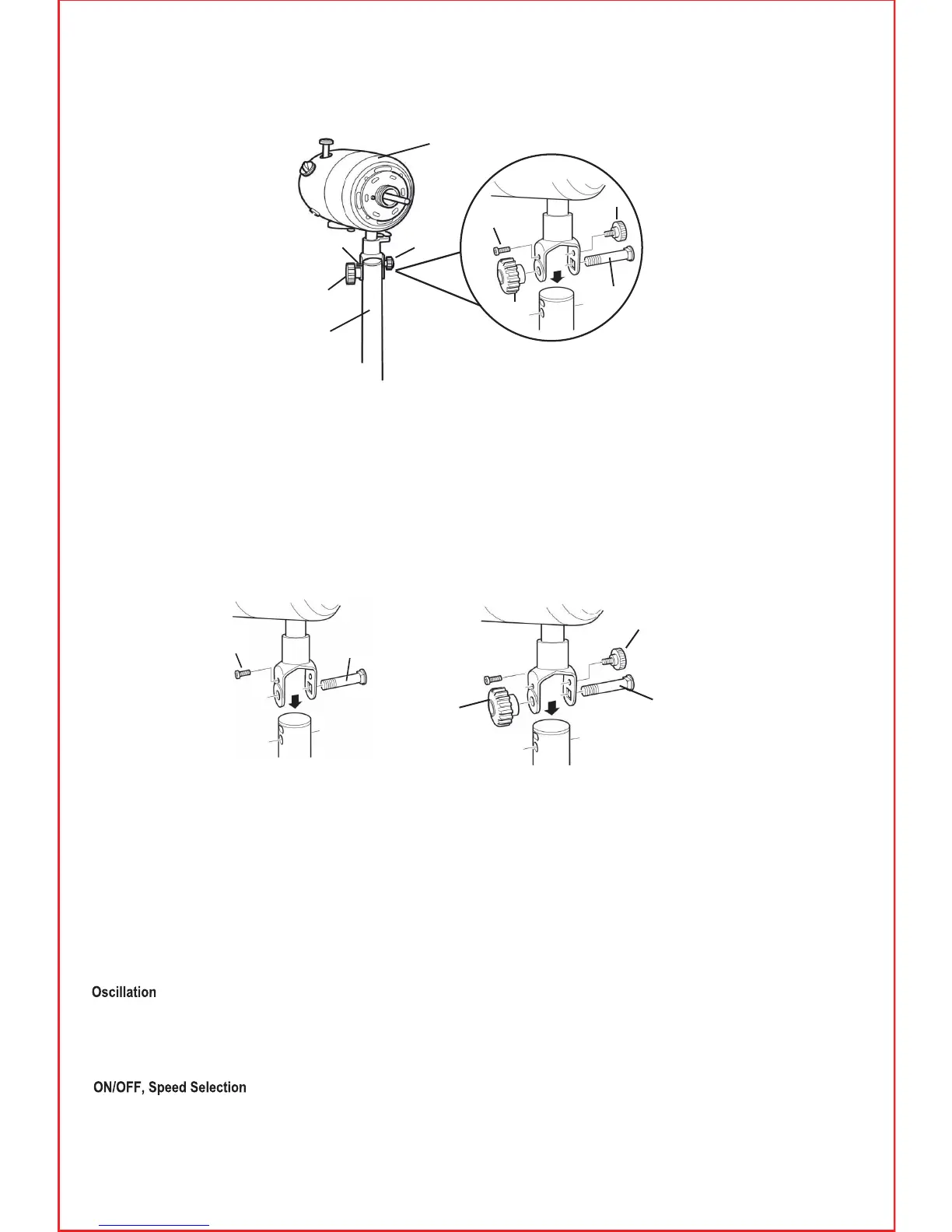
3. Place the Motor Housing on the top of the stand and thread the Large Pivot Bolt (20) through the bracket
and screw in the Small Retaining Screw (8) and tighten (but do not over tighten).
4. Fit the Large Pivot Knob (7) onto the end of the Bolt (20) and the Small Adjusting Knob (19).
Hold the fan motor upright and tighten the Large Pivot Knob (7) and the Small Adjusting Knob (19).
2. Next attach the motor housing (9) to the top of the telescopic stand (6).First remove all the screws, etc.
(7, 8, 19 & 20) from the motor housing bracket.


 To Next Page