EasyManua.ls Logo

Chamberlain CWA2000C - User Manual

Chamberlain CWA2000C
4 pages
Print Icon
To Next Page IconTo Next Page
Loading...
1
Batteries: If the Base Station batteries are low, the Base
Station will beep every 30 minutes. The AA batteries
in the Motion Sensor will last up to 2 years depending
on use (Lithium batteries are recommended for colder
environments). If the Motion Sensor batteries are low, the
Base Station will beep every 30 minutes until the batteries
are replaced. The Motion Sensor will continue to operate
with a low battery, however the light will not illuminate. For
peak performance, inspect batteries annually and replace as
needed.
Programming Additional Motion Sensors: The Base Station
can learn the code of up to 7 additional Motion Sensors,
responding with unique buzzes. To program additional
Motion Sensors see Step 4.
To order additional Motion Sensors call 1-800-528-9131.
Clear Memory: Press and hold the Learn Button on the Base
Station until 3 beeps are heard.
On/Off: To turn the Base Station on and off, hold down the
power button until you hear the on/off tone.
Volume: The Base Station is equipped with adjustable
volume controls. The lowest volume setting is the mute
feature.
Carton Inventory
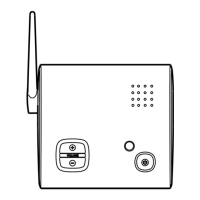
Antenna
On/Off Button
Volume
BASE STATION
Operation and Features
Overview
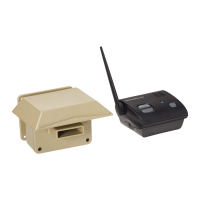
The Wireless Motion Detection System uses a Passive Infra-Red (PIR) Motion Sensor to detect movement of people and vehicles.
The Base Station is powered by the DC adapter and the 4 AA batteries supply power in case of a power outage.
NOTE: The Base Station is intended for indoor use only.
Wireless Motion Detection System
Models CWA2000 and CWA2000C
Base Station
Motion Sensor
Rubber Pads
Mounting Plate
DC Adapter
(9 Vdc @ 200mA)
Sun/Rain Shield
Swivel bushing
WARNING: This product can expose you to chemicals including lead, which are known to the State of California to cause cancer
or birth defects or other reproductive harm. For more information go to www.P65Warnings.ca.gov
Question and Answer IconNeed help?

Do you have a question about the Chamberlain CWA2000C and is the answer not in the manual?

Summary

Overview and Carton Contents

Operation and Features

Base Station Operation Controls

Explains how to turn the Base Station on/off and adjust volume settings.

Battery Management and Alerts

Details low battery indicators for Base Station and Motion Sensor.

Sensor Programming and Configuration

Covers adding new motion sensors and clearing the system memory.

Assembly and Programming

Switch Settings

Details sensitivity and detection range settings for the Motion Sensor.

Motion Sensor Installation

Guidance on mounting the Motion Sensor and its antenna placement.

Vehicle Alert Installation

Recommended mounting position for detecting vehicles.

Troubleshooting Common Issues

System Response and Detection Problems

Addresses issues like no response, intermittent detection, and false alarms.

Battery and Transmission Range

Covers low battery beeps and solutions for poor transmission range.

Overview

The Chamberlain Wireless Motion Detection System, available in models CWA2000 and CWA2000C, is designed to detect the movement of people and vehicles using a Passive Infra-Red (PIR) Motion Sensor. The system consists of a Base Station and one or more Motion Sensors. The Base Station is intended for indoor use only and is powered by a DC adapter, with four AA batteries providing backup power in case of an outage.

Function Description

The core function of the system is to alert users to movement within a monitored area. When a Motion Sensor detects movement, it transmits a signal to the Base Station, which then emits an audible alert. The system can be expanded to include up to seven additional Motion Sensors, each programmed to elicit a unique buzz from the Base Station, allowing users to differentiate which sensor has been activated.

Usage Features

Base Station Operation:

  • Power On/Off: To turn the Base Station on or off, hold down the power button until an on/off tone is heard.
  • Volume Control: The Base Station features adjustable volume controls, including a mute setting.
  • Low Battery Alert: If the Base Station batteries are low, the unit will beep every 30 minutes.
  • Memory Clearing: To clear the memory of all programmed Motion Sensors, press and hold the Learn Button on the Base Station until three beeps are heard.

Motion Sensor Operation and Installation:

  • Battery Installation: Each Motion Sensor requires four AA alkaline batteries. Lithium batteries are recommended for colder environments to ensure longer life. An LED light on the sensor will flash upon battery installation.
  • Detection Range: Motion Sensors offer two detection range settings: 15 feet (4.5 m) when Switch #1 is OFF, and 30 feet (9.1 m) when Switch #1 is ON (default).
  • Sensitivity: The sensors have two sensitivity settings: Low Sensitivity when Switch #2 is OFF, and High Sensitivity when Switch #2 is ON (default). To avoid detecting small animals, Switch #2 should be set to OFF.
  • Mounting: Motion Sensors should be mounted horizontally on a solid surface, 3-5 feet (1-1.5 m) off the ground, and within 1/2 mile (0.8 km) of the Base Station. The sensor unit can swivel to allow for optimal positioning.
  • Environmental Considerations: It is important to attach the sun/rain shield to protect the sensor. The Motion Sensor antenna should be kept away from metal objects. Avoid mounting the sensor in direct sunlight, near moving tree branches, or in the path of a sprinkler system, as these can cause false alarms.
  • Vehicle Alert Installation: For detecting cars, the optimal mounting position is about 4 feet (1.2 m) high, 10-20 feet (3-6 m) back from the detection point, and angled to see the back of a car after it passes the sensor.
  • Programming Additional Sensors: To program additional Motion Sensors, ensure the Base Station and the new Motion Sensor are in close proximity. Press and release the Learn Button on the Base Station, which will sound a buzzer. Within 60 seconds, press the Learn Button inside the Motion Sensor. The sensor's LED light will illuminate, and the Base Station will buzz, confirming successful programming.
  • Testing: To test a Motion Sensor, wave a hand in front of it. The LED light should flash, and the Base Station will buzz a number of times corresponding to the activated sensor.

Power Outage Protection:

  • The Base Station includes an input for a DC adapter for primary power. Four AA batteries can be optionally installed in the Base Station to provide power during a power failure.

Troubleshooting:

  • No Response from Base Station: If the Motion Sensor lights up but the Base Station doesn't respond, ensure the Motion Sensor is programmed to the Base Station (refer to Step 4 in the manual), and confirm the Base Station is on with the volume turned up.
  • Partial Motion Detection: If the Motion Sensor detects motion only part of the time, verify that Switch #2 on the Motion Sensor is set to High Sensitivity. For car detection, ensure the sensor is mounted at the height of a car's motor and positioned 10-20 feet (3-6 m) from the road, swiveling as needed.
  • False Alarms: False alarms can be caused by moving tree branches, insects in the sensor window, direct or reflected sunlight, or motion in front of a light source. Condensation on the sensor can also cause false alarms; wipe it with a cotton swab and let it air dry for a few hours with batteries removed. Check the sensor switches for correct settings.
  • Low Battery Beeps: If the Base Station beeps every 30 minutes, either its own batteries or the Motion Sensor's batteries are low. Replace the four AA batteries in the Base Station. If the Motion Sensor's LED illuminates, change its batteries.
  • Poor Transmission Range: To improve transmission range, keep both antennas vertical and ensure the Motion Sensor antenna is away from trees and metal objects. The Base Station should have the clearest possible line of sight to the Motion Sensor, as fewer objects between the devices will result in a longer range.

Maintenance Features

  • Battery Replacement: The AA batteries in the Motion Sensor are expected to last up to two years, depending on usage. Lithium batteries are recommended for colder climates to extend battery life. The Motion Sensor will continue to operate with low batteries, but its light will not illuminate. For optimal performance, batteries should be inspected annually and replaced as needed.
  • Cleaning: If condensation builds up on the sensor, it can be wiped with a cotton swab and allowed to air dry.

Chamberlain CWA2000C Specifications

General IconGeneral
BrandChamberlain
ModelCWA2000C
CategorySecurity System
ConnectivityWi-Fi
Remote ControlYes
Battery LifeUp to 1 year
Power SourceBattery
Mobile AppYes

Related product manuals