5
OPERATION
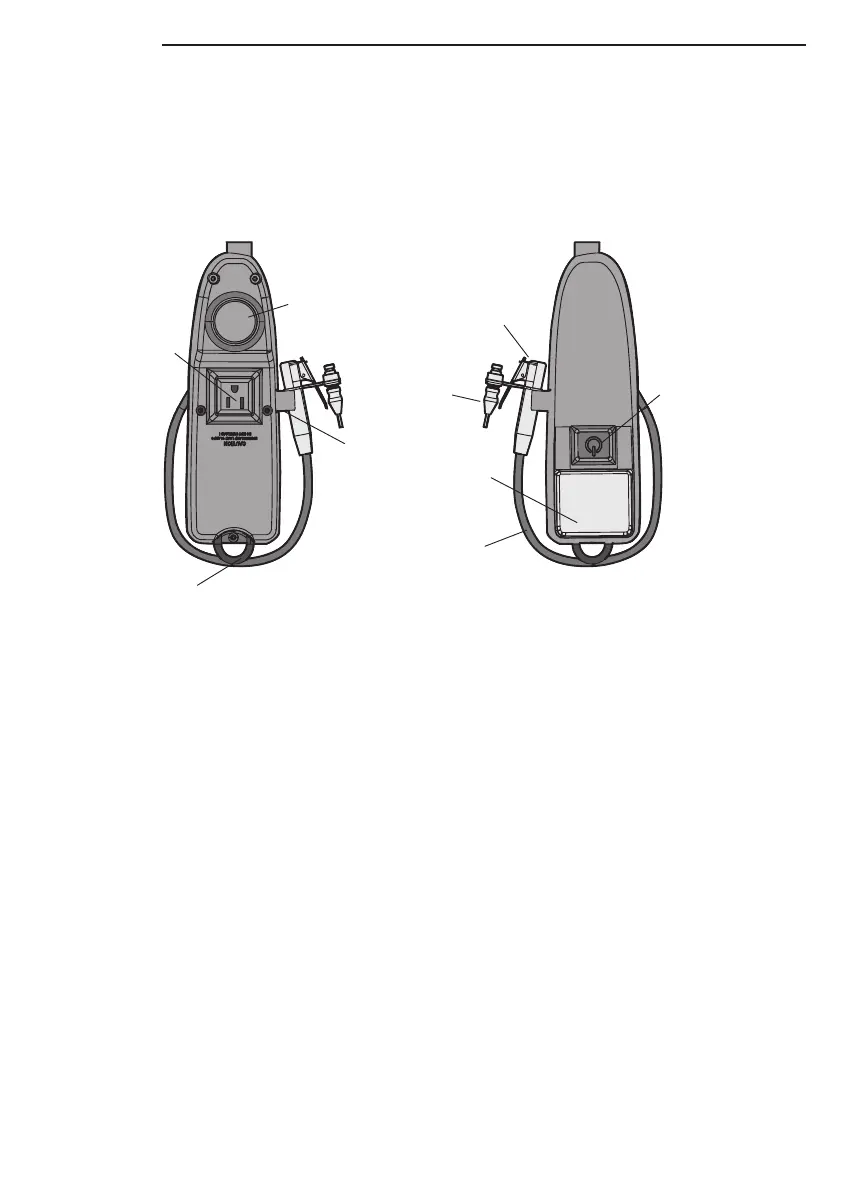
Pull the work light assembly down to a position where the reel prevents the cord from being retracted and
release to activate the Garage Power Station. The task lights will turn on and power will be supplied to the
electrical outlet on the work light assembly. Power will be supplied to the compressor and will run for 3 – 5
seconds to fill air hose to cutoff pressure. (The work light assembly should be pulled from the garage
power station at no more than a 45 degree angle to either side.)
WORK LIGHT
Turn the work light on by pressing the on/off button on the work light assembly. Press the on/off button
again to turn the work light off.
INFLATOR
To inflate vehicle or bicycle tire:
1. Pull the work light assembly to the tire and make sure the utility cord does not automatically retract
when released.
2. Remove the air hose from the retainer on the work light assembly.
3. Press the lever on the quick-connect locking inflator and press the tire chuck onto the end of the valve
stem. Release the lever to lock onto the valve stem. The tire will immediately start to inflate.
4. Monitor the tire pressure using the pressure gauge on the work light assembly.
5. Press the lever on the quick-connect locking inflator and remove from the valve stem once the desired
pressure is reached. The inflator will shut off.
6. Secure the air hose in the retainer.
7. Pull and release the work light assembly, the work light assembly automatically retracts and the Garage
Power Station will shut off.
Air
Hose
Hook
Work Light
On/Off
Button
Pressure
Gauge
FRONT BACK
Outlet
Retainer
Quick-Connect
Locking Inflator
Fill Nozzle/
Inflation
Needle


 To Next Page