5
Wiegand Interface Module Programming
Wiegand Retransmission Delay
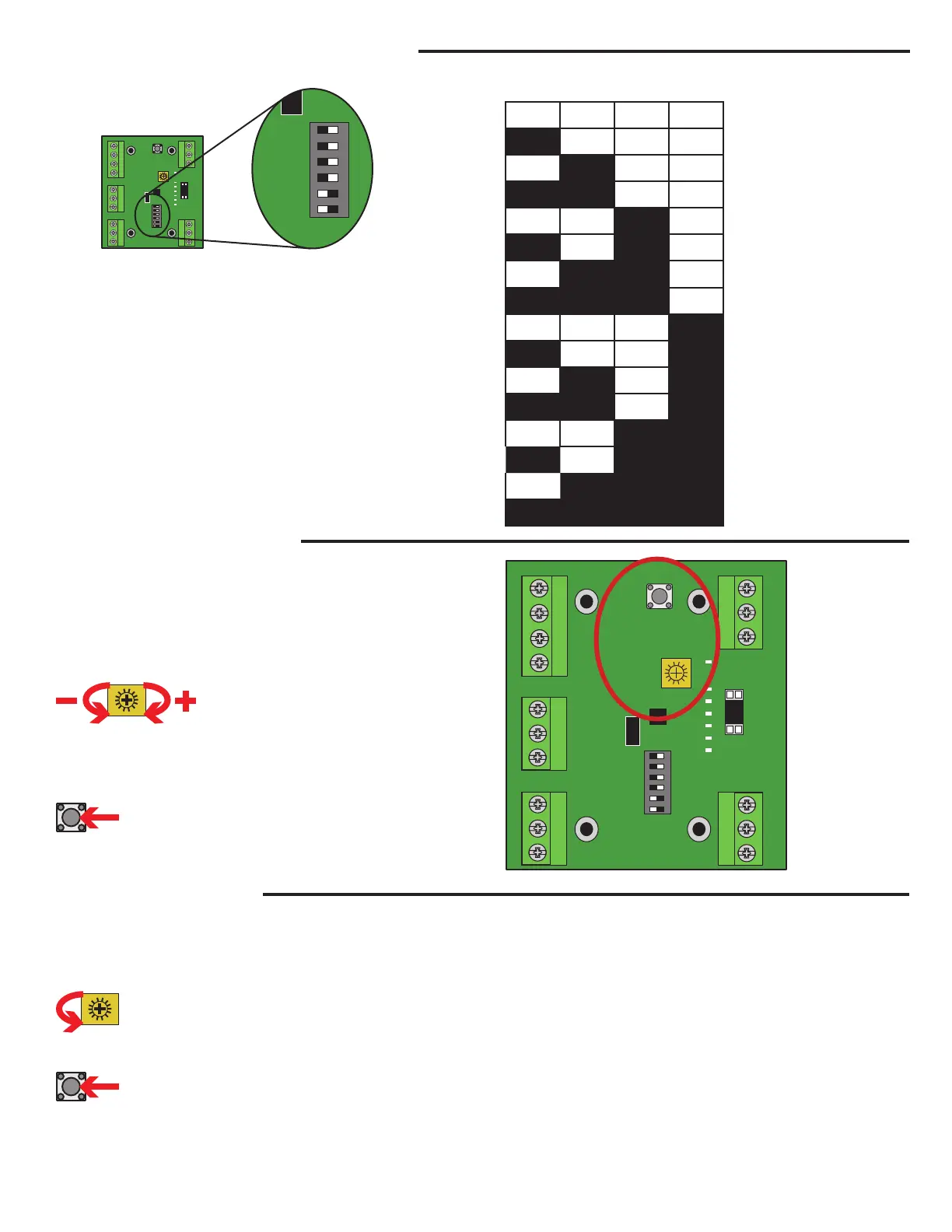
The S2W Wiegand Interface Module has an adjustable Wiegand output
retransmission delay from 0-15 seconds. When enabled, the S2W Wiegand
Interface will transmit 1 Wiegand pulse and start the timer. If a tag remains
in the active reading zone, the S2W Wiegand Interface will not transmit
another pulse until the timer expires. The delay is set using the bottom
4 dip-switches shown above. When the switch is set to the left it is in the
“On” position. Use the chart to the right to select the desired amount of
retransmission delay (in seconds). The default setting is 3 seconds delay.
NOTE: The power to the S2W Wiegand Interface must be cycled for any
switch changes to take effect.
1234
Delay
(Seconds)
Off Off Off Off 0
On Off Off Off 1
Off
On Off Off 2
On On Off Off 3
Off Off
On Off 4
On Off On Off 5
Off
On On Off 6
On On On Off 7
Off Off Off
On 8
On Off Off On 9
Off
On Off On 10
On On Off On 11
Off Off
On On 12
On Off On On 13
Off
On On On 14
On On On On 15
RF
LP
PWR
RESET
Serial
Power Loop
Dry ContWiegand
SET/ERR
SER I
SER 0
WO
DC
SETUP
LOOP
8SEC
4SEC
2SEC
1SEC
1
2
3
4
5
6
PWR
SET
SETUP
LOOP
8SEC
4SEC
2SEC
1SEC
1
2
3
4
5
6
ON - OFF
ON - OFF
Beeper Enable/Disable
By default, the LMSC1000 will beep when it reads an RFID tag. To toggle this
feature (turn on or off) perform the following steps:
1. Place the module in programming mode by setting switch 6 (Setup) to “On”
(left).
2. Turn the adjustment pot counter-clockwise to the minimum setting.
3. Press the Reset button just above the range adjustment to toggle the setting.
4. Return the antenna range setting to its original position.
5. Press the Reset button just above the range adjustment to set range.
6. Place the module into operating mode by setting switch 6 to “Off” (right).
RF
LP
PWR
RESET
Serial
Power Loop
Dry ContWiegand
SET/ERR
SER I
SER 0
WO
DC
SETUP
LOOP
8SEC
4SEC
2SEC
1SEC
ON - OFF
1
2
3
4
5
6
PWR
SET
Antenna Range Adjustment
The S2W Wiegand Interface Module has an antenna range adjustment
located on the circuit board just left of the LED Display. To adjust the range
perform the following steps:
1. Place the module in programming mode by setting switch 6 to “On”(left).
2. Locate the adjustment pot and turn clockwise to increase range or
counter-clockwise to decrease range. The LED display will show the
relative power setting (Max is all LEDs on).
3. To send the new range setting to the reader press the Reset button just
above the range adjustment.
4. Once the desired range is set, place the module into operating mode by
setting switch 6 (Setup) to “Off” (right).


 To Next Page
 Loading...