Need help?
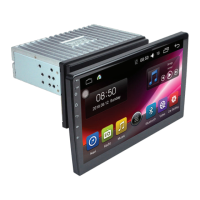
Do you have a question about the CHAMELEON Concept XL-10 and is the answer not in the manual?
Emphasizes avoiding distractions while driving and reading all safety instructions before use.
Requires professional installation and warns about potential electrical issues and overheating.
Recommends professional stereo installers for safe and proper installation.
Ensures secure mounting, adequate space, and correct wiring to prevent damage.
Compares features like panel size, Android version, CarPlay, and DSP across different models.
Details the connection for AV input and rear camera.
Illustrates the connection points for USB and the main power harness.
Explains the function of each wire color in the power harness.
Details wiring for steering wheel control and notes on required interfaces.
Shows the main interface and icons for different functions like Radio, Music, and Apps.
Identifies key control icons such as Microphone, Reset, Power, Home, Back, and Volume.
Instructions for entering/exiting the radio menu and performing auto/manual searches.
Guidance on how to save radio stations and switch between frequency bands.
Steps to enter and exit the Bluetooth menu and access related features.
Instructions for pairing a phone via Bluetooth using a PIN code.
How to play music from a connected Bluetooth device.
Instructions for playing music from a USB drive.
Guide to entering the video menu, playing videos from USB, and shuffle/playlist options.
Instructions on accessing music menu and controlling playback using steering wheel keys.
Details on PWC wiring and the need for interface adapters.
Steps to connect and access Apple CarPlay and Android Auto.
Instructions for connecting Apple and Android phones via USB for app integration.
Guide to accessing and exiting the settings menu and general options.
Adjusting brightness, contrast, saturation, and other display/audio parameters.
Options for changing language and setting the device's date and time.
Configuring phone link, auto-connect, link type, and USB port usage.
Customizing the device's background, theme, and logo.
Adjusting sound profiles, bass, treble, and equalizer presets.
Accessing advanced settings with a factory password and adjusting audio parameters.
 General
| Brand | CHAMELEON |
|---|---|
| Model | Concept XL-10 |
| Category | Touchscreen |
| Language | English |

 To Next Page