05 06
1
2
3
2
3
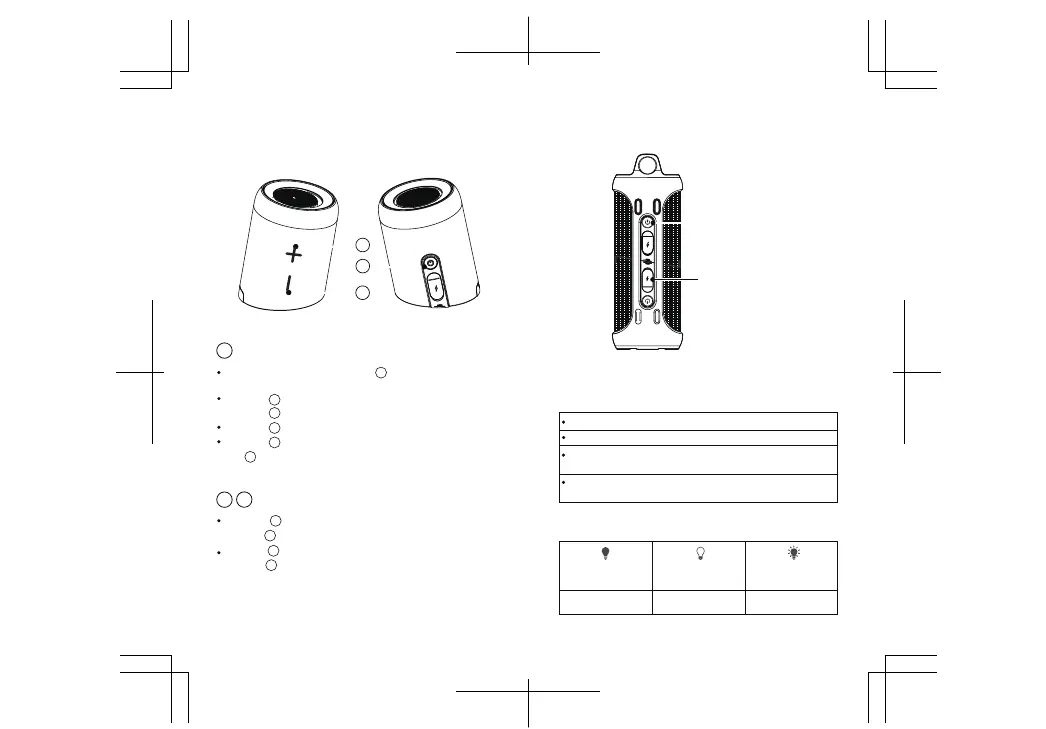
VolumeButtons
Press the button quickly to increase the volume/press and
holdthe button for the next track
Press the button quickly to reduce the volume/press and
hold the button for the previous track
2
2
3
R(Note: Both speakers can be controlled simultaneously after being paired.)
3
BASIC FUNCTIONS
Press and hold the power button for 2 seconds to
power ON/ power OFF
Press the button quickly to answer/disconnect calls
Press the button twice to decline calls
Press the button quickly to resume/pause music
Press the button three times to disconnect TWS and press
the button 2 times again to disconnect the Bluetooth device.
1
1
1
1
1
1
1
Power button/Multi-functionbutton (ON/OFF-button)
LED INDICATOR
Bluetooth indicator
Charging indicator
Turn on the speaker, the blue LED lamp begins to flash.
The blue LED lamp stays lit when the connection is established.
Micro USB port
Indicator
Charging mode
The red LED lamp is lit
The red LED lamp
turns off
The red LED
lamp is flashing
Fully charged Low battery
The blue LED lamp flashes if the Bluetooth distance is too long.
Bluetooth will automatically disconnect after 10 minutes of inactivity.
The LED lamps on the sub-masterand master speaker flash
when music is played.


 To Next Page