EasyManua.ls Logo

Chaney Instrument AcuRite 06045 - User Manual

Chaney Instrument AcuRite 06045
8 pages
Print Icon
To Next Page IconTo Next Page
Loading...
Instruction Manual
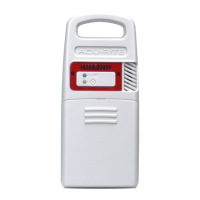
Lightning Detection Sensor
model 06045
Features & Benets
1. Integrated Hanger
For easy placement.
2. Wireless Signal Indicator
Flashes when data is being
sent to the companion unit.
3. Interference Indicator
Flashes when interference is
detected (see page 4).
4. A-B-C Switch
Slide to select A-B-C channel.
5. Battery Compartment
6. Lightning Strike Indicator
Indicates a lightning strike has
occurred within 25 miles (40 km).
7. Battery Compartment Cover
2
4
3
5
7
6
1
Note: Under no circumstances shall the Lightning Detection Sensor, Chaney Instrument Co.
or the Primex Family of Companies be held responsible for any damages whatsoever that may
result from the use of or inability to use this product, including without limitation any indirect,
incidental, special, exemplary or consequential damages, which are expressly disclaimed. This
disclaimer of liability applies to any damages or injury caused by any failure of performance,
error, omission, inaccuracy, interruption, deletion, defect, delay in operation or transmission
software virus, communication failure, theft or destruction or unauthorized access to, alteration
of, or use of the product, whether for breach of contract, tortuous behavior (including, without
limitation, strict liability), negligence, or under any other cause of action, to the fullest extent
permissible by law. This does not affect any statutory rights which may not be disclaimed. The
contents of this product, including all lightning and weather data are provided “as is” and
without warranty or condition of any kind, express or implied, including, without limitation, any
warranty of merchantability or fitness for a particular purpose. Chaney Instrument Co. & the
Primex Family of Companies do not warrant that this product or the data that it provides will be
free of errors, interruptions, viruses or other harmful components. Chaney Instrument Co. & the
Primex Family of Companies do not warrant the accuracy or reliability of any lightning strike
alerts, weather data or other information provided by the product. Chaney Instrument Co. & the
Primex Family of Companies reserve the right to alter the product or withdraw it from the market
at its sole discretion.

Questions and Answers

Summary

Lightning Detection Sensor Features

Sensor Setup and Battery Installation

Setting the A-B-C Channel Switch

Select the same A-B-C channel for sensor and companion unit to synchronize.

Sensor Placement for Accuracy

Optimal Sensor Placement

Place sensor outdoors, protected from direct weather, 4-8 ft high in shade.

Lightning Detection Indicator Function

Sensor detects lightning, beeps, and flashes for first 10 strikes.

Operational Issues, Troubleshooting, and Safety

Troubleshooting Interference Indicator

Relocate sensor or ensure 3ft separation from interfering electronics.

Lightning Safety Warning

Take shelter immediately when lightning is present; do not rely solely on the sensor.

Customer Support and Product Warranty

Overview

The AcuRite Lightning Detection Sensor, model 06045, is a device designed to detect lightning strikes and provide alerts, enhancing safety during thunderstorms. This sensor is intended for outdoor use and works in conjunction with a companion unit (sold separately) to display lightning information.

Function Description

The primary function of the AcuRite Lightning Detection Sensor is to detect various types of lightning: cloud-to-cloud, cloud-to-ground, and intra-cloud lightning. When lightning is detected, the sensor provides an audible alert (a beep) and a visual alert (a flashing strike indicator). For the first 10 strikes, both the beep and flash occur. After 10 strikes, the sensor enters a silent mode, continuing to flash the strike indicator but without the audible beep. This silent mode lasts for 2 hours after the last lightning detection, ensuring that continuous beeping does not become a nuisance during prolonged storm activity.

The sensor is equipped with advanced technology to differentiate between actual lightning strikes and potential interference from other electronic devices. However, in rare instances, it may "false detect" lightning activity due to interference. In such cases, users are advised to verify the presence of actual lightning and, if none is present, to relocate the sensor or identify and remove the source of interference.

An interference indicator on the sensor flashes when it detects interference from nearby equipment that might prevent accurate lightning detection. This feature helps users identify when the sensor's performance might be compromised.

Usage Features

The AcuRite Lightning Detection Sensor is designed for ease of use and optimal performance in outdoor environments.

  • Integrated Hanger: The sensor features an integrated hanger, allowing for easy placement. Alternatively, it can be hung using a string (not included) from a suitable location, such as a well-covered tree branch.
  • Wireless Signal Indicator: A wireless signal indicator flashes when data is being sent wirelessly to the companion unit, confirming active communication between the sensor and the display unit.
  • A-B-C Switch: Located inside the battery compartment, an A-B-C switch allows users to select one of three channels (A, B, or C). This is crucial for synchronization with a companion product; both the sensor and the companion unit must be set to the same channel for proper operation.
  • Battery Compartment: The sensor is powered by 4 x AA batteries. The battery compartment is easily accessible by sliding off the cover.
  • Battery Type Recommendation: AcuRite recommends using high-quality alkaline or lithium batteries for the best product performance. Heavy-duty or rechargeable batteries are not recommended. For cold temperature conditions (below -4°F / -20°C), lithium batteries are specifically recommended as alkaline batteries may function improperly in such environments.
  • Placement Guidelines:
    • Outdoor Placement: The sensor must be placed outdoors to observe outdoor conditions. While water-resistant, placing it in an area protected from direct weather elements can extend its lifespan.
    • Optimal Height and Shade: The ideal placement is 4 to 8 feet above the ground, in a location with permanent shade and plenty of fresh air circulation.
    • Wireless Range: The sensor should be placed within 330 feet (100 meters) of its companion unit to ensure reliable wireless communication.
    • Interference Prevention: To prevent wireless interference, the sensor should be placed at least 3 feet (90 cm) away from electronic devices such as TVs, computers, microwaves, and radios.
    • Heat and Humidity Sources: For accurate temperature and humidity measurements (if applicable to the companion unit), the sensor should be located away from direct sunlight, heat sources, indoor pools, spas, or other bodies of water.

Maintenance Features

Maintaining the AcuRite Lightning Detection Sensor is straightforward, focusing on cleanliness and proper battery management.

  • Cleaning: The sensor should be cleaned with a soft, damp cloth. Caustic cleaners or abrasives should not be used, as they could damage the device.
  • Battery Safety and Replacement:
    • Users should clean battery contacts on both the sensor and the batteries prior to installation.
    • Batteries should be inserted following the polarity (+/-) diagram within the battery compartment.
    • Dead batteries should be promptly removed and disposed of properly according to local laws and regulations.
    • If the device will not be used for an extended period, batteries should be removed to prevent leakage.
    • Mixing old and new batteries or different types of batteries (alkaline/standard) is not recommended.
    • Rechargeable batteries should not be used, and non-rechargeable batteries should not be recharged.
    • Batteries should not be incinerated or disposed of in fire, as they may explode or leak.
    • Short-circuiting the supply terminals should be avoided.

The device is designed to be a helpful tool for monitoring lightning activity, but it is important to remember that it should not be relied upon as the sole source for warnings about potentially deadly lightning strikes or other severe weather conditions. Users are always advised to follow all safety precautions when lightning is present.

Chaney Instrument AcuRite 06045 Specifications

General IconGeneral
Model06045
CategoryAccessories
Temperature Range-40°F to 158°F (-40°C to 70°C)
Humidity Range1% to 99%
MaterialPlastic
Power SourceBattery
Wireless Range330 ft (100 m)
CompatibilityAcuRite weather stations
FunctionMeasures temperature and humidity
BrandChaney Instrument