1
Connections and Setup
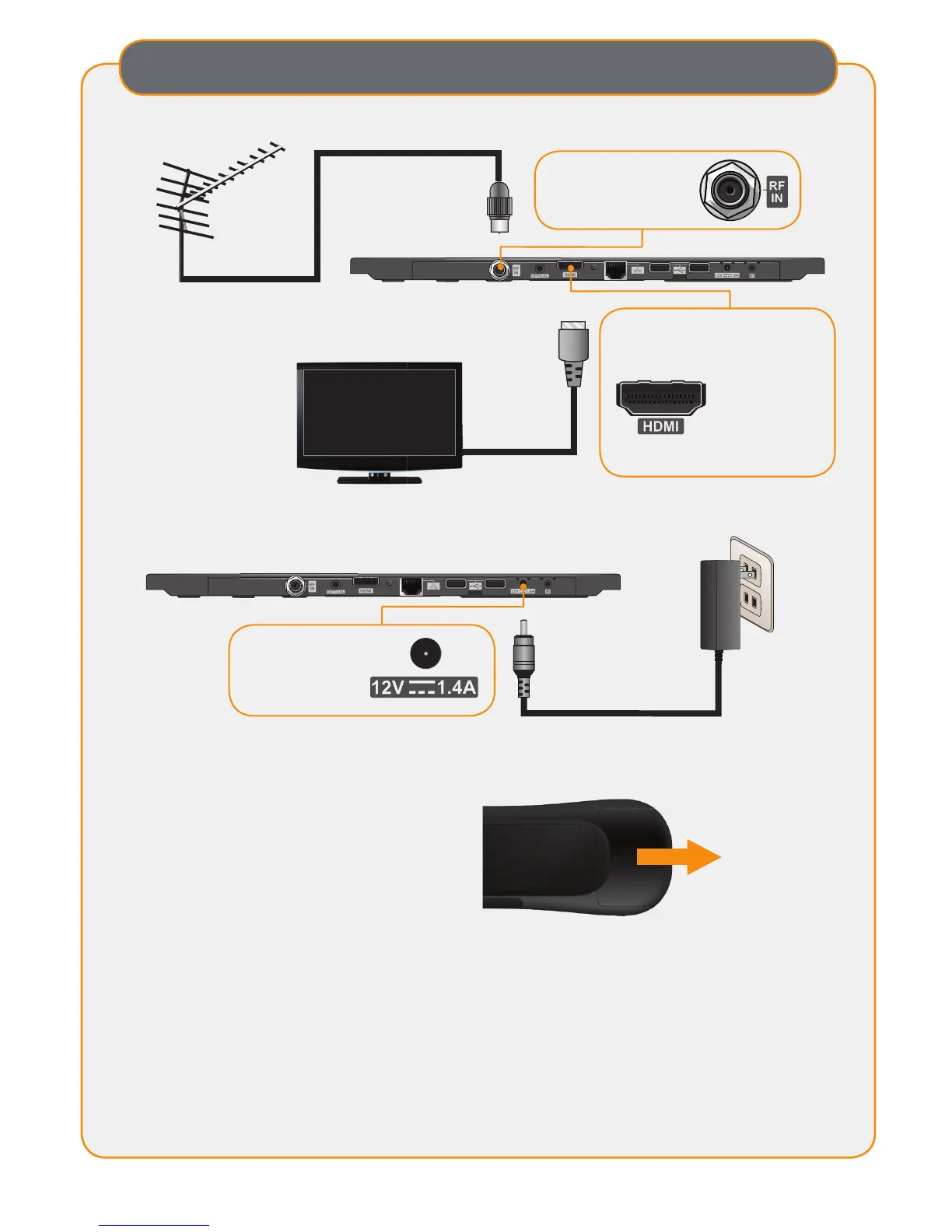
Connect the antenna to the receiver.
1
Connect the power cord to the receiver and plug in to a wall outlet.
Turn on the TV and select the correct HDMI input.
3
Remove the battery compartment from the remote control and insert the
provided batteries in the correct orientation.
4
Power Input
Provides power
to the DVR+
RF IN
Connects over-the-air
antenna
Connect the receiver to the TV.
2
Follow the on-screen Setup Wizard instructions, using the remote control.
5
Once you are receiving TV channels, you can connect the Wi-Fi Adapter or
Ethernet cable for access to Internet-delivered apps, channels, and enhanced
guide information. When connected, the DVR+ will guide you through the
setup process.
6
You can also connect an external hard drive to one of the open USB ports.
When connected, the DVR+ will guide you through the setup process.
7
Note: Only use
high-quality
HDMI and USB
cables from major
manufacturers.
HDMI
®
Output
Provides high-de nition digital
audio and video to the TV


 To Next Page