ii
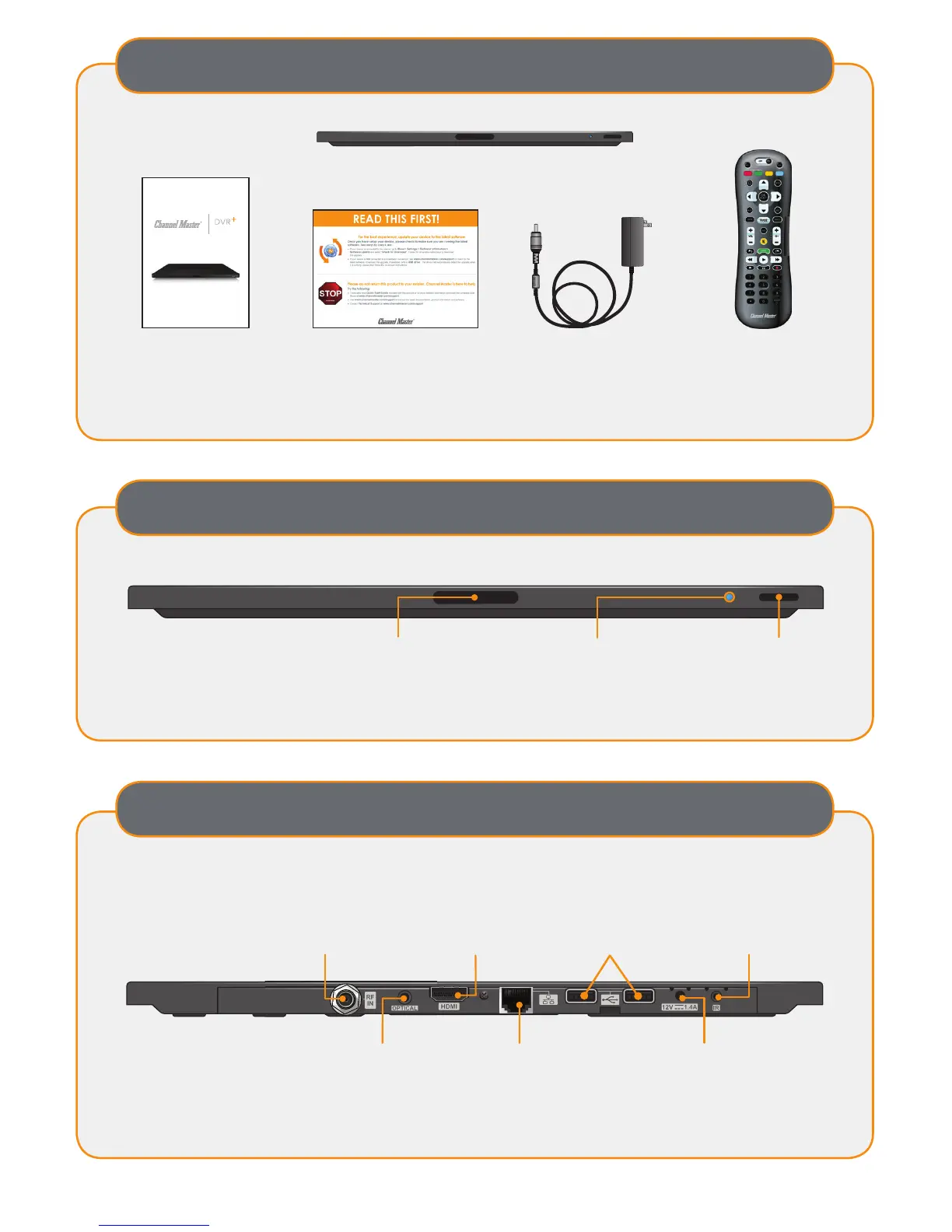
What’s Included
DVR+
Power Supply Remote ControlQuick Start Guide
For detailed product information, view the online user guide available at ChannelMaster.com/Support.
For additional accessories, visit ChannelMaster.com.
Stop Sheet
Record without limitations or fees.
Quick Start Guide
Front Panel Controls
IR Receiver
Receives IR signals
from remote.
Do not cover or obstruct
Status LED
Red – Recording
Dim Red – Recording in Standby
Bright Blue – On
Dim Blue – Standby
Power Button
Turns power on/off;
push and hold
to reset
Rear Panel Connections
USB 2.0 Ports
Connects to external
hard drive/ ash drive
and optional
Wi-Fi adapter
HDMI
®
Output
Provides high-
de nition digital audio
and video to the TV
Ethernet
Connects to the broadband
home network
Antenna
Connects over-the-air
antenna
Digital Audio
Optical connection to a
high-quality digital sound
decoding system
Power
Provides power
to the DVR+
IR
Connects IR
extension cable


 To Next Page