3E
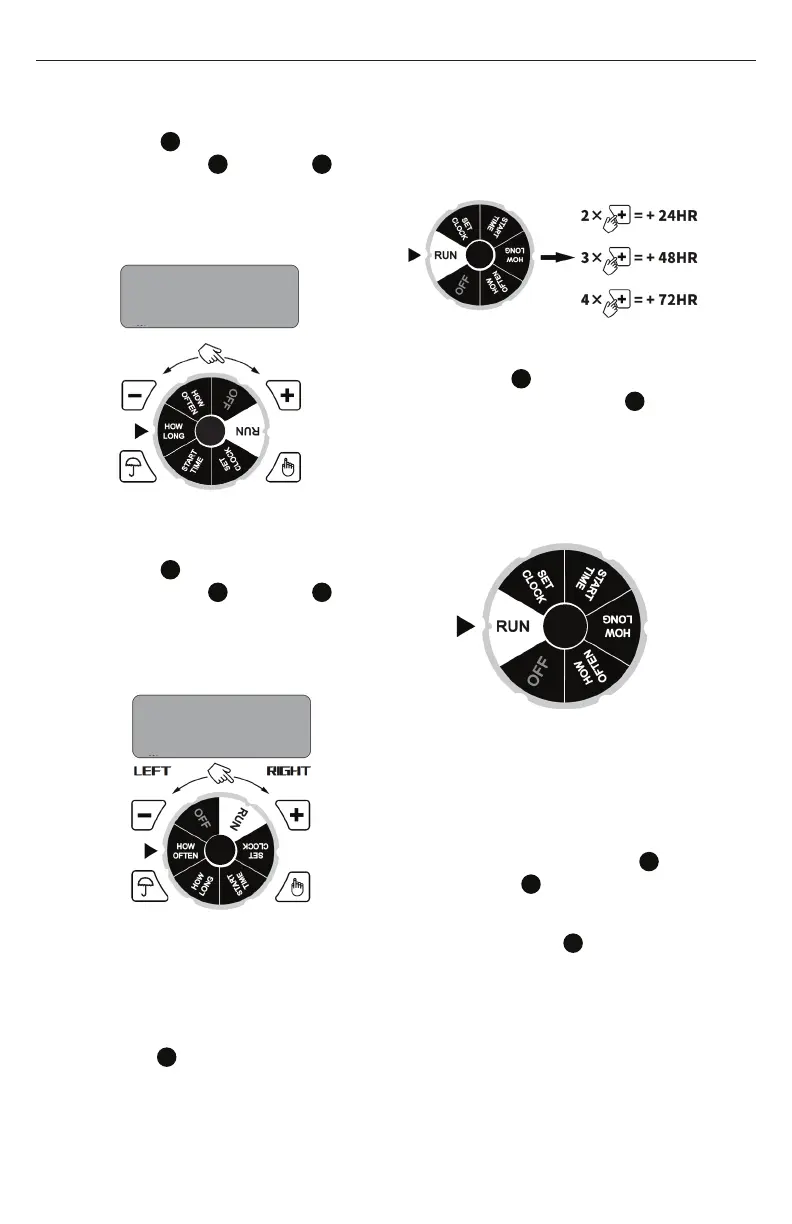
HOW LONG
1. Turn dial
6
to HOW LONG position,
press + Button
8
or - Button
9
to advance or reverse run time (hold
button for quick advance or reverse).
(0-360 minutes)
HOW OFTEN
1. Turn dial
6
to HOW OFTEN position,
press + Button
8
or - Button
9
to advance or reverse watering
frequency (hold button for quick
advance or reverse). (1,2,4,12 hours
or 1-7 days)
NOTE:
HOW OFTEN SHOULD ALWAYS BE
LONGER THAN HOW LONG
(Example: How Often = 1 Hrs, How Long
= 90 Mins, is NOT a valid setting.)
RUN
1. Turn dial
6
to RUN position, to save
settings. Timer waters according to
programmed time, frequency and
run time.
2. Screen will flash between clock time
and watering time.
Tip: Take down notes of the settings for
records or reference.
RAIN DELAY
1. When dial
6
at RUN position and
program saved, press the
10
button
to delay for 0, 24, 48 or 72 hours.
2. Screen will flash between clock
time and hours remaining before
program resumes.
3. To remove rain delay, turn dial OFF to
and then back to RUN .
MANUAL WATERING
Manual watering is for one time instant
watering without interrupting the set
program.
1. Press the manual on/off buton
and then press the + Button
8
or - Button
9
to set from 0 to 240
minutes.
2. Press L/R button
10
to choose Left
or Right valve
3. Manual watering will start within 5
seconds if no more change
4. Screen will flash between clock
time and minutes remaining before
program resumes.
5 mins
EVERY
2 DAYS
Instrucon Manual - English


 To Next Page