3E
Instrucon Manual - English
Note: Start time is set in this situation
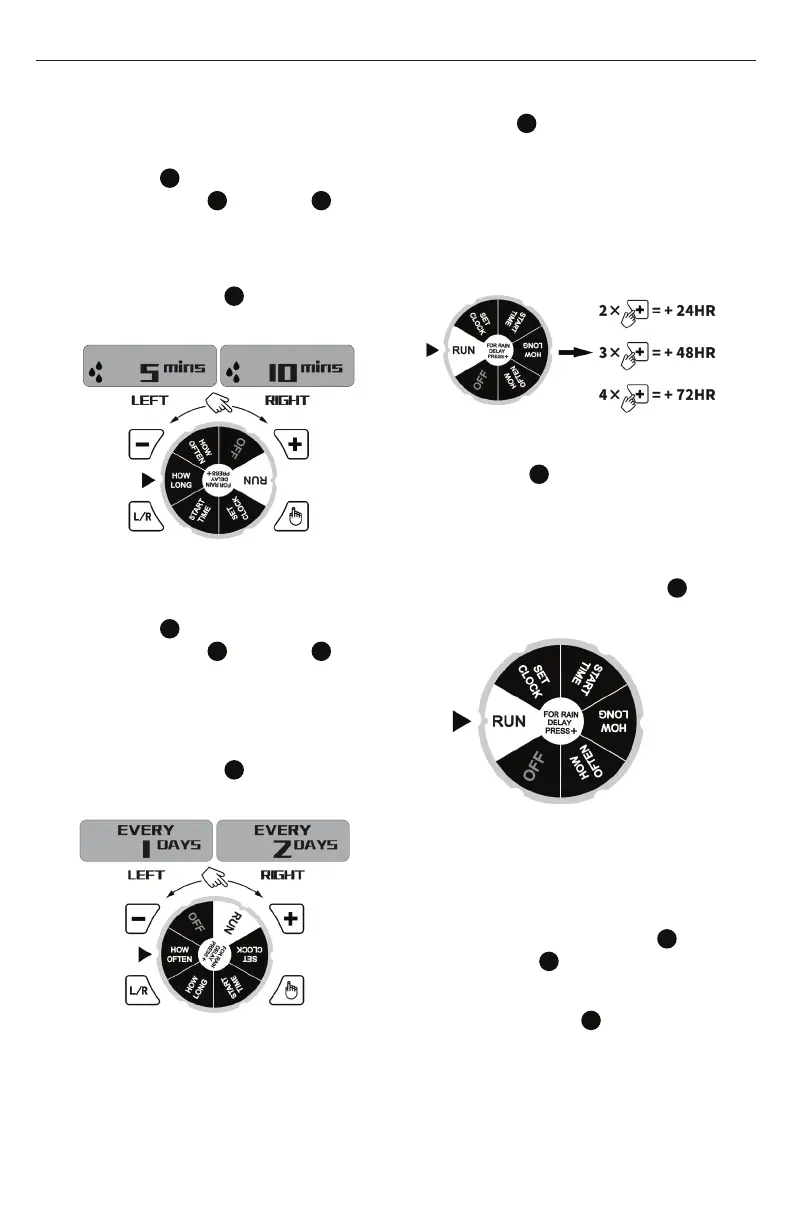
HOW LONG
1. Turn dial
6
to HOW LONG position,
press + Button
8
or - Button
9
to advance or reverse run time (hold
button for quick advance or reverse).
(0-360 minutes)
2. Press L/R button
10
to choose Left
or Right valve.
HOW OFTEN
1. Turn dial
6
to HOW OFTEN position,
press + Button
8
or - Button
9
to advance or reverse watering
frequency (hold button for quick
advance or reverse). (1,2,4,12 hours
or 1-7 days)
2. Press L/R button
10
to choose Left
or Right valve.
NOTE:
HOW OFTEN SHOULD ALWAYS BE
LONGER THAN HOW LONG
(Example: How Often = 1 Hrs, How Long
= 90 Mins, is NOT a valid setting.)
RUN
1. Turn dial
6
to RUN position, to save
settings. Timer waters according to
programmed time, frequency and
run time.
2. Screen will flash between clock time
and watering time.
Tip: Take down notes of the settings for
records or reference.
RAIN DELAY
1. When dial
6
at RUN position and
program saved, press the + button to
delay for 0, 24, 48 or 72 hours.
2. Screen will flash between clock
time and hours remaining before
program resumes.
3. To remove rain delay, turn dial
6
to
and then back to RUN .
MANUAL WATERING
Manual watering is for one time instant
watering without interrupting the set
program.
1. Press the manual on/off buton
and then press the + Button
8
or - Button
9
to set from 0 to 240
minutes.
2. Press L/R button
10
to choose Left
or Right valve
3. Manual watering will start within 5
seconds if no more change


 To Next Page