
 Need help?
Do you have a question about the CHARGETRONIX TP-EVPD-160kW and is the answer not in the manual?
Defines the meaning of DANGER, WARNING, and CAUTION symbols used in the manual.
Warns against servicing internal components due to high-voltage hazards.
Instructs to shut off power and contact support if the charging cable is damaged.
Emphasizes that only qualified electricians should work with high-voltage AC and DC systems.
Provides warnings about working with open doors and residual charge in components.
Details input voltage (480 VAC), full load amperage (215A), and breaker capacity (300A).
Specifies required clearances for air circulation and maintenance access.
Outlines requirements for the concrete base, including dimensions and gradient.
Details concrete mounting pad dimensions and height relative to finished grade for ADA compliance.
Recommends bollards for restricting vehicle approach to the charger.
Specifies copper input cables and embedding them in ground ducts.
Emphasizes reliable, dedicated grounding and connection to external ground.
Requires a 3P+N breaker with suitable current capacity per NEC standards.
Warns against flammable materials and suggests canopies for harsh weather.
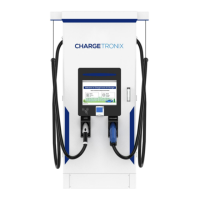
Identifies and labels various internal and external components of the charger.
Details the construction of the concrete pad using 3,000-4,000 psi concrete and conduit placement.
Explains connecting the ground rod to the anchor bolts using acorn clamps.
Advises on foundation sizing per jurisdiction and limits height to 6 inches for ADA compliance.
Describes using Hilti anchors for alternative installation methods.
Highlights best practices for ADA compliance during charger installation.
Provides step-by-step instructions for moving and positioning the charger on the mounting pad.
Details installing 1/2" washers, lock washers, and nuts to Hilti specifications.
Specifies the input voltage as 480 VAC (3 Phase + Neutral + Earth), 60Hz, and 215 amps.
Identifies the AC input termination components: L1, L2, L3 phase lines, Neutral (N), and Protective Earth (PE).
Step-by-step guide for initiating a charging session using an RFID card.
Guide to starting a charging session by scanning a QR code or using a mobile application.
Instructions for authorizing a charging session using a credit card.
States that initial settings must be configured by authorized personnel.
Provides steps to access the settings window, including touching the logo and entering a password.
Advises waiting one minute after power-off before servicing internal components due to residual voltage.
Lists routine checks including input voltage, ground resistance, air filter, module lights, cables, and fans.
Recommends checking for abnormal sounds, odors, corrosion, and dust accumulation.
Provides guidelines for replacing components like air filters before they reach their lifespan.
Lists error flags, descriptions, and possible solutions for identified error conditions.
Provides solutions for common fault types like IP address issues, voltage anomalies, and connector failures.
Explains icons indicating server network connection status and internet connectivity.
Describes the icon indicating the charger's operational status and controller activity.
Explains the icon indicating the active or inactive status of the RFID card reader.
Details the meaning of LED colors (RED/Orange, Green, White) for fault, charging, and available states.
Outlines customer duties including using protective devices, writing emergency plans, and ensuring maintenance space.
Warns that unauthorized changes or modifications to the charger will void the ChargeTronix warranty.
States ChargeTronix is not liable for damages resulting from misuse, abuse, or unauthorized modifications.
Details the two-year limited warranty, covering defects in materials and workmanship.
Lists conditions that void the warranty, including wear and tear, misuse, accidents, and improper maintenance.
 General
| Power Output | 160kW |
|---|---|
| Output Voltage | 200-1000VDC |
| Cooling System | Liquid Cooling |
| IP Rating | IP54 |
| Efficiency | 95% |
| Protection Features | Overvoltage, Overcurrent, Short Circuit, Overheating |
| Communication Interface | Ethernet |
| Operating Temperature | -30°C to 50°C |
| Charging Standards | CCS |

 To Next Page