EasyManua.ls Logo

Chauvet D-Fi - User Manual

Chauvet D-Fi
14 pages
Print Icon
To Next Page IconTo Next Page
Loading...
User Manua
l

Other manuals for Chauvet D-Fi

Questions and Answers

Summary

1. Before You Begin

What Is Included

Lists the items included in the package, such as the D-Fi unit, power supply, warranty card, and quick reference guide.

Unpacking Instructions

Guides on how to carefully unpack the product and check its condition upon receipt to ensure all parts are present and undamaged.

Claims

Instructions for filing claims for damaged or missing items within seven days of receiving merchandise, emphasizing timely notification.

Text Conventions

Explains various text conventions, symbols, and formatting used in the manual for clarity, including value ranges and menu navigation.

Icons

Explains the meaning of different warning and informational icons used throughout the manual for safety and operation, highlighting critical information.

Document Information

States that information is subject to change without notice and where to download the latest version of the manual from the website.

Product at a Glance

Provides a quick overview of the product's features and specifications, indicating compatibility with dimmer, outdoor use, sound, and DMX.

Safety Notes

Crucial safety precautions for installation, usage, and maintenance to prevent hazards like electrocution, fire, and damage to the unit.

2. Introduction

Product Overview

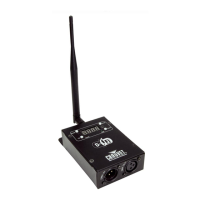
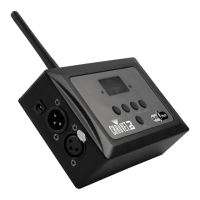
General description of the D-Fi 2.4GHz product, including its top and bottom views with labeled components like antenna, mounting hole, and DMX connectors.

Product Dimensions

Detailed measurements of the D-Fi 2.4GHz unit in inches and millimeters, showing length, width, and height for installation planning.

3. Setup

AC Power

Information on the product's external fixed voltage power supply and how to determine power requirements based on the product's label.

Mounting

Guidelines for mounting the product, emphasizing safety recommendations and proper placement, including using a mounting hole and safety hook.

Orientation

Instructions regarding the acceptable mounting positions for the D-Fi 2.4GHz unit to ensure adequate ventilation around the product.

Rigging

Advice on rigging the product, including ensuring structural support, using safety cables, and selecting appropriate mounting clamps for trusses.

4. Operation

Control Panel Operation

Explains how to use the four buttons (MODE, UP, DOWN, ENTER) around the display to access control panel functions and navigate menus.

Menu Map

Details the menu structure, including modes like Receive/Transmit channel selection and their corresponding programming steps.

Frequencies

Lists the available channels (1-16) and their corresponding frequencies in GHz, used for wireless communication between D-Fi units.

Configuration

Steps to set the product in DMX mode, including connecting to a power outlet and a DMX controller's output to the product's input.

Manual Operation

Step-by-step guide to operating the product in manual mode, including switching between Transmitter/Receiver and selecting desired frequencies.

Automatic Operation

Instructions for setting up and operating the product in automatic mode, including syncing Transmitter and Receiver units for wireless operation.

Miscellaneous Operations

Covers auto scan syncing, checking the current frequency in use, and clearing receiver settings, ensuring optimal wireless connection.

5. Technical Information

General Troubleshooting

A table detailing common symptoms like no power or no DMX response, their possible causes, and suggested actions for troubleshooting.

Contact Procedure

Outlines the procedure for contacting CHAUVET® support for product issues or returns, specifying whom to contact based on location.

CHAUVET Contact Information

Provides contact details for CHAUVET® World Headquarters and Europe Ltd., including addresses, voice, fax, and email for support.

Returning Products to CHAUVET

Detailed instructions on how to return products, including obtaining an RMA number, proper packaging, and required information for return.

DMX Primer

Starting Address

Explains the importance of setting correct starting addresses in DMX systems to avoid channel overlapping and ensure proper product operation.

Product Linking (Daisy Chain)

Describes how to link multiple DMX products sequentially using DMX cables, emphasizing signal integrity and connection best practices.

DMX Cabling

Information on using special data cables for DMX, including electrical characteristics and recommendations for building your own cables.

DMX Connectors

Details the pin assignments for 3-pin and 5-pin XLR connectors used in DMX cables and adapters, ensuring correct connectivity.

6. Technical Specifications

Dimensions and Weight

Lists the physical dimensions (length, width, height) and weight of the D-Fi 2.4GHz product for installation and handling considerations.

Power

Specifies the power supply type, input voltage range (100-240V), and DC power requirements (9V DC 500mA) for the unit.

Wireless

Details the RF output power, maximum range (230m), refresh rate (15 Hz/s), and frequency range (2.433-2.481 GHz) for wireless operation.

Thermal

Provides information on the maximum external operating temperature (104°F/40°C) and the cooling system (convection) used by the product.

DMX

Lists the DMX I/O connectors available (3- and 5-pin XLR) and their type (sockets) for connectivity to DMX controllers and other devices.

Ordering

Information related to ordering the product, including product name (D-Fiâ„¢ 2.4GHz), item code (02080308), and item number (DFI2.4GHZ).

Chauvet D-Fi Specifications

General IconGeneral
FHSSYes
Number of Channels16
Connector Type3-pin XLR
Power Supply12V DC, 500mA
Frequency Range2.412 - 2.484 GHz

Related product manuals