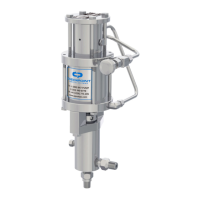
3.1.1.4 Now ensure that the CheckPoint pump is running. Take note of the level of chemical in the gauge using
the appropriate scale for the volume units you want to measure the pump’s output in. Usually the gauge will show
liters on one scale and quarts or gallons on the other. It is best to write down the number so that you can
calculate flow accurately.
3.1.1.5 Open the Gauge Fill Valve (#4), and simultaneously close the Chemical Supply Valve (shown as #1 in
Figure 1). This isolates the pump and gauge so that the pump is being supplied its entire chemical directly from
the gauge.
3.1.1.6 The level in the gauge should begin to fall. (If it does not, or if the level seems to go down and then back
up with each stroke, refer to troubleshooting in Section 5.1 on page 11). When the liquid level in the gauge gets
near the bottom of the gauge, or when one minute has expired (whichever comes first), stop timing, note the
ending level on the gauge, and reopen the Chemical Supply Valve.
3.1.1.7 Write down the amount of time in seconds and the final gauge reading, then close the Gauge Fill Valve.
NOTE: Failure to reopen the Chemical Supply Valve will result in the pump quickly depleting the remaining
chemical in the gauge and running on air, necessitating pump re-priming.
NOTE: In cases where the chemical flow rate is extremely low, you may need to time for longer than one
minute to allow an adequate amount of chemical to move out of the gauge.
3.1.1.8 The pumping volume (in the units specified on the gauge scale) will be given by the following equation:
PUMPING VOLUME =
[END READING] – [BEGINNING READING]
X 60
[DURATION OF READING IN SECONDS]
NOTE: To ensure accurate stroke rate measurement, allow sufficient measurement duration. Where
possible, allow at least thirty seconds of gauge drawdown.
NOTE: At extremely slow stroke rates, only a small turn of the speed control valve is required to alter the
stroke rate, so if readjusting the rate of the pump, it is helpful to turn the valve only a small increment
(a couple of angular degrees) at a time.
3.1.2 Calculation of Stroke Rate
It is possible to calculate your pump’s minimum required cycle rate. To do so, you have to look up a volume factor,
then multiply it by your desired chemical flowrate requirement. The instructions below will detail this process. This
is most helpful when determining if a particular plunger or pump size will output a required volume. Note that these
formulas calculate cycle rates assuming zero discharge pressure. Allowances will then need to be made for liquid
compressibility for discharge pressures greater than zero.
NOTE: This procedure should not be used as the sole means of setting the pump’s speed in the field.
Without checking pump output with a calibration gauge, you cannot be assured that the pump is
delivering the correct liquid flow rate. For example, if the suction check valve is stuck due to trash or
thickened chemical, chemical would not be injected even if the cycle rate has been properly set.
3.1.2.1 Using your desired chemical flow rate, calculate the Minimum Cycle Rate (MCR): [MINIMUM CYCLE RATE
(MCR) (CYCLES/MIN)] = [FLOWRATE (GAL/HR)] X [VOLUME FACTOR]. Figure 4 gives the Volume Factor used
to determine the MCR. Figure 5 contains basic conversions to assist you.


 To Next Page