Need help?
Do you have a question about the CHEF IQ CQ60-1-HUB and is the answer not in the manual?
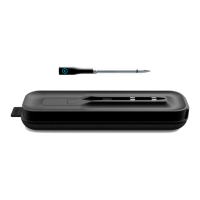
Details the components and sensors of the wireless probe, including its temperature range and battery life.
Explains the function of the Smart Hub in charging the probe and relaying data, noting its battery life and alerts.
Describes the necessity of the CHEF iQ App for operation, live readings, and guided cooking features.
Emphasizes the importance of reading all instructions before use for safe operation.
Provides a mandatory warning for California residents regarding potential cancer and reproductive harm.
Outlines the device's compliance with FCC rules regarding radio frequency interference.
Instructions for hand-washing the probe with mild soap and drying it thoroughly to ensure proper charging.
Guidance on cleaning the hub with a damp cloth, noting it is not dishwasher-safe or waterproof.
Details the 1-year warranty, activation via the app, and coverage for manufacturer defects.
 General
| Connectivity | Bluetooth |
|---|---|
| Response Time | 3 seconds |
| Display | LCD |
| Magnet | Yes |
| Stand | Yes |
| Auto Shut-off | Yes |
| App Compatibility | CHEF iQ App |


 To Next Page