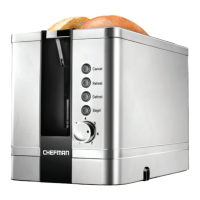
The Chefman Smart Touch 2-Slice Digital Toaster (Model RJ31-SS-T) is a modern kitchen appliance designed for effortless and precise toasting. This toaster allows users to toast a variety of foods, from standard bread and English muffins to bagels, frozen waffles, and thick-sliced challah, achieving a golden-brown perfection. Its intuitive touch screen controls and 6 custom shade settings offer a personalized toasting experience, ranging from light and tender to dark and crisp.
Function Description:
The toaster features two toasting slots designed to accommodate standard bread slices or single toaster products. It offers three primary functions: BREAD, BAGEL, and DEFROST, along with 6 customizable shade settings.
- BREAD Function: This setting is ideal for most types of sliced bread or any food that requires both sides to be toasted evenly. All heating elements within the toasting slots activate to ensure uniform browning on both sides.
- BAGEL Function: Specifically designed for bagels, English muffins, or rolls, this function applies more heat to the cut side of the food. Users should insert the food with the cut side facing outwards to achieve a golden-brown, crunchy cut side while keeping the outside soft and chewy.
- DEFROST Function: This feature is used when toasting frozen foods such as frozen bread, waffles, pancakes, or toaster pastries. When activated, it simultaneously defrosts and toasts the food by automatically increasing the toasting time for the selected shade.
- Shade Settings: The toaster provides 6 shade settings, allowing users to select their desired level of browning. A higher number corresponds to a darker and crispier result. The shade number is displayed on the Shade/Time Display.
- +10 SECONDS Button: This button allows users to add an additional 10 seconds to the toasting time. This is particularly useful for fine-tuning the toast shade to an exact preference, especially if it falls between two preset shade settings.
- CANCEL Button: Users can press the CANCEL button at any time to stop the toasting process. When pressed, the lever and food will automatically pop up, and the chosen settings will reappear on the display. If toasting is resumed, the timer will restart from the beginning.
- READY Indicator Light: This light illuminates when the toasting cycle is complete, accompanied by an audible beep.
- Anti-Jam Safety Feature: The toaster is equipped with an anti-jam mechanism. If food becomes stuck in the toasting slots, the unit will automatically power off to prevent damage. To resume operation, the user must unplug the unit, remove the stuck food, and then plug the unit back in.
Important Technical Specifications:
While specific electrical ratings like voltage and wattage are not explicitly detailed in the provided pages beyond a general mention of "120v~60hz 1800W" on an example label (which may not be for this specific model), the toaster is designed for household use only. It features a polarized plug to reduce the risk of electric shock, meaning one blade is wider than the other and it should only fit into a polarized outlet one way. A short power-supply cord is provided to minimize entanglement and tripping hazards.
Usage Features:
- Control Panel: The toaster features an intuitive control panel with touch screen buttons for selecting toast functions, shade settings, and special features. The Shade/Time Display shows the selected shade number and a countdown timer during toasting.
- Lever: A manual lever is used to lower the food into the toasting slots to start the toasting process. After toasting is complete, the lever automatically pops up. It can also be lifted above the ready position for easier retrieval of smaller food items.
- First Use Preparation: Before initial use, all packing materials and removable stickers (except the rating label) should be removed. The exterior should be wiped with a damp cloth and dried. The power cord should be unwrapped from its compartment under the base, and the unit placed on a flat, heat-resistant surface at least 2 inches away from walls or other objects. The crumb tray must be properly inserted.
- Toasting Tips:
- Avoid putting buttered bread or pastries with frosting into the toaster to prevent fire hazards.
- Do not force food into the slots; it should lower smoothly.
- Do not overlap foods in the slots; each slot is designed for one piece of standard bread or a single toaster product.
- For bagels, load with cut sides facing out for optimal toasting.
- When toasting a single slice, select one shade lighter than desired, as the toaster heats the entire chamber for two slices.
- For fresh or very thick bread, choose a darker shade due to higher moisture content. For drier or thinner bread, choose a lighter shade.
- To make croutons, toast bread on a higher setting and then crumble.
- For gluten-free bread, choose thicker slices with sturdier crusts, as gluten-free bread tends to be thin and crumbly.
- Remove loose fruit from raisin or other fruit breads before toasting to prevent sticking.
- Sleep Mode: If not unplugged, the toaster will automatically enter sleep mode after 20 minutes of inactivity, with all buttons except CANCEL disappearing from the display. Pressing the CANCEL button wakes the unit up.
Maintenance Features:
The Chefman Smart Touch 2-Slice Digital Toaster requires minimal maintenance.
- Cleaning:
- Always unplug the toaster and allow it to cool completely before cleaning.
- The exterior can be gently wiped with a damp cloth or paper towel.
- CAUTION: Never immerse the toaster, cord, or plug in water or any other liquid. Avoid using scouring pads or abrasive cleaners, as they can damage the finish.
- Crumb Tray: The removable crumb tray, located at the bottom back of the toaster, should be periodically removed and cleaned to prevent crumb buildup and burning smells. It can be washed with a sponge and warm, soapy water and dried completely. The crumb tray is NOT dishwasher safe. Ensure the crumb tray is pushed all the way back into position before the next use.
- Cord Storage: The power cord can be wrapped through its compartment underneath the toaster for neat storage.
This toaster is designed for convenience, safety, and consistent performance, making it a valuable addition to any kitchen.

 Need help?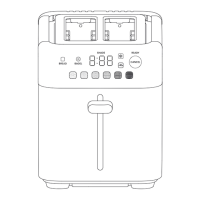

 To Next Page
 General