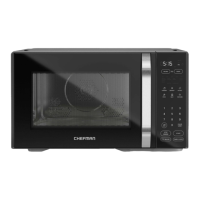
The Chefman Countertop Classic Compact Microwave is a versatile kitchen appliance designed for efficient and convenient cooking in smaller spaces. This microwave offers a range of features for heating, cooking, and defrosting various foods, making it a practical addition to any household.
Function Description
The primary function of this microwave is to heat, cook, and defrost food using microwave energy. It is equipped with a control panel that allows users to select various cooking modes and settings. The microwave operates with a turntable system to ensure even heating of food.
Usage Features
The Chefman microwave offers several user-friendly features for diverse cooking needs:
- Clock/Timer Display: This display shows the countdown of an active cooking cycle and the time of day in Standby Mode.
- TIME COOK Button: Used to set a specific cooking duration.
- DEFROST Buttons: Provides options to defrost food either by time (TIME DEFROST) or by weight (WEIGHT DEFROST). The default power level for defrosting is 3/30%, but it can be adjusted.
- POWER Button: Allows users to set the microwave's power level from 0 to 10. Level 10 is full power (100%). If power level 0 is selected, the fan operates without heating, which can be used to clear odors.
- CLOCK Button: For setting the microwave's internal clock.
- TIMER Button: Functions as a kitchen timer for tasks that do not involve microwaving. The maximum time for this timer is 99 minutes and 99 seconds.
- Preset Icons: Six dedicated icons (Popcorn, Potato, Pizza, Veggies, Beverage, Leftovers) offer one-touch cooking functions for popular foods. Users can toggle through size/quantity choices for each preset.
- Number Pad: Used for manually entering cooking times, setting the clock, or the kitchen timer. Numbers 1 through 9 also serve as 1-touch quick cooking buttons, instantly starting the microwave for that number of minutes at 100% power.
- STOP/CANCEL Button: Stops an active cooking cycle or returns the microwave to Standby Mode. Pressing it once pauses cooking, and pressing it a second time returns to Standby.
- O/Select Favorites Button: The "0" button on the number pad can be used to program and select up to three favorite cooking cycles, allowing for quick access to frequently used settings.
- START/+30 SEC Button: Initiates cooking after a preset or manual time has been entered. It can also be pressed at any time to add 30 seconds of cooking at the current power level.
- Quick-Cook Functions: For simple, one-touch microwaving at 100% power, users can press any number from 1 to 9 on the keypad to start cooking for that many minutes. The +30 SEC button can also be used for quick 30-second cooking cycles.
- Manual Microwave Mode: Allows for timed microwaving at full power or adjusted power levels. Users press TIME COOK, enter the time, and optionally press POWER to select a level.
- Multiphase Cooking: This advanced feature allows users to program two different cooking cycles with varying times and power levels to run consecutively without interruption.
- Turning Sound Off and On: The microwave's beeps can be muted or unmuted by pressing and holding the "8" button on the keypad for 3 seconds.
- Safety Lock (Childproof Mode): To prevent unintended use, the unit can be put into Lock Mode by pressing and holding the STOP/CANCEL button for 3 seconds. The screen will display "[ニコ]". To deactivate, press and hold STOP/CANCEL again for 3 seconds.
- Eco Mode (Power-Saving): This mode can be activated by pressing and holding the "7" button for 3 seconds. In Eco Mode, the clock display turns off when the microwave is not in use, saving power. Pressing any button will turn the clock back on.
Maintenance Features
Maintaining the Chefman microwave is straightforward, focusing on cleanliness to ensure optimal performance and longevity:
- Interior Cleaning: The interior of the microwave should be wiped down periodically with a damp cloth. For food splatters, use a mild soap and a damp cloth. Abrasive cleansers or steel wool pads should not be used as they can damage the finish.
- Glass Turntable Cleaning: The glass turntable can be cleaned with mild soap and a damp cloth. It is also top-rack dishwasher safe for convenience.
- Turntable Support Ring Cleaning: The turntable support ring should be cleaned as needed. The unit itself and the turntable support are not dishwasher safe and should not be immersed in water.
- External Cleaning: The exterior of the oven can be gently wiped with a clean, damp cloth and dried thoroughly.
- Door and Sealing Surfaces: For optimal performance and to reduce interference, the door and sealing surfaces should be kept clean using mild, nonabrasive soaps or detergents applied with a sponge or soft cloth.
The microwave is designed for household use only and should not be disassembled or repaired by the user. In case of damage or malfunction, Chefman Customer Support should be contacted. Proper grounding is essential for safety, and the appliance should only be connected to a properly grounded outlet. The manual also provides a comprehensive chart of microwave-safe materials to guide users on appropriate utensils and containers, helping to prevent arcing or damage to the oven.


 To Next Page
 General