

EasyManua.ls Logo

CHERUBINI METAHome - User Manual

CHERUBINI METAHome
16 pages
Print Icon
To Next Page IconTo Next Page
Loading...
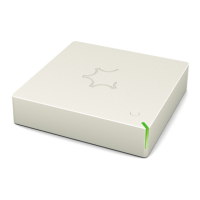
METAHome
ISTRUZIONI - INSTRUCTIONS - EINSTELLANLEITUNGEN
INSTRUCTIONS - INSTRUCCIONES
Gateway doppia radio
Gateway radio double
Gateway radio dual
IT
EN
DE
FR
ES
Dual radio Gateway
Doppelfunk-Gateway
Question and Answer IconNeed help?

Do you have a question about the CHERUBINI METAHome and is the answer not in the manual?

Summary

Device Description

METAHome Gateway Application and Connection

Gateway Connection

Connect the device to the LAN socket via Ethernet and to the mains via its power supply.

LED Status Indicator

The RGB LED shows the device status during installation, with different colors and patterns.

Gateway Operation and Registration

Switching On Gateway

The Gateway turns on when powered, or by pressing the ON/OFF button for one second. LED illuminates YELLOW.

Gateway Shutdown

Press and hold the ON/OFF button for approximately 4 seconds until the RED LED lights up to shut down.

Registration and First Access to the Gateway

Log in using the App with a smartphone/tablet connected to the same LAN network. Default credentials: user/smarthome.
Local Access

Profile Storage

Main Screen Description

Inclusion of a Z-Wave Device

Exclusion of a Z-Wave Device

Pairing and Unpairing a Device from the 433 Radio Network

Smart Management

USB Update Procedure

Factory Reset

EU Declaration of Conformity

CHERUBINI METAHome Specifications

General IconGeneral
BrandCHERUBINI
ModelMETAHome
CategoryGateway
LanguageEnglish