6
Power Seats
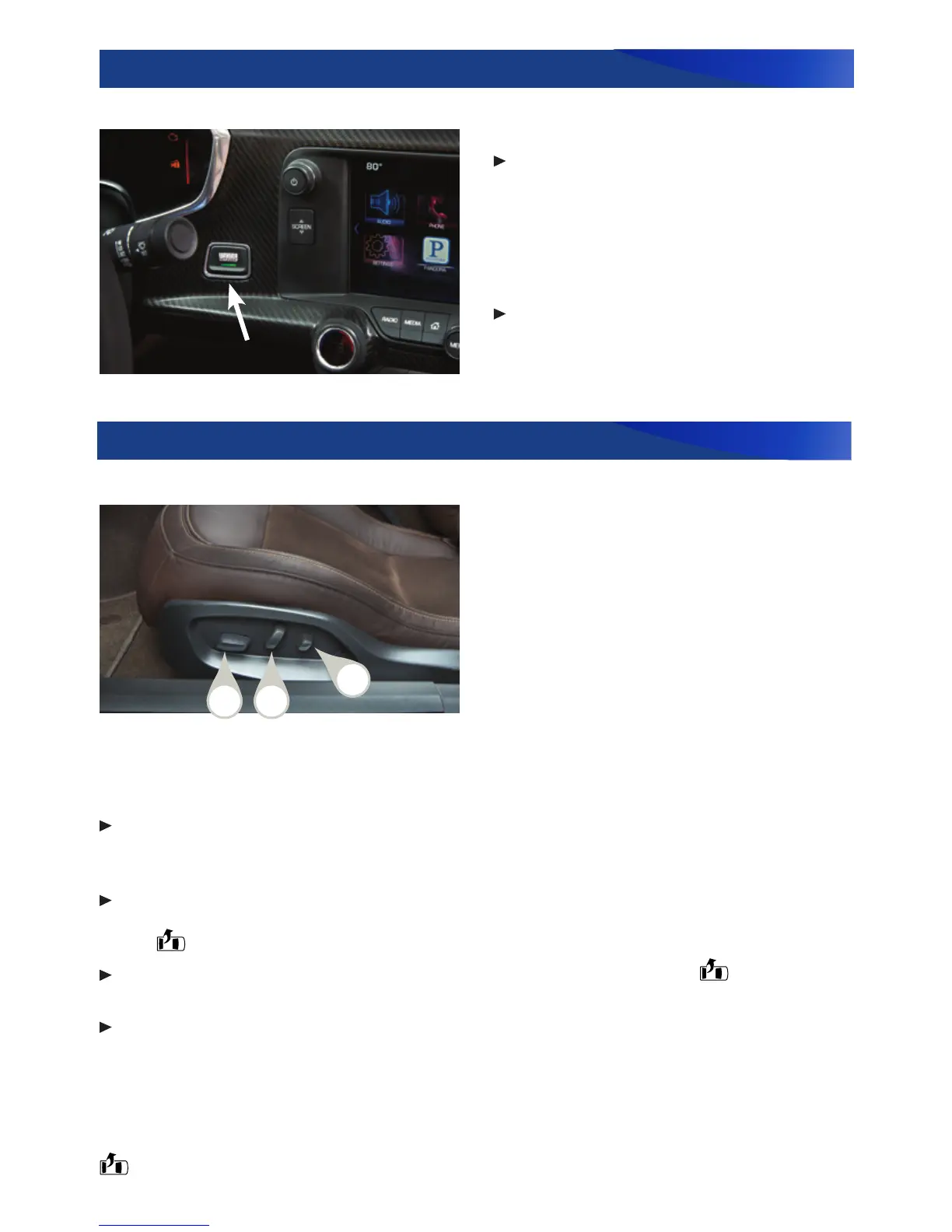
A. Seat Adjustment
Move the front control to move the
seat forward or rearward, or to tilt, raise
or lower the seat.
B. Seatback Recline Adjustment
Move the top of the vertical control to
recline or raise the seatback.
C. Lumbar/Side Bolster Adjustment
F
Move the rear control forward or rear-
ward to adjust the lumbar support.
Move the rear control up or down to
adjust the side bolsters.
Starting and Stopping the Engine
Starting the Engine
With the vehicle in Park or Neutral,
press the brake pedal (automatic
transmission) or the clutch pedal
(manual transmission) and then press
the ENGINE START/STOP button.
Stopping the Engine
Shift to Park (automatic transmission
only) and press and hold the ENGINE
START/STOP button.
The Keyless Access transmitter must be in the vehicle to turn on the ignition.
Memory Seats
F
To set the memory position, adjust the driver’s seat, outside mirrors and steering
wheel to the desired positions. Press and release the SET button (a beep sounds) and
then press and hold button 1 or 2 until two beeps sound.
To set the exit position, adjust the driver’s seat and steering wheel to the desired
positions. Press and release the SET button (a beep sounds) and then press and hold
the EXIT button until two beeps sound.
To recall the setting at any time, press and hold button 1 or 2 or the EXIT button
until the stored position is reached.
To set the Auto Memory Recall (Driver Door Open or At Ignition On) or Easy Exit Recall
(Vehicle Off and Driver Door Open), go to Settings > Vehicle > Comfort and
Convenience > Auto Memory Recall or Easy Exit Options.
Note: On vehicles with a manual transmission, the parking brake must be applied in order for the
memory seats to be recalled automatically.
If the stored position is not recalled, move the seat forward and press button 1 or 2 or the
EXIT button again.
See Seats and Restraints in your Owner Manual.
Seat Controls
See Driving and Operating in your Owner Manual.
F
Optional equipment
A
B
C









 To Next Page