Infotainment System 165
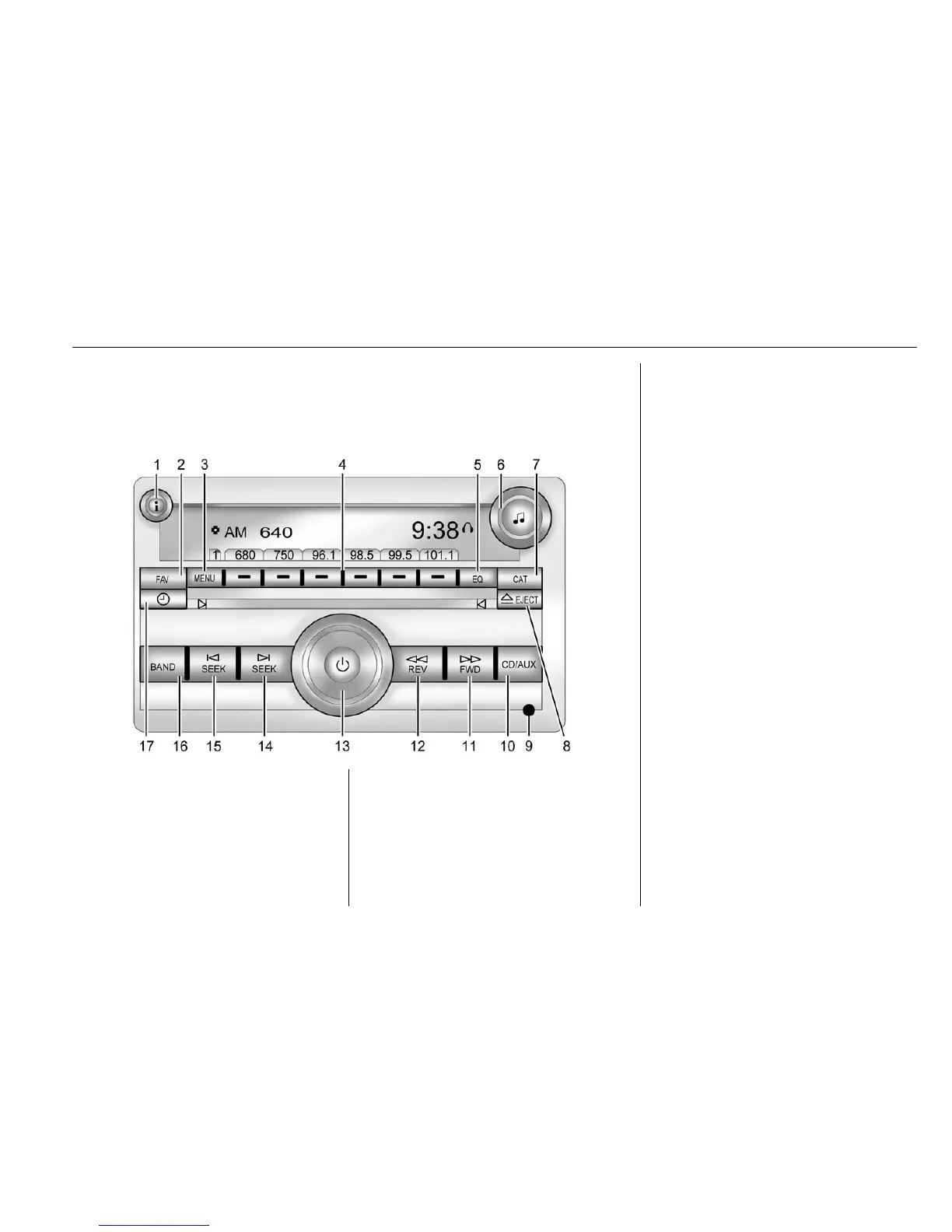
Overview (Radio without Touchscreen)
For information on using the radio, see Operation (Radio without
Touchscreen) 0 167
ii or Operation (Radio with Touchscreen) 0 169ii .
1. 4 (Information)
.
Press to show information
on the current station or
track.
2. FAV (Favorites Pages)
.
Press to scroll through the
favorite pages.
3. MENU
.
Press to open the tone
menu to adjust the bass,
midrange, treble, fade, and
balance.
4. Buttons 1 - 6
.
Saves and selects favorite
stations.
.
Select options.
5. EQ (Equalizer)
.
Press to adjust the
equalizer.
6.
f (Tone/Tune)
.
Press to set Tone options.
.
Turn to manually select
radio stations.
7. CAT (Category)
.
Press to display a list of
SiriusXM
®
categories (if
equipped).
8.
Z EJECT
.
Press to eject the
loaded CD.















 To Next Page