EasyManua.ls Logo

Chevrolet Express - Page 161

Chevrolet Express
412 pages
Print Icon
To Next Page IconTo Next Page
To Previous Page IconTo Previous Page
Loading...
Black plate (3,1)
Chevrolet Express Owner Manual (GMNA-Localizing-U.S./Canada/Mexico-
6014662) - 2014 - CRC - 4/22/13
Infotainment System 7-3
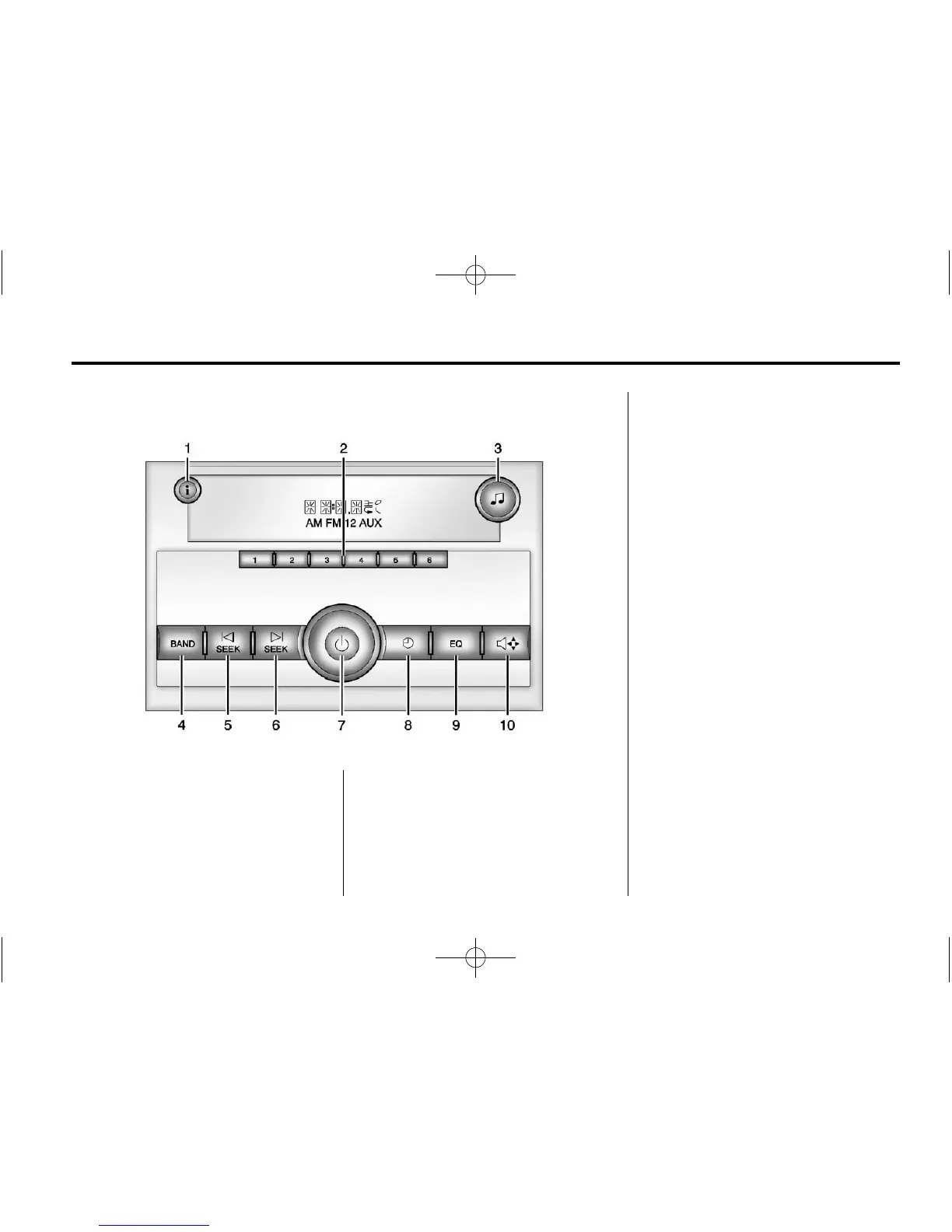
Overview (AM-FM Radio)
1.
4 (Information)
.
Press to show information
on the current station or
track.
2. Buttons 1 - 6
.
Saves and selects favorite
stations.
3.
f (Tone/Tune)
.
Press to set the bass or
treble.
.
Turn to manually select
radio stations.
4. BAND
.
Press to scroll through the
available bands AM, FM,
or XM if equipped.
5.
© SEEK
.
Seeks the previous station.
6.
¨ SEEK
.
Seeks the next station.
7.
P (Power/Volume)
.
Press to turn the
infotainment system on
or off.
.
Turn to adjust the volume.

Table of Contents

Related product manuals