Chevrolet VOLT Owner Manual (GMNA-Localizing-U.S./Canada/Mexico-
9807421) - 2017 - CRC - 11/18/15
Keys, Doors, and Windows 35
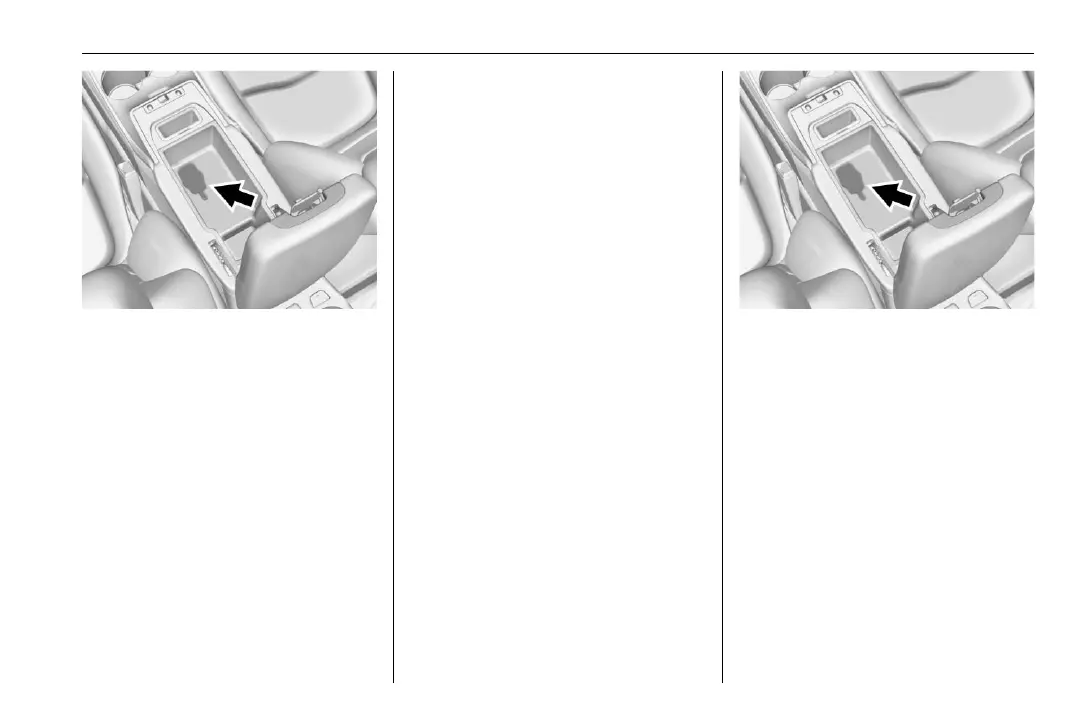
4. Remove the rubber mat in the
center console storage area.
5. Place the new transmitter into
the transmitter pocket.
6. Press and hold POWER
O for
two seconds. When the
transmitter is programmed, the
DIC will show that it is ready to
program the next transmitter.
7. Remove the transmitter from
the transmitter pocket and
press
K on the transmitter.
To program additional
transmitters, repeat Steps 5–7.
When all additional transmitters
are programmed, press and
hold POWER
O for 12 seconds
to exit programming mode.
8. Return the key back into the
transmitter.
Starting the Vehicle with a Low
Transmitter Battery
If the transmitter battery is weak or
there is an interference with the
signal, the DIC may display NO
REMOTE DETECTED or NO
REMOTE KEY WAS DETECTED
PLACE KEY IN TRANSMITTER
POCKET THEN START YOUR
VEHICLE when you try to start the
vehicle. The REPLACE BATTERY
IN REMOTE KEY message may
also be displayed at this time.
To start the vehicle:
1. Open the center console
storage area and remove the
rubber mat.
2. Place the RKE transmitter into
the transmitter pocket.
3. With the vehicle in P (Park) or
N (Neutral), press the brake
pedal and POWER
O on the
center stack. See Power
Button 0 175.
Replace the transmitter battery as
soon as possible.














 To Next Page